AI Mode Queries Are in Search Console: Where to Find Them (It's Not the AI Report)
AI Mode queries show up in Search Console's regular performance report, not the generative AI reports. John Mueller confirmed it in August 2026. Here's how to spot them, why you'll see queries like "yes" or "yes, pricing", and what to do with that data.
AI Mode queries are not in Search Console's generative AI report. They're in the regular performance report, mixed in with your normal traffic. Google confirmed it in August 2026: AI Overviews and AI Mode data goes into the general report, with complete queries, positions, and clicks. The generative AI report, by contrast, shows only aggregated impressions and not a single query. So the way to measure AI Mode isn't opening the new report. It's learning to recognize its queries inside the old one.
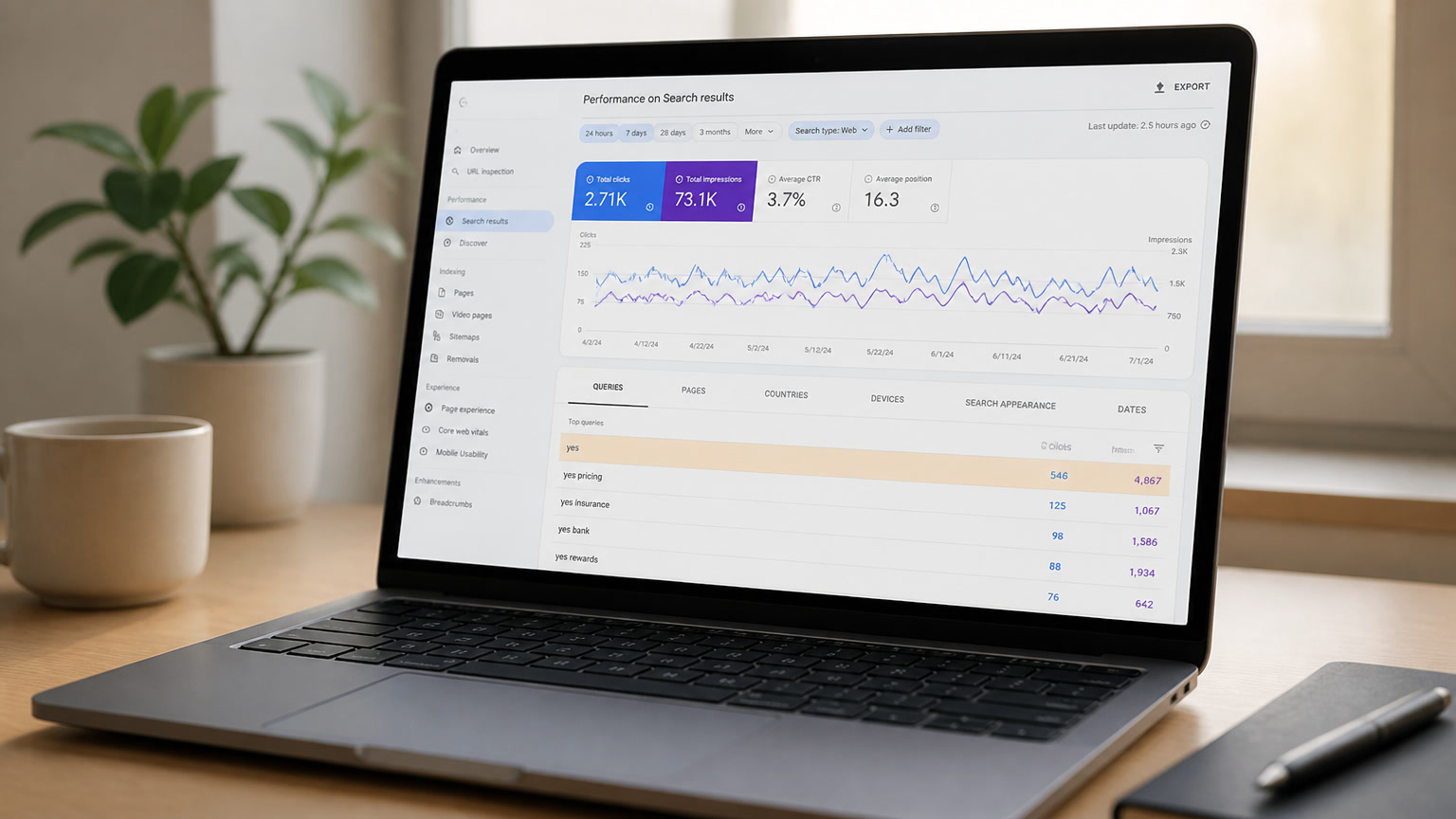
On August 6, 2026, Barry Schwartz documented a discussion that had been circling the SEO community for weeks: why do absurd queries keep showing up in Search Console, like "yes", "yes go on", or "yes, pricing"? The answer came in a LinkedIn thread where Anastasia Kourou showed exactly those queries and John Mueller replied with a link and a sentence worth framing: "Search Console includes information on AI Overviews and AI Mode in the general performance report."
That's the detail almost nobody read carefully. There is no magic AI Mode filter in the regular report. The data is there, but you have to know how to recognize it.
The report that actually has queries: the regular one
Google has said for months that AI Overviews and AI Mode data is lumped into the main report. What changed in August is that we now have concrete evidence of what that looks like from the inside, and the example is brutal.
A query like "yes, pricing" is not something someone typed into Google. It's a follow-up question inside an AI Mode session. The user asked something, the AI answered, and the user said "yes" to keep going. According to Google's documentation, when a user asks a follow-up question in AI Mode, it counts as a new query, and all impression, position, and click data from that response is attributed to that query.
Translation: every "yes" you see in your report is an AI Mode session where your content was part of the answer. That's visibility classic SEO never knew it had.
The new report has no queries, and that makes sense
In June 2026, Google launched generative AI performance reports in Search Console, first for a subset of sites with progressive rollout. Marie Haynes summed it up well when they arrived: the report shows impressions, grouped by page, country, device, or date. Nothing else. No clicks, no positions, no queries.
The standard reaction was to complain, and I get why. But the missing queries aren't a bug, they're a decision. Google doesn't want you to know exactly which question produced each impression inside AI Mode, because that data reveals how its models do grounding. The regular performance report has queries because "one query, one result" logic still applies there. In AI Mode, where one answer cites several sources for a single question, the data model is different.
The operational question isn't why the data is missing. It's how to get value out of what we do have.
How to identify AI Mode queries in the regular report
There's no official filter that says "this is AI Mode". But three signals, combined, leave little room for doubt:
1. Ultra-short follow-up queries. "Yes", "go on", "ok", "and?", "pricing", "more". Fragments nobody would ever type into a traditional search box. If they show up with impressions and a position, they're almost certainly AI Mode continuations. The "yes, pricing" case is perfect: the session probably started with something like "best SaaS pricing tools" and ended with a "yes, pricing" that asked the AI to go deeper on that part of the answer.
2. Long conversational queries with planning intent. Phrases of 10 to 30 words with context, constraints, and comparisons. We covered how to optimize for these in our guide to planning queries, but in the report they work as a marker: if a query like that generates impressions, it's almost certainly from AI Mode or AI Overviews.
3. Impressions without clicks on brand or niche queries. When a query shows impressions but zero CTR, it may mean the AI answered with your content without linking you. That's not a failure, it's the behavior pattern of the 93% zero-click sessions we documented in the AI Mode traffic analysis.
The framework for reading Search Console with AI Mode eyes
Every week, Mintec runs an LLM traffic report and reviews GSC in this order:
- Filter the performance report to the last 28 days and export queries with more than 10 impressions.
- Look for follow-up queries: 1 to 3 word phrases that make no sense as standalone searches. Put them in a separate sheet. That list is your AI Mode thermometer.
- Cross-reference with the generative AI report: if a page has high impressions in the new report and follow-up queries show up against that same page in the regular report, that's your best signal that the AI is using it as a source.
- Check positions: follow-up queries usually show high positions because the AI answer is literally the number one result. A position 1 on "yes go on" with low CTR is not a bad sign, it's grounding without a click.
This cross-check of two reports is what separates people who actually measure AI Mode from people who stare at the new report and get frustrated. We break down the logic of the generative AI reports in our analysis of the June launch, and the full measurement framework is in how to measure GEO ROI.
Why this matters more than it looks
AI Mode data inside the regular report has a consequence few have connected: follow-up queries pay the price of classic SEO. When a user says "yes" in AI Mode and Google counts it as a new query with its own impression and position, that impression competes in the same pool as your normal searches. A site with strong AI Mode presence will see weird queries inflating impressions and dragging down average CTR. And if someone compares that CTR against history without knowing what they're looking at, they'll conclude "SEO is dying" when their total visibility is actually growing.
We warned about this in the vanity metrics post: the old metrics break when the search surface changes. What's new is that we can now see the break with names attached, query by query.
What to do today, concretely
If your Search Console has access to the generative AI report (not everyone does yet), do this:
- Export the 50 pages with the most impressions in the generative AI report.
- Look in the regular report for which queries drive those impressions.
- If you see follow-up queries, those pages are being used by AI Mode. Strengthen their structure: direct answer up top, FAQ with schema, citable first-party data. It's the same work we describe in the AI citation guide, but now you know exactly which page to focus on.
And if you don't have access to the new report yet, don't wait. Follow-up queries are already in your regular report. Start noting them today. The next time you see a "yes, pricing" sitting at position 1, you'll know it's not a bug. It's Google telling you, in its own way, that your content is inside the AI answer that user is getting. Learning to read that is the difference between measuring AI Mode and guessing.
Frequently Asked Questions
Where do AI Mode queries appear in Search Console?
In the regular performance report, not the generative AI report. Google includes AI Overviews and AI Mode data in the general performance report with full queries, positions, and clicks. The generative AI report only shows aggregated impressions, with no query data.
Why do I see weird queries like "yes" or "yes, pricing" in Search Console?
They are follow-up questions inside an AI Mode session. According to Google, when a user asks a follow-up question in AI Mode, it counts as a new query, and all impression, position, and click data is attributed to that query. That's why you see short fragments that don't look like real searches.
Does the generative AI report in Search Console show queries?
No. The generative AI report (launched June 2026) only shows impressions, grouped by page, country, device, or date. It has no queries, clicks, or positions. To see which queries come from AI Mode, you have to use the regular performance report.