AI Mode Follow-Ups Are Hiding in Your Search Console. Here's How to Read Them
AI Mode follow-ups like 'yes, pricing' appear in Search Console's main report; the generative AI reports hide query data. Here's how to read it.
AI Mode Follow-Ups Are Hiding in Your Search Console. Here's How to Read Them
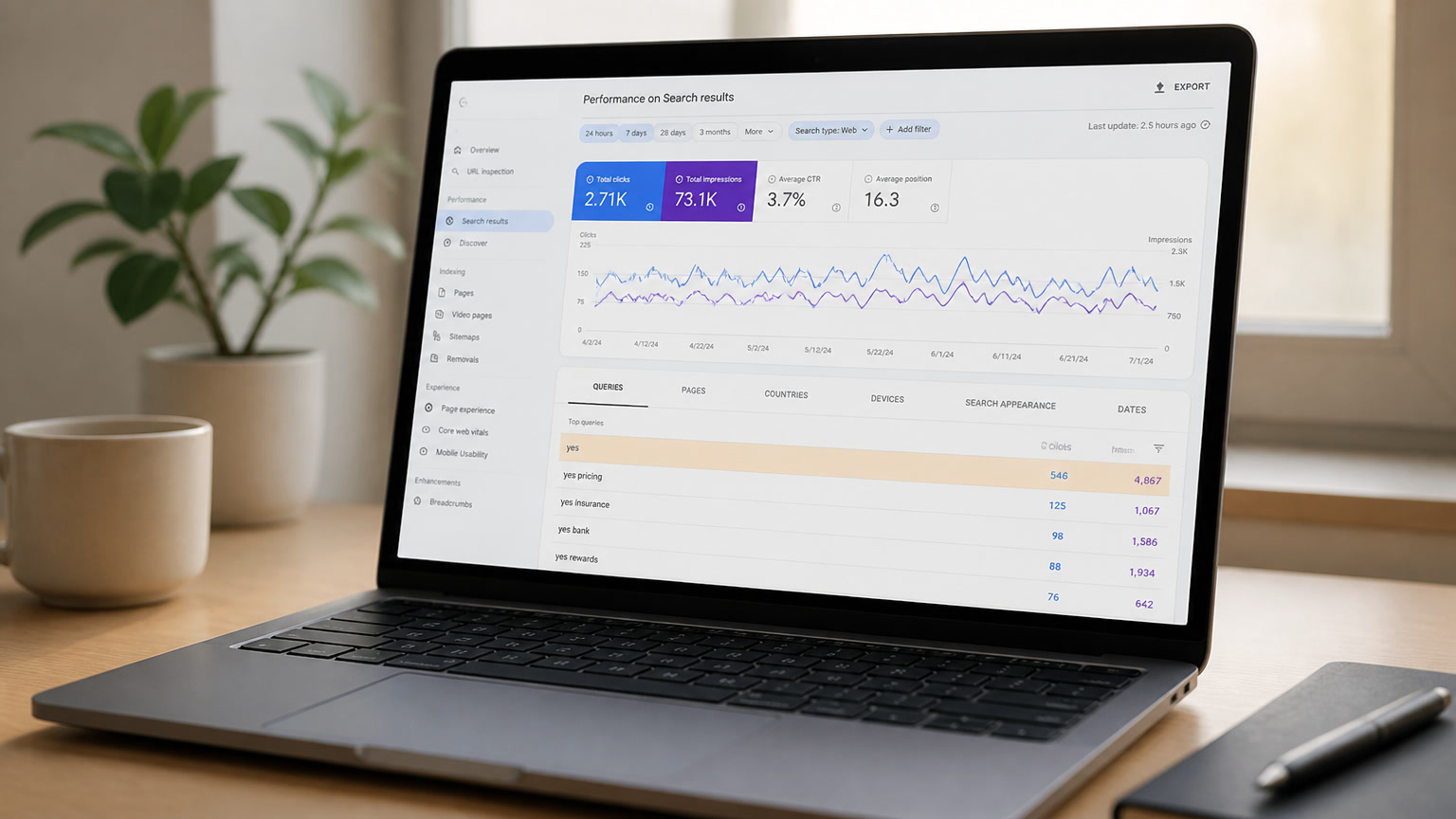
Yes, you can see AI Mode follow-up queries in Search Console. They land in the main Search performance report as short, weird strings: "yes", "yes go on", "yes, pricing". John Mueller confirmed it in August 2026. And no, the dedicated generative AI performance reports won't help you find them. Those reports show impressions only, with no query data at all.
The trail started with a LinkedIn post. SEO Anastasia Kourou noticed her Search Console query data was full of one-word strings that made no sense as searches, asked John Mueller about them, and he pointed to AI Mode: "Search Console includes information on AI Overviews and AI Mode in the general performance report." Google's own documentation spells out the mechanic: "If a user asks a follow-up question within AI Mode, they are essentially performing a new query. All impression, position, and click data in the new response are counted as coming from this new user query."
Search Engine Roundtable covered the exchange on August 6, and Ross Tavendale summarized the mood on X: "Search console is recording people's responses to AI mode.... now how do we reverse engineer?"
Fair question. Here's the honest version: you can't reverse engineer all of it, and you don't need to. But you can read the trail, and it tells you something no other report in Google will tell you: which pages a model keeps going back to inside a live conversation.
What Google shipped and what it still hides
Two things happened this year, and they get conflated.
First, in June, Google launched Search generative AI performance reports: dedicated views for AI Overviews, AI Mode, and generative AI in Discover. The rollout finished worldwide on August 31, so every property should have them now. They're useful and also limited: impressions by page, country, device, and date. No clicks. No CTR. No queries.
Second, there's the main Search performance report, which has always contained AI Overviews and AI Mode data lumped into the Web numbers. Google has said this for years. What Mueller added in August is the follow-up mechanic: every follow-up prompt inside an AI Mode conversation is logged as its own query. So the main report's query view is currently the only place on Earth where you can see conversational AI Mode behavior, and it shows up as garbage-looking strings.
Keep those two reports straight, because they answer different questions. The gen-AI reports tell you where you get AI visibility. The main report's query data tells you how people talk to AI when your content is in the loop.
What a "yes" query actually tells you
Here's the part I'd bet most teams skip: a follow-up only exists if a conversation exists, and a conversation only exists if the model already answered with your content once. Follow-up impressions are the closest thing Google currently offers to a "cited and retained" signal. The page attached to that "yes, pricing" row is a page the model kept in context after the first answer.
Two caveats, because this data is messier than it looks. Follow-up responses can pull fresh sources; the model isn't obligated to stick with the first batch. And position data on follow-up rows is low-granularity, since the "position" of a source inside a generated response is mostly a guess. Treat these rows as directional signals, not precise metrics.
The three reads
We've been going through client accounts with this lens all week. Three passes, in order:
1. Spot the follow-up clusters. Filter your query report for strings of three words or fewer. You're looking for "yes", "yes go on", "yes, pricing", "options", "more details", and other fragments that no human types into a search box. Cluster them, don't chase them individually.
2. Map them to pages. Which URLs are attached to those follow-up rows? Those are your conversation anchors. In our accounts, they're almost always the same pages that attract long conversational entry queries, but not always. The mapping surprises people: a pricing page will often only show up in the follow-ups, never in entry queries, because it surfaces mid-conversation when the user asks about cost.
3. Optimize the anchors, not the fragments. You cannot and should not optimize a page for "yes". You optimize the anchor page so a model can keep using it, which means grounding density: current facts, numbers with sources, tables, clean Q&A blocks. The follow-up rows are the proof the page is already working. Don't touch the query, improve the page.
| Query pattern you'll see | What it likely means | What to do |
|---|---|---|
| "yes", "yes go on" | User continuing the same AI Mode conversation | Keep the anchor page dense and current; no action on the query itself |
| "yes, pricing" / "options" | User pushed for cost or choices mid-conversation | Make pricing and plan data accurate, structured, and quotable |
| "tell me more about X" | Follow-up asking for depth on one angle | Add a dedicated section on that angle with specifics and sources |
| "vs" / "alternatives" follow-ups | Comparison requests inside the conversation | Keep comparison data updated; comparison pages win citations |
The traps
Easier to list what not to do than what to do, because this data tempts people into bad moves.
Don't try to rank for follow-up fragments. The day you write a page targeting "yes go on" is the day you've lost the plot. Follow-ups are responses, not searches. Nobody is shopping for a page that says "yes".
Don't panic at weird CTR. Follow-up rows often carry odd click numbers, because the click that matters usually happened on the initial query. A follow-up row with high impressions and zero clicks isn't a failure; it's a user reading the generated answer instead of leaving.
Don't treat the gen-AI reports as the full picture. They're impressions-only, query-free, and as Cogny documented, the data isn't in the Search Analytics API yet. No BigQuery pipeline, no scheduled export, no MCP. It's a UI report, so refresh it by hand and treat it as a dashboard, not a data feed.
Don't confuse visibility with revenue. We wrote before about how rankings and AI citations came apart and why the trust gap decides who keeps the clicks. An AI Mode impression is a model saying your name. It is not a sale, and it isn't even always a visit.
What to do this week
Concrete checklist, in order:
- Open Search performance → Queries, filter for three words or fewer, eyeball for fragments like "yes". Export that slice.
- Cluster the fragments by pattern and map each cluster to the URLs that appear on those rows.
- Pick the top three anchor pages and audit them for grounding density: Are the numbers current? Sources cited? Is there a table or structured block a model can lift cleanly? This is the same standard that decides ChatGPT citations.
- Record the follow-up query count per month. Growth here is the closest thing to an "AI engagement" KPI you can build right now, because Google won't give you one.
- If any anchor page is a pricing or plans page, make sure your offering data is exactly right. Models quote the numbers; AI Mode is already making buying decisions in commerce, and a wrong number in a generated answer is worse than no answer.
The fun part of this data is that it's backwards from everything else in SEO. Every other report tells you what people searched and what they clicked. This one tells you what a machine kept bringing into a conversation, which is a retention signal wearing a disguise. Keep five minutes in your weekly report for it, and skip the reverse engineering. The trail is readable enough as is.
Frequently Asked Questions
Can I see AI Mode queries in Google Search Console?
Yes. Data from AI Mode and AI Overviews is included in the main Search performance report. A follow-up question inside AI Mode counts as a new query, so short conversational strings like 'yes', 'yes go on', or 'yes, pricing' show up there. The dedicated generative AI performance reports do not include query-level data.
Why does my Search Console show one-word queries like 'yes'?
Those are follow-up prompts from AI Mode conversations. When a user asks a follow-up inside AI Mode, Google treats it as a new query and attributes impressions, position, and clicks from the new response to it. John Mueller confirmed this in August 2026 after SEO Anastasia Kourou asked him about the pattern.
Do the generative AI performance reports in Search Console include query data?
No. They show impressions by page, country, device, and date only. No queries, clicks, or CTR. The data is also not exposed through the Search Analytics API yet, so the main performance report is currently the only place to see AI Mode follow-up queries.