How to Build an AI Chatbot from Scratch: The 6-Layer Architecture We Use in Production
Build a production AI chatbot without a SaaS subscription: $11-23/month with n8n, OpenAI and RAG, 13-26 hours of work the first time. Here is the 6-layer architecture we deploy, with real costs and the pitfalls no tutorial covers.
If you search "how to build an AI chatbot from scratch", the tutorials show you two nodes: receive a message and send a reply. Production reality has seven more components that those tutorials skip — and that gap is what separates a pretty demo from a chatbot that actually answers your customers at 11pm.
The short answer: a working AI chatbot today is built with n8n, OpenAI and a RAG knowledge base, costs between $11 and $23 per month in infrastructure for up to 1,000 conversations, and takes 13-26 hours of work the first time. This is the 6-layer architecture we use at Mintec for the chatbots we ship to clients, with real costs and the mistakes no tutorial covers.
The uncomfortable truth: tutorials cover 2 of the 9 components
An honest look at the tutorial ecosystem sums it up: what you find on YouTube about n8n chatbots almost always shows two blocks (receive a message, send a template reply) and skips the other seven you need for the bot to be useful. Those seven are webhook validation, conversation parsing, per-message-type branching, the AI brain, the RAG knowledge base, conversation memory, and monitoring. Even the official n8n blog confirms it: its RAG chatbot guide focuses on the happy path (trigger, agent, model, memory, vector store) and assumes you already know how to handle everything else.
We see the result every week: clients who start a "weekend project" from a tutorial are still stuck three weeks later. It's not a capability problem — the tutorial sold them 20% of the work and left them with the other 80%.
Decide first: build or buy?
Before writing a single node, do the math. The real 2026 cost comparison looks like this:
| Option | Monthly cost | Initial setup | Time to production | Control |
|---|---|---|---|---|
| DIY with self-hosted n8n | $11-23 | 13-26 hours of your time | 2-4 weeks | Total: you see every node |
| Make or Zapier | $20-50 + tasks | 8-15 hours | 1-3 weeks | Good, but platform limits |
| Chatbot SaaS (AssistBot, ConversAI, etc.) | $24-99 | 1-2 hours | Same day | You depend on vendor roadmap |
| Managed platform / BSP | $23-59 | 1 hour | 60 seconds | Zero: everything in their dashboard |
Agencies that implement these stacks consistently report the same thing: the self-hosted path is the cheapest long-term, but only if you know how to run a server with HTTPS. Make is the reasonable middle ground if you don't want to touch infrastructure. Zapier ends up expensive because WhatsApp burns tasks fast and almost always pushes you to a higher plan.
My take after implementing dozens of these projects: DIY with n8n wins whenever your volume exceeds 1,500 messages a month or you plan to run several bots. For a small business with no technical person on staff, a $24-99/month SaaS is the financially correct decision, even if it hurts to admit.
The 6-layer architecture we use in production
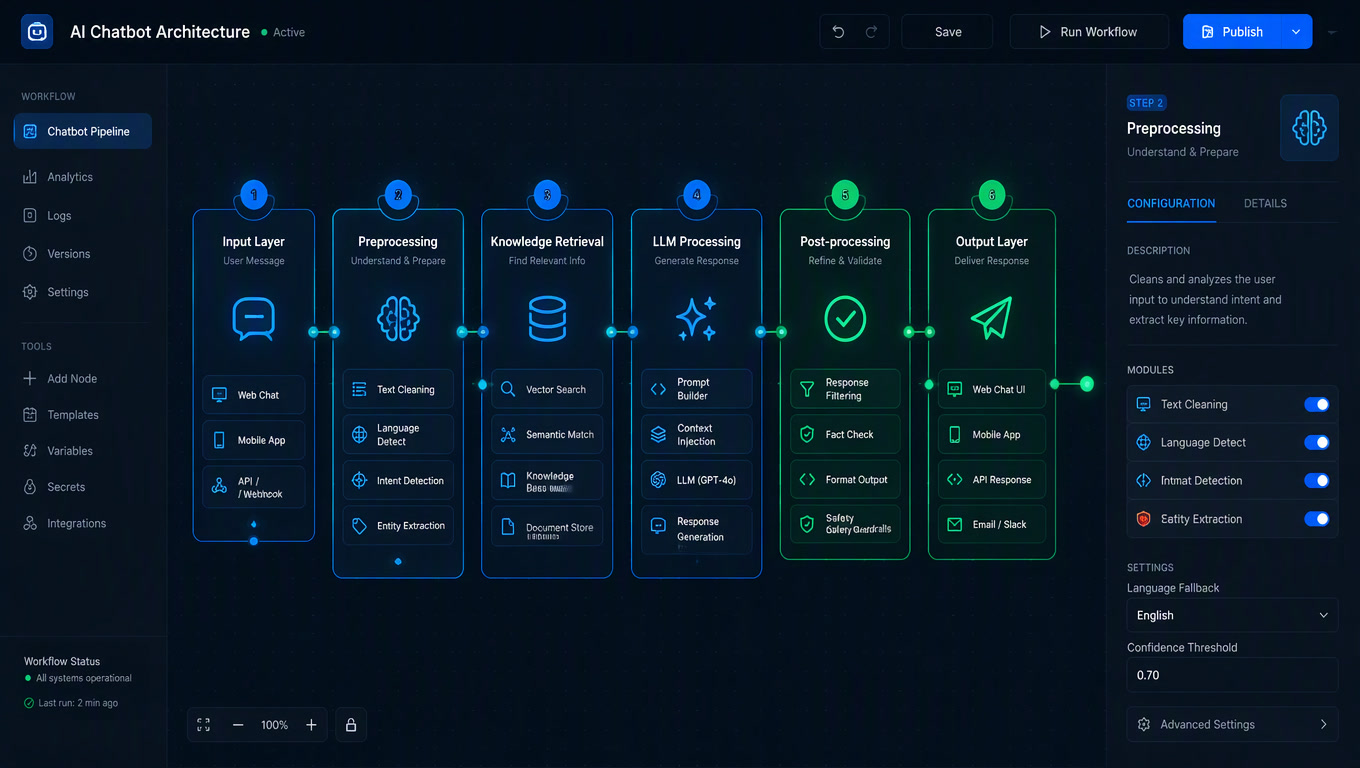
Every serious AI chatbot we deliver follows this structure. No layer is optional — only the concrete tool changes:
| Layer | Function | Typical tool | What happens if you skip it |
|---|---|---|---|
| 1. Channel | Receive and send messages | WhatsApp Business API, n8n web embed, Instagram | No conversation at all |
| 2. Validation | Verify webhook and sign requests | hub_verify_token + signature checks | Bot hijacked or silently down |
| 3. Orchestration | Route the conversation | n8n (main workflow + subworkflows) | One giant canvas that's impossible to debug |
| 4. Brain | Generate responses | OpenAI gpt-4o-mini (or Claude, DeepSeek) | Cardboard answers |
| 5. Knowledge & memory | RAG + per-user history | Vector DB (Pinecone/Supabase/pgvector) + Postgres/Redis | Hallucinates prices, forgets context |
| 6. Actions & logging | Write to CRM, notify, log | HTTP Request to Clientify, Slack, execution logs | Lost leads and blind debugging |
The official n8n RAG chatbot guide uses exactly this pattern: a Chat Trigger as entry point, an AI Agent node that orchestrates, an OpenAI chat model, Window Buffer Memory for short-term memory, and a Vector Store Tool connected to Pinecone with text-embedding-3-small embeddings. That's the part they do teach. What they don't teach lives in layers 2 and 6.
Layer by layer: what nobody tells you
Validation (layer 2). Connecting the WhatsApp Business API is not a toggle. It's 4-8 hours the first time: create the app in Meta for Developers, configure the webhook with the hub_verify_token, register the number, and stand up a public HTTPS endpoint (a VPS with a real domain and SSL, not localhost). And there's a clock you can't speed up: Meta takes 2-10 business days to verify your business before you move from the test number to the real one. The test number lets you reply the same day, but capped at 250 messages every 24 hours.
Brain (layer 4). A system prompt alone only works for very basic questions (hours, address). With product catalogs or long documents, the model can't load thousands of words into every call without blowing up cost and latency. That's where RAG comes in: you store your content as vectorized chunks, and on every question the bot retrieves only the relevant fragments. The killer detail: bad chunks ruin retrieval. The sweet spot is 300-500 tokens per chunk, and if your recall@3 metric drops below 80%, the problem is chunking, not the model. If your chatbot already exists and the problem is the knowledge base, the diagnosis is the same: source quality and chunking determine answer quality more than any model choice — the argument we make in our RAG knowledge base optimization guide.
Memory (layer 5). WhatsApp remembers nothing by itself: every inbound message runs the workflow from scratch. If a customer asks "do you have size 42?" after asking about shoes, the bot has no idea which shoes unless you store the history in a database (Postgres or Redis on self-hosted n8n). This is the component most projects forget and the one that generates the most frustration.
Actions (layer 6). A bot that only answers is a brochure. A bot that writes to the CRM is a lead machine. In our deployments, the same workflow that replies creates the contact in Clientify with the phone number, name and detected intent. The difference between a read-only chatbot and one that executes real actions in the CRM is enormous — it's the line separating an expensive Q&A box from a tool that cuts process times by more than half, exactly what we cover in our analysis of AI agents that execute actions in CRMs and ERPs.
What it really costs per month
At small-business volume (500-1,500 inbound messages per month), the real breakdown is:
| Component | Monthly cost |
|---|---|
| VPS for self-hosted n8n | $10-20 |
| OpenAI (gpt-4o-mini, ~300 conversations × 200 tokens) | $1-3 |
| WhatsApp Business API (first 1,000 conversations free, then ~$0.0147 each) | $0-10 |
| Vector DB (pgvector on the same VPS) | $0 |
| Total | $11-23 |
These figures come from 2026 implementation guides: Octacs Systems documents the full breakdown for a WhatsApp chatbot on n8n (VPS $10-20, OpenAI $1-3 with gpt-4o-mini at ~300 monthly conversations, and Meta's per-conversation fee), and Bravos AI's comparison of n8n, Make and Zapier confirms the hour ranges and the webhook detail. If you want to compare before deciding, our chatbot cost framework for local businesses breaks down why SaaS platforms charge what they charge and when the leap to a custom agent pays off.
Compare that with the $2,000-15,000 agencies charge for a managed setup or the $15,000-40,000 for a custom MVP, and you understand why interest in this route exploded. But be honest about the build hours. For people with REST experience but no prior Meta or RAG work: 3-5 hours just for the webhook, 4-8 for RAG, 1-3 for memory, 2-4 for media handling (transcribing audio with Whisper, reading images). Total: 13-26 hours the first time. Without RAG, 8-15.
The mistakes no tutorial mentions
- The token expires every 60 days. Meta's standard access token dies at 60 days and the bot goes silent until a customer complains. The fix is a persistent System User token — another documentation deep-dive nobody warns you about.
- Media arrives separately. When a customer sends a photo or voice note, Meta doesn't include the file in the webhook: it sends a
media_id, and your workflow must make a second call to download it. Without that, any image breaks the flow. - The 24-hour window still applies. DIY doesn't free you from Meta's rules: you can't initiate conversations outside the 24-hour service window without approved templates.
- Meta duplicates webhooks. It occasionally delivers the same event twice. Without a deduplication check on
messageId, your bot replies twice or creates duplicate CRM contacts. - Maintenance is 2-4 hours a month. Between token renewals, Meta webhook changes (2-3 times a year) and prompt tweaks, the bot doesn't maintain itself. That's exactly why $24-99 SaaS platforms still exist: they take those hours off your plate.
And one thing few design well: the moment the bot must hand the conversation to a human. Without a well-defined handoff, the bot answers easy questions and traps the customer in a loop when things get complicated. The bot-to-human handoff pattern for WhatsApp we use keeps 70% of conversations that should escalate from getting stuck in the bot.
When NOT to build (seriously)
Not everything is for DIY. If your volume is tiny and predictable (50 messages a month, one conversation type), a monthly subscription doesn't pay off — but neither does investing 20 hours. If your ERP can only be queried and can't push events, a custom n8n middleware does have a real advantage because you can make the HTTP call at the moment of the message. And if nobody on your team will maintain the bot, don't build it: buy.
The decision framework is simple: build if you have a technical maintainer and growing volume; buy if you have neither. A poorly maintained chatbot is worse than no chatbot, because it answers badly to customers who would otherwise have talked to a human. And once you decide the bot is ready, the next step isn't letting it run: it's training and improving it with real resolution metrics.
If you'd rather have us build it for you with this same architecture, we do it through our automation and chatbot service with n8n, OpenAI and Clientify integrated.
Frequently Asked Questions
How much does it cost to build an AI chatbot from scratch with n8n?
A production AI chatbot with self-hosted n8n, OpenAI and the WhatsApp Business API costs $11-23 per month for up to 1,000 conversations: $10-20 for the VPS, $1-3 for the OpenAI API with gpt-4o-mini, plus Meta's per-conversation fees. First-time build time is 13-26 hours.
What do you need to build an AI chatbot without coding?
You need an automation platform like n8n (self-hosted on a VPS), an LLM API like OpenAI, a vector database for knowledge retrieval (Pinecone, Supabase or pgvector), and a channel such as the WhatsApp Business API, a web embed or Instagram. A production build requires six layers: channel, validation, orchestration, brain, knowledge and actions.
When should you NOT build your own chatbot?
Skip the DIY route if no one on your team will maintain it, if your volume is tiny and predictable, or if your ERP can only be queried but cannot push events. In those cases a $24-99/month SaaS costs less than 13-26 build hours plus 2-4 monthly maintenance hours.