Your Automated Emails Are Going to Spam: The Deliverability Layer Nobody Configures
Global email deliverability averages 83% — one in six automated emails never lands in the inbox. SPF, DKIM, DMARC, sender reputation and list hygiene are the layer nobody configures. The 4-layer stack, LatAm traps, and a pre-flight checklist.
Your Automated Emails Are Going to Spam: The Deliverability Layer Nobody Configures
If your email automation reports "delivered" but your customers never see it, the problem isn't the workflow — it's the deliverability layer. In 2026, global email deliverability averages 83.1% — one in six emails never reaches the inbox — and in Unspam's corpus only 60% of sent emails landed in a visible mailbox. The cause is almost never the copy: it's a domain without SPF, DKIM and DMARC configured, without sender reputation, and without list hygiene. Automating before you fix that is automating a leak.
We see it every week. An SMB invests in behavioral email automation, builds a perfect sequence in Make or n8n, the platform shows 98% "delivered," and nobody opens anything. The workflow is fine. The problem sits three layers down: the domain the email comes from isn't authenticated, it shares reputation with everything the company has ever sent from that mailbox, and the list hasn't been cleaned in months. This is the layer nobody configures — and the difference between a flow that sells and a flow that pays to not exist.
"Delivered" Is the Lie You Pay For Every Month
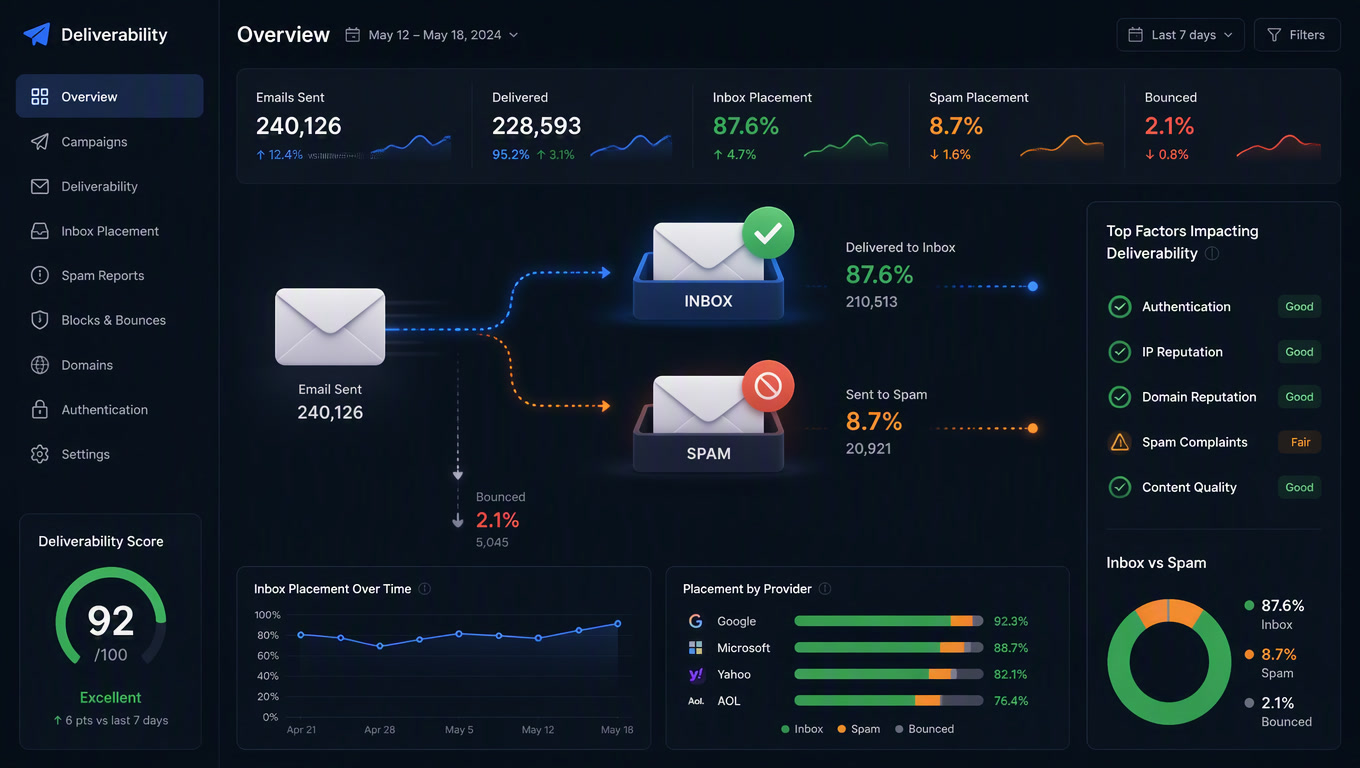
The first uncomfortable lesson: your email platform doesn't measure deliverability, it measures acceptance. "Delivered" means the receiving server accepted the message. It says nothing about where it ended up. Landbase's 2026 benchmark puts global deliverability at 83.1%; Digital Applied puts the median for compliant senders at 89%. And Microsoft Outlook remains the hardest: 75.6% of messages reach the inbox there. If a third of your customers use Outlook, that's where your campaign is dying.
The number that should scare you: per Unspam (corpus updated August 2026), only 60% of sent emails reached a visible mailbox. The rest went to spam or was dropped before anyone could see it. And senders who don't comply with Gmail and Yahoo bulk-sender rules don't get a gentle decline — their spam rate jumps from the typical 5-10% to 22-34%. It's a switch, not a slope.
The Four Layers That Decide Where Your Email Lands
After shipping email automation for clients across Mexico, Colombia and Central America, we've reduced deliverability to four layers, in order. They get fixed in this order and they break in this order:
| Layer | What it solves | Typical SMB state in 2026 | Cost |
|---|---|---|---|
| 1. Authentication | SPF (<10 DNS lookups), DKIM (2048-bit signature), DMARC published and aligned | Only 53% of domains have DMARC; ~33% of the top 1M publish a valid one and almost nobody enforces it | $0 (DNS records) |
| 2. Reputation | Domain and IP Sender Score, warm-up, shared vs dedicated pool | 18% of commercial senders have a Sender Score below 70 (problematic) | $0-30/mo |
| 3. Hygiene | Bounces, complaints, list decay (2.1% monthly) | Most send without verification and without excluding inactive contacts | $0.002-0.01 per verification |
| 4. Monitoring | DMARC RUA reports, inbox placement tests, blacklists | Almost nobody reads DMARC's XML reports | $0-15/mo |
Layer 1 is where everything fails. Having SPF and DKIM is no longer optional: since February 2024, Gmail, Yahoo and Microsoft reject unauthenticated bulk mail at the SMTP level. But there's a gap almost nobody closes: publishing DMARC is not the same as enforcing it. 85.7% of domains don't run an enforcement policy (p=reject), and that's the difference between "we could send from your domain" and "you're allowed into the inbox."
The #1 Mistake in Latin America: Sending Everything from Google Workspace
Here's the opinion you won't read on any email platform's blog: the most expensive mistake we see in LatAm is sending automation and cold outreach from the same domain the company uses for operational email. In the region, that domain is almost always Google Workspace. The company uses [email protected] for quotes, invoices and confirmations — then connects the same mailbox to an outreach tool or a cold-email flow. Result: every bounce and every complaint from a cold sequence degrades the reputation of the domain that carries the business's billing. Within two weeks, order confirmations stop arriving. And nobody understands why.
The rule we run in production: always separate. Use a subdomain (sends.yourcompany.com) or a dedicated outreach domain for automated and cold sequences; keep the root domain exclusively for transactional email (invoices, OTPs, confirmations) and opted-in newsletters. Transactional and promotional don't share a lane. It's the same logic we apply to CRM email exclusions: without traffic separation, one mistake in one flow contaminates everything else.
Shared Pool, Dedicated IP, or Cold-Email Tool?
The "do I need a dedicated IP?" question always arrives, and the honest answer is almost never yes. The 2026 volume math:
| Your case | What to use | Why |
|---|---|---|
| <50,000 emails/mo, opted-in list | Your ESP's shared pool + sending subdomain | The shared reputation is already warm; a cold dedicated IP performs worse at first |
| 50,000-100,000/mo | Dedicated subdomain + Sender Score monitoring | Volume is now affecting the root domain's reputation |
| >100,000/mo | Dedicated IP + 4-8 week warm-up | Only at this volume does reputation control pay for itself |
| Cold B2B outreach sequences | Cold-email tool (Smartlead, Instantly) + dedicated domain | Never from the root domain, never from a marketing ESP |
The nuance the table hides: warm-up is not optional. A new IP or domain that jumps from 0 to 2,000 messages in a day gets flagged as a spammer and takes months to recover. Gradual ramp-up — starting at 20-50 messages and scaling daily — is what separates inbox senders from those who burn out in week two.
The Pre-Flight Checklist Before Activating Any Flow
Before you connect a nurture sequence or a conversational email workflow, run this. It's 30 minutes of DNS and settings that save you months of burned reputation:
- [ ] SPF published and under 10 DNS lookups — every extra provider breaks the limit
- [ ] DKIM signing with a 2048-bit key and an active selector
- [ ] DMARC published, starting at p=none with rua so you can see who sends from your domain
- [ ] SPF or DKIM alignment with the From domain (without it, DMARC does nothing)
- [ ] Separate subdomain or domain for automation/cold vs transactional
- [ ] Bounce rate <2-3% — list cleaned within the last 90 days
- [ ] Complaints <0.1% (the operational target; Gmail's hard limit is 0.3%)
- [ ] One-click unsubscribe and physical address — mandatory since the 2024 rules
- [ ] Warm-up plan if the domain, subdomain or IP is new
- [ ] An owner for the metric — someone who reads the RUA reports the first week
The hygiene point connects to something we've covered: CRM data decays at 2.1% per month. Every bounce from a dead email isn't just a lost message — it's a notch against your domain's reputation. List cleaning isn't a marketing extra; it's deliverability infrastructure.
If You're Already in Spam: The 30-Day Rescue Plan
Recovering a burned domain takes more than fixing a DNS record. It's a process, and ours goes like this:
- Weeks 1-2: stop the bleeding. Pause cold sequences. Authenticate everything (SPF/DKIM/DMARC) and move DMARC from p=none to quarantine within two weeks. Each enforcement stage is validated against the RUA reports before moving to the next.
- Week 3: clean the list. Verify emails, remove contacts inactive for 90+ days, and set sunset rules. A smaller but alive list outperforms a large dead one.
- Week 4: re-engage and monitor. Resend only to active contacts, segmented by engagement — the same spirit as dynamic segmentation — and measure inbox placement per provider (Gmail, Outlook, Yahoo) with a testing tool.
The goal isn't "raise deliverability." It's to stop your automation from lying to you. A sequence reporting 98% delivered but 40% real inbox placement doesn't have a copy problem — it has a layer problem.
Conclusion
Deliverability is the invisible layer of email automation: nobody sees it until they lose it, and when they lose it, it doesn't come back in a day. Configuring SPF, DKIM and DMARC, separating transactional from promotional traffic, keeping the list clean, and naming an owner for the metric costs hours and almost no money. Ignoring it costs 20-40% of every campaign — and in the worst case, the reputation of the domain that carries your billing.
At Mintec we configure this layer before activating any email automation and chatbot workflow — because a flow that never reaches the inbox isn't automation, it's expense. If you don't know where your email lands today, contact us and we'll measure it before you touch a single node.
Frequently Asked Questions
What is email deliverability and why does it matter for automation?
Deliverability measures whether your messages reach the inbox, not whether a server accepted them. In 2026 the global average sits around 83.1%, and in Unspam's corpus only 60% of sent emails reached a visible mailbox. It matters double for automation: a flow that only lands 60% of its messages isn't a flow, it's a budget leak with fake metrics.
Why do my automated emails go to spam even with SPF and DKIM?
Because authentication is only the first of four layers. SPF, DKIM and DMARC prove the message is yours; sender reputation, list hygiene (bounces and complaints) and monitoring decide where it lands. Senders that don't comply with Gmail and Yahoo bulk-sender rules see their spam rate jump from 5-10% to 22-34%.
When do I need a dedicated IP for email?
Below 50,000 emails a month, a well-maintained shared pool usually performs as well as or better than a dedicated IP, because the shared reputation is already warm. Above 100,000 messages a month, a dedicated IP with a 4-8 week warm-up starts to pay for itself. The typical mistake is buying a dedicated IP before fixing authentication.