CRM Automation Workflows with n8n: 3 Processes We Built for Real Clients (and the Mistakes We Made)
We built CRM automation workflows with n8n for real clients — email-to-CRM pipelines, data hygiene automation, and event-driven task generation. Here's the architecture, the mistakes, and what it actually costs.
Every CRM starts clean. Six months later, it's a graveyard of duplicates, orphan records, stale deals, and contacts that sales can't remember ever talking to.
This isn't a CRM problem — it's a process problem. The CRM isn't the issue; the manual work flowing into it is. And the fix isn't buying another CRM tool. It's automating the workflows that feed, clean, and maintain it.
We build CRM automation for clients across Latin America. In this article, I'm sharing three real n8n workflows we rolled out this year, the architecture behind each, exactly what went wrong, and what the economics look like when you're not paying per task.
Why CRM workflows need their own automation layer
Most people think "CRM automation" means auto-assigning leads from a web form. That's the entry level. The real problems live elsewhere.
Think about what actually happens in a CRM on any given day:
- Sales receives an email with an inquiry — someone manually creates a contact
- A deal changes stage — someone needs to log the activity, update the forecast, and maybe assign tasks
- A contact fills the same info twice — someone has to merge the records
- A follow-up date passes — someone has to notice and act
These aren't lead gen problems. They're operations problems. And they're exactly what n8n excels at because n8n is built to watch, listen, and react to changes across systems — not just pipe data in one direction.
The keyword gap data confirms this: "crm automation workflow" and "crm automation examples" are among the most searched terms right now because teams discover that buying a CRM doesn't solve their process problems — it exposes them.
Below are three workflows we've built that directly address these operational gaps.
Workflow 1: Email-to-CRM pipeline
The problem: A B2B services client in Mexico City was receiving 40-60 inquiries per day via email — consultations, RFPs, partnership requests. An operations person spent 3-4 hours daily reading each email, manually creating a contact in Clientify, setting up a deal with the right stage, and assigning ownership. Emails that arrived after 2 PM usually waited until the next morning.
The architecture:
| Layer | What it does | n8n component |
|---|---|---|
| 1. Inbound | Polls a shared inbox every 5 minutes via IMAP | n8n Email Trigger (IMAP node) |
| 2. Classification | AI classifies intent: "consultation", "RFP", "partnership", or "spam" | OpenAI node with structured output |
| 3. Enrichment | Extracts company name → looks up via Clearbit API → fills industry, size, location | HTTP Request node |
| 4. CRM write | Creates contact in Clientify → creates deal with correct stage → logs email as activity | Clientify API via HTTP node |
| 5. Routing | Assigns to the right team based on industry + intent | n8n Switch node + Slack notify |
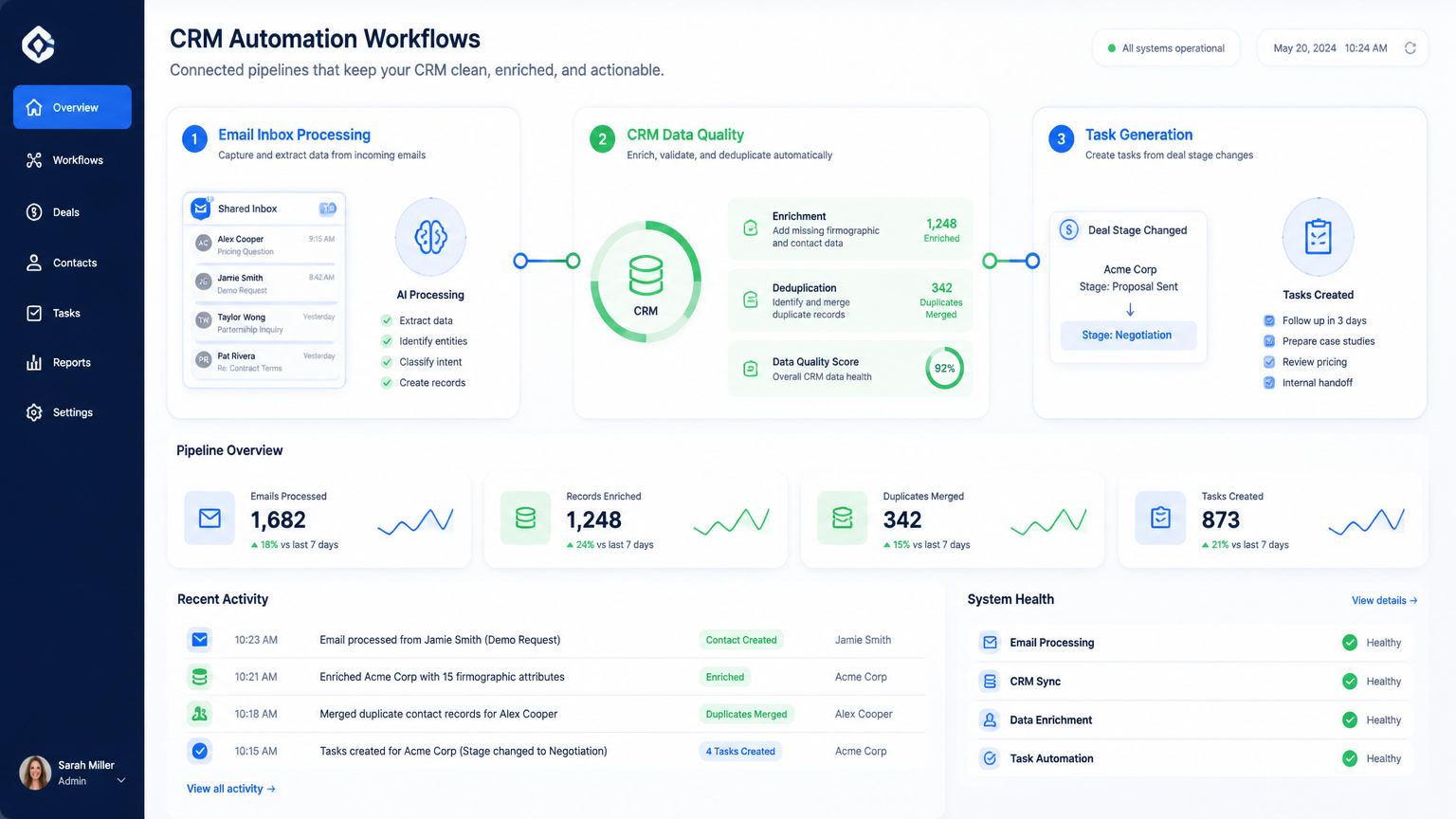
The flow: Email arrives → n8n reads it via IMAP → passes the body to OpenAI which classifies intent and extracts key details (company name, request type, urgency) → enriches with company data from Clearbit → writes to Clientify as a new contact with an associated deal → notifies the right sales rep on Slack with the full context.
Result: Response time dropped from 4-6 hours to under 5 minutes. The operations person went from 3-4 hours of manual entry to 30 minutes of exception handling. The client recovered approximately 12 leads per week that previously fell through the cracks during after-hours.
How we broke it: Our first version classified emails by sender name alone — a sensible shortcut that failed spectacularly when a legitimate RFP came from a generic Gmail address. The lesson: classify by message content, not sender metadata.
Workflow 2: CRM data hygiene automation
The problem: A fintech client had 14,000 contacts in their CRM, but 40% were missing at least one critical field (industry, company size, phone). Another 8% were duplicates — same company, different lead sources, no merge logic. Their sales team couldn't trust the data, so they stopped using CRM reports. They were making decisions on gut feel.
The architecture:
| Step | What it does | Schedule |
|---|---|---|
| 1. Scan | n8n reads all contacts modified in last 24h via CRM API | Daily at 3 AM |
| 2. Detect gaps | Checks for missing fields: industry, size, phone, website | n8n Filter + Function node |
| 3. Enrich | For contacts missing data → search company by domain via enrichment API | HTTP Request (Clearbit/Hunter) |
| 4. Update | Writes enriched data back to CRM if confidence > 85% | CRM API PATCH |
| 5. Deduplicate | Compares emails and company names → flags potential duplicates for manual review | n8n Code node (JS) |
The trick: We don't try to fix everything at once. The daily scan only processes contacts that were modified or created in the last 24 hours. This keeps API costs predictable (~$15/month in enrichment calls) and avoids overwhelming the CRM with batch updates.
Result: After 60 days, missing-field rate dropped from 40% to 11%. Duplicate detection caught 340 potential duplicates in the first month. The sales team started using CRM reports again — pipeline accuracy improved noticeably because they were looking at real data.
How we broke it: We initially enriched every single contact with Clearbit on a one-time backfill. This cost us $380 in a single day and flagged 3,000 contacts where the enrichment API returned partial data. The fix: put a confidence threshold on enrichment (skip if < 85% match) and only enrich new/modified contacts, not the entire database.
One critical lesson: data quality automation is a maintenance process, not a one-time project. You have to run it continuously because bad data accumulates at the same rate your team enters it.
Workflow 3: Event-driven task generation
The problem: A professional services firm with 12 consultants tracked their deals in CRM, but nothing automated the internal follow-up. When a deal moved to "proposal sent," no task was created to follow up in 7 days. When a deal was won, no handoff was triggered to the delivery team. Everything relied on individual discipline, which meant most follow-ups never happened.
The architecture:
| Event | Trigger | Action |
|---|---|---|
| Deal → "Proposal Sent" | CRM webhook | Create task: "Follow up in 7 days" + assign to owner |
| Deal → "Closed Won" | CRM webhook | Create handoff deck task + notify delivery team via Slack |
| Deal → "Stalled" (30+ days no activity) | Daily n8n query | Send escalation to manager + log activity in CRM |
| Contact → birthday/anniversary | Daily check | Create task: "Send personal note" + suggest LinkedIn interaction |
The flow: n8n listens for webhook events from the CRM. When a deal stage changes, it creates tasks in the CRM's built-in task system, sends a Slack notification to the responsible person, and logs the activity in the deal history. If nobody updates the deal for 30 days, it escalates to management.
Result: Task completion rates went from ~30% (when everything was manual) to ~75% (when tasks were auto-generated and visible). Lost deal follow-ups dropped by 80%. The firm closed 3 additional deals in the first quarter that would have otherwise remained in "waiting for response" purgatory.
How we broke it: We generated too many tasks. Every deal stage change created 3-4 tasks, which overwhelmed the team and caused them to ignore task notifications entirely. The fix: one task per stage change maximum, and only for three stages (proposal sent, won, stalled). Less is more in task automation.
The decision framework: which workflow to start with
Not every business needs all three workflows. Here's how to prioritize:
| If you're struggling with... | Start with | Expected timeline | Monthly cost (n8n + APIs) |
|---|---|---|---|
| Inbound email chaos — leads and inquiries arriving in a shared inbox | Workflow 1: Email-to-CRM pipeline | 1-2 weeks setup | $25-45/mo |
| CRM data you can't trust — missing fields, duplicates, inaccurate reports | Workflow 2: Data hygiene automation | 2-3 weeks setup | $30-55/mo |
| Follow-ups falling through the cracks — stage changes with no action | Workflow 3: Event-driven task generation | 1-2 weeks setup | $20-35/mo |
| All three | Start with #1, add #3 in week 2, #2 in week 3 | 4-6 weeks full stack | $45-80/mo |
What it actually costs
Here are real numbers from our deployments in Latin America (all prices in USD):
| Component | Monthly cost | What it covers |
|---|---|---|
| n8n self-hosted (VPS) | $6-20/mo | DigitalOcean/Vultr droplet, 2GB RAM |
| OpenAI API (classification + enrichment) | $15-30/mo | ~3,000 AI calls per month |
| Clearbit/Hunter enrichment API | $10-25/mo | Company lookup, email verification |
| CRM API (Clientify, HubSpot, etc.) | $0-99/mo | Included in most CRM plans |
| Total | $31-174/mo | All three workflows running |
For context, running these three workflows on Zapier's equivalent tier would cost $99-349/mo (Professional to Team plan, 10,000-50,000 tasks) — and Zapier's IMAP polling and CRM event triggers are more limited. Make would cost $29-99/mo but lacks self-hosting for data-sensitive clients.
Three mistakes we made more than once
I mentioned specific errors in each workflow above, but there are three patterns that cut across all of them:
1. Connecting directly to production CRM tables. This is the most dangerous mistake. One bad n8n workflow can PATCH thousands of records with wrong data. We now use a staging environment — the workflow writes to a staging table first, human reviews the first 10-20 records, then we flip the switch to production. It adds one day to deployment and prevents weeks of cleanup.
2. Not handling API rate limits. CRM APIs have limits. Clientify's is 30 requests per minute. HubSpot's is 100 per 10 seconds. If your n8n workflow fires 200 updates in a burst, you'll get 429 errors. The fix: n8n's built-in "Wait" node with retry logic. We batch operations and add 200ms delays on write operations.
3. Starting with the hardest workflow first. Teams almost always want to automate their most complex process first. This is backward. Start with the highest-ROI, lowest-risk workflow (usually email-to-CRM), prove it works, get team buy-in, then layer on complexity. A perfect workflow nobody uses is worse than a simple one that actually runs.
How to start this week
If you want to build your first CRM automation workflow with n8n:
- Pick one inbox — the one that has the most inquiries coming in today. Could be a shared email, a WhatsApp number, or a web form
- Map the manual process: "Email arrives → someone reads it → types the info into CRM → assigns to a person → sends a response"
- Identify the bottleneck — is it the data entry? The assignment? The notification?
- Build that part first — just the core flow, no AI yet. Rules first, then AI
- Add AI only where interpretation is needed — classifying email intent, extracting company names from free text
The simplest working version of the email-to-CRM workflow takes about 3 days to build with n8n. The full stack (all three workflows) takes 4-6 weeks to configure, test, and stabilize with real data.
At Mintec, we've implemented these CRM automation workflows for clients across Latin America — from Mexico City fintechs to Bogotá professional services firms. If you'd like help mapping out which workflow fits your operation, our automation team can guide the process.
Related articles:
- AI Lead Scoring Won't Work Without Clean Data — why data quality is the foundation of any CRM automation
- n8n vs Make for AI Agents — platform comparison for workflow automation
- Lead Nurture Automation: 4-Level Maturity Framework — what to automate after the first contact
- The Hidden Cost of Disconnected Automation — why standalone tools create more work than they save
- RevOps Automation for LatAm Agencies — connecting CRM, marketing, and delivery processes
Frequently Asked Questions
What CRM processes should I automate with n8n first?
Start with the three that deliver the fastest ROI: inbound email-to-CRM pipeline (auto-create contacts and deals from incoming emails), CRM data hygiene (deduplication and enrichment of incomplete records), and event-driven task generation (auto-create follow-up tasks when deal stages change). Together these three cover 80% of the manual CRM work most teams experience.
How much does it cost to run CRM automation workflows with n8n?
A self-hosted n8n instance runs on a $6-20/month VPS. Three core CRM workflows (email pipeline, data hygiene, task generation) processing 2,000-5,000 operations per month total costs $30-70/month including server, OpenAI API for classification calls, and CRM API usage. This is 5-10x cheaper than Zapier's enterprise tiers for equivalent volume.
What are the most common mistakes in CRM workflow automation?
Three mistakes we've made repeatedly: (1) connecting n8n directly to production CRM tables without staging — one bad workflow can corrupt thousands of records; (2) not handling CRM API rate limits, causing silent failures where data goes missing; (3) starting with the hardest workflow instead of the highest-ROI one, which delays adoption.