WhatsApp Flows: The In-Chat Form Your Customers Will Actually Fill Out
WhatsApp Flows turn chat into structured forms with 55-70% completion rates vs 8-15% on landing pages. How they work, what they cost, and when to use them.
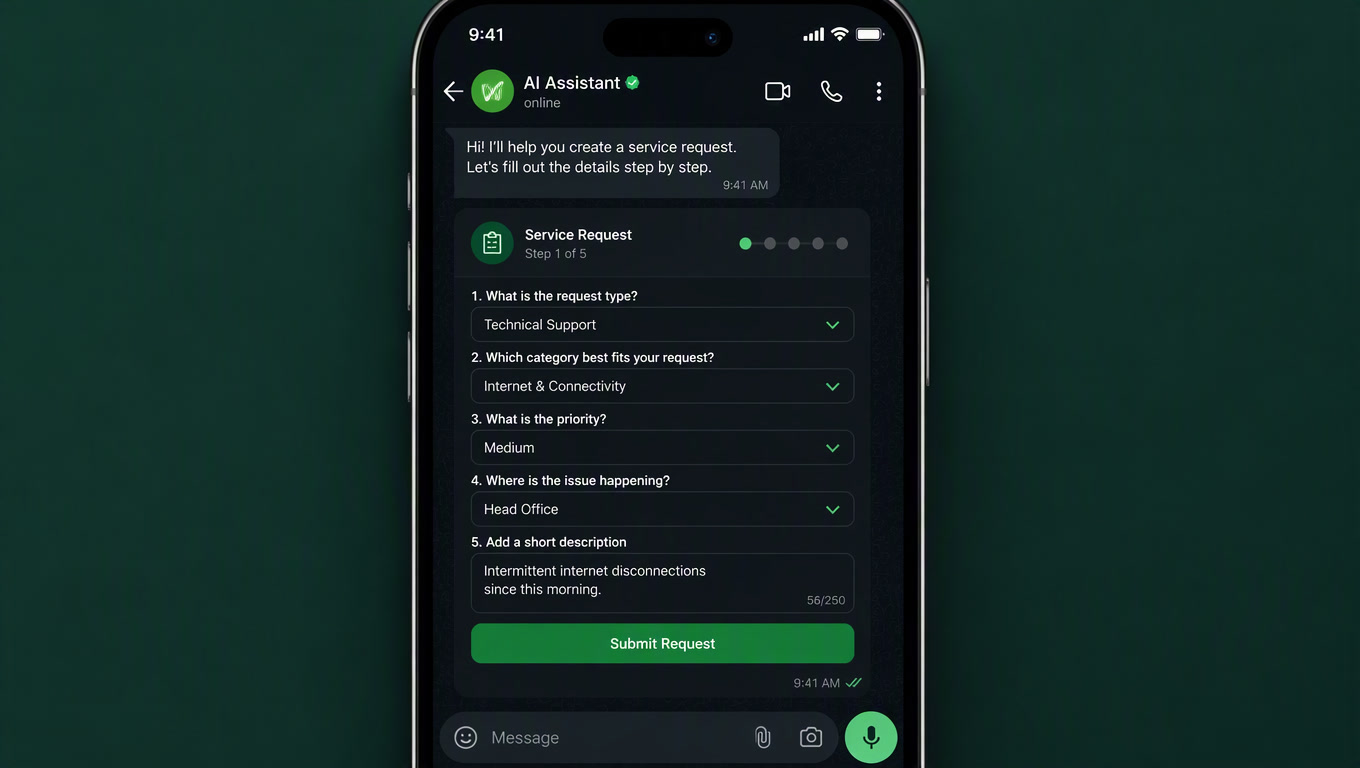
WhatsApp Flows is Meta's feature for sending structured, multi-screen forms inside a WhatsApp chat: customers fill in fields, pick from dropdowns, select dates and submit — all without leaving the conversation. Launched in late 2024 and expanded through 2025, it replaces the fragile "type your name, now your email, now..." back-and-forth with a native form UI. And the production numbers justify the switch: sign-up Flows complete at 55–70% of opened forms, versus 8–15% for an equivalent landing page; post-purchase surveys get 25–40% response rates, versus 3–8% for an email survey link (Kanal, 2026). In a market where WhatsApp is the default business channel, the in-chat form is probably the cheapest conversion improvement your business hasn't shipped yet.
The in-chat form: what WhatsApp Flows is (and isn't)
A Flow is a mini-app of one or more screens that opens inside WhatsApp: text inputs, dropdowns, date pickers, checkboxes, conditional logic between screens and a submit button. When the customer completes it, a webhook delivers the data to your server (or your BSP's) as structured, validated fields. No parsing free text, no guessing intent.
The most common mistake is conflating the three messaging formats Meta offers:
| Format | Direction | UI | Best for |
|---|---|---|---|
| Template message | One-way (notification) | Message + up to 3 buttons | Order updates, OTPs, shipping alerts |
| Broadcast | One-to-many | Plain message | Bulk campaigns to a list |
| Flow | Two-way (collects data) | Native multi-screen form | Sign-ups, bookings, lead capture, surveys |
| Chatbot / agent | Two-way (free text) | Conversation | Open questions, intent qualification |
The practical rule: if you need to collect two or more structured fields in one session, use a Flow. If the customer needs to write freely, use a chatbot or a human. If you just need to notify, use a template. The typical failure is using a chatbot to capture data (the customer types "my name is..." and parsing breaks) or using a template where a form belongs.
The numbers that justify the switch
Benchmarks from 2025–2026 production operations (Kanal, Flowcart, Zargham Labs) show a consistent pattern:
| Metric | Web form / email | WhatsApp Flow |
|---|---|---|
| Completion rate (simple capture) | 8-15% | 55-70% |
| Completion rate (post-purchase surveys) | 3-8% | 25-40% |
| Time inside the form | 2-5 minutes | 18-60 seconds |
| Form abandonment | 60-70% | 15-30% |
| Tap rate on the CTA that opens the Flow | — | 35-55% |
| Conversion on return/refund Flows | — | 40-65% |
This isn't magic — it's removing friction. The customer is already in WhatsApp: no context switch, no page reload, no expired session. For post-sale surveys, 25–40% vs 3–8% is the difference between "we have no satisfaction data" and "we have actionable data every week." For lead capture, going from 10% to 60% completion isn't incremental — it's 5x more qualified leads from the same traffic.
When to use a Flow (and when not): the decision tree
This is the criterion we use in implementations, and it beats any feature-list discussion:
- Do you only need to notify? → Template. No form.
- Does the customer need to write freely? → Chatbot or human.
- Do you need 2+ structured fields? → Flow.
- Do you need to charge? → Depends on country: India and Brazil have partial WhatsApp Pay; everywhere else, the pattern is capturing data in the Flow (cart, address, discount code) and redirecting to checkout with a button at the end.
The five patterns we see repeated in production: sign-up with explicit opt-in (converting click-to-ad traffic into a database), appointment booking (service + date + slot), B2B lead qualification with branching, support intake (order number + category + photo) and post-purchase surveys. For e-commerce, a return-request Flow cuts first-response time from 6–8 hours to under 30 minutes, because the customer delivers all structured context upfront.
How to build one: three paths
There are three ways to build a Flow, and the choice depends on who maintains it:
- Meta's Flow Builder (free, inside WhatsApp Manager): drag-and-drop screens and components, configure validations and conditional rules. Ideal for marketing and operations teams without a developer. The builder writes the JSON for you.
- JSON spec + Cloud API: a Flow is a JSON document with a version, a list of screens, components and a routing model. This is the right path when the Flow is part of a larger codebase and needs version control.
- A BSP (Business Solution Provider): where most brands end up. The BSP handles the HTTPS endpoint, certificates and data mapping into your CRM, and typically adds event triggers (cart abandoned, order delivered). We integrate the webhook data into Clientify or the client's CRM with n8n as the orchestration layer.
One technical detail that surprises everyone: Meta requires your endpoint to answer 200 in under 10 seconds, and Flows work only on the Cloud API — not on the free WhatsApp Business app, not on the on-premises API. If you're on the free app, consider this article your migration signal.
The pattern we use at Mintec
For a dental clinic in Mexico City, we built a three-screen appointment Flow: service, date and time, confirmation. The webhook creates the appointment directly in the CRM and triggers the automatic confirmation. Result: 68% of patients who opened the Flow completed the booking, versus 22% on the previous web form. The receptionist stopped transcribing data, and no-shows dropped because the confirmation lands in the same thread where the appointment was made.
For an e-commerce brand in Bogotá, the return-request Flow (order number, reason, photo) cut support first-response time from hours to minutes and killed the "can you give me your order number?" back-and-forth — the data arrives structured when it reaches the agent. It's the same handoff pattern we describe in our article on bot-to-human transfer, but with clean data from the first message.
The rule we repeat on every project: start with a single-screen, low-risk Flow (sign-up or return request), measure completion against your current web form, and scale only once you have the reference number.
What Meta won't tell you
After implementing several of these, five limitations are worth knowing before you commit:
- No native payments in most countries. India and Brazil have partial WhatsApp Pay; everywhere else, the customer leaves the Flow to pay. Plan the checkout redirect as part of the design.
- Manual approval by Meta. Every Flow goes through review (24–48 hours, slower in Q4). First-pass approval is around 70%, rising above 95% after one resubmission. Common rejection reasons: requesting sensitive data without justification, broken screen transitions, missing privacy policy link.
- No native A/B testing. You can ship two Flows and split traffic at the template level, but there's no experiment manager.
- Limited analytics. The builder shows opens, completions and field-level drop-off, but not per-message attribution. You need a BSP or your own pipeline to tie a Flow completion to revenue.
- ~5 screens max in practice. Completion drops more than 30% on long Flows. If your process needs more than five screens, the problem is the process, not the Flow.
What this means for Latin America
Here's the angle no US-focused blog will cover: in LatAm, the in-chat form isn't a conversion improvement — it's commercial infrastructure. Millions of SMBs in the region have no website, or one that doesn't convert; their sales channel is WhatsApp. For them, a Flow turns chat into an order form, a credit application or a booking — no hosting, no landing page, no developer. The cost of a Flow conversation (typically $0.005–$0.08 USD depending on country and category) is irrelevant next to losing an order because a customer wouldn't fill out a web form.
That said, collecting data on WhatsApp comes with obligations we already broke down in our WhatsApp compliance guide for LatAm: explicit opt-in, a privacy policy link on every screen that collects personal data, and no sensitive data without justification. Flows asking for ID numbers or health data without a registered use case get rejected by Meta — and if they pass, they put you at regulatory risk under LGPD, LFPDPPP or Ley 1581.
The 4-step roadmap
- Verify your base: Cloud API active and Business Manager verified. If you're on the free app, migrate first.
- Pick a low-risk Flow: sign-up with opt-in or return request. One screen, four fields, one CTA.
- Measure against your baseline: completion rate of your current web form vs the Flow, on a small sample.
- Scale with data: once you have the reference number, add the second Flow (booking or post-purchase survey) and connect the data to your CRM. Our chatbot cost framework for local businesses shows where this layer fits in the total budget — and our retail order pipeline deep-dive covers where Flows sit in the full order-to-delivery flow.
Flows don't replace the chatbot or the template: they close the gap between "send a message" and "open the website." If your operation already lives on WhatsApp — and in LatAm most do — the in-chat form is the missing piece that gets data to you clean, structured and friction-free. That's the difference between a chat that entertains and a chat that sells.
Want to implement WhatsApp Flows in your business? Talk to us.
Frequently Asked Questions
What is WhatsApp Flows?
It's Meta's feature for sending structured, multi-screen forms inside a WhatsApp chat: customers fill fields, pick options, and submit data without leaving the conversation. It only works on the WhatsApp Cloud API.
How much does WhatsApp Flows cost?
Meta charges no extra fee for Flows: opening one from a template counts as a single conversation at that template's category rate. Fully loaded with a BSP fee, a Flow conversation typically lands between $0.005 and $0.08 USD depending on country and category.
Is WhatsApp Flows the same as a chatbot?
No. A chatbot is free-text conversation; a Flow is a structured form with fixed fields and validations. Chatbots handle open questions well; Flows capture clean data with no parsing errors. Production setups combine both: a chatbot qualifies intent, then opens a Flow when structured data is needed.