
AI Mode Takes the Booking. Check Your Wiring.
Google's AI Mode now books home-service jobs through Angi, Thumbtack, Housecall Pro and Jobber. Eligibility is connected accounts, not ranking.
Google's AI Mode now books and quotes home-service work directly, and the entry ticket is not a ranking. It is a set of connected accounts: a paid field-service subscription, a business profile pinned to the same address, a form assigned to Google. Get the wiring wrong and no amount of content wins the slot, because at that moment Google is not reading your page. It is reading your account.
On November 4, 2026, Google Search product VP Robby Stein announced direct links in AI Mode to book and request home services through four partner platforms: Angi and Thumbtack on the marketplace side, Housecall Pro and Jobber on the field-service-software side, with ServiceTitan "coming soon." It is live in the United States only. The same day, Google Canada's Sabrina Geremia announced UCP-powered direct checkout inside AI Mode and Gemini for Canadian shoppers.
Two rails, one pattern: the surface stopped being an answer engine and became a transaction engine, and the price of admission is plumbing.
What actually determines whether you get booked
Not your meta description. Not your city page. The recommendation decision happens inside a match between accounts, and each vendor publishes its own version of the rules in its own help centre — which is why almost nobody in marketing has read them.
Jobber's help page lists four conditions: Help clients find my business turned on in company settings, a complete business address in Jobber, a Google Business Profile connected to Jobber at that same address, and a request or booking form assigned to Google. Trial subscriptions cannot appear at all. Once Google matches the profile, a "Book Online" button appears on the business's Google profile pointing at the Jobber form.
Housecall Pro's partner page describes something close to the opposite: every Professional is auto-enrolled, there is nothing to configure, availability is pulled from the Professional's calendar — and, explicitly, no Google Business Profile is required to show up in AI Mode. Angi sends homeowners to choose from the profile they already have on Angi. Thumbtack is on Google's announcement but had not published an AI Mode plan of its own as of November 4.
That divergence is the finding. "Is my business eligible for AI Mode?" has no single answer, because eligibility is per-vendor software configuration, not a search standard. If a competitor is appearing and you are not, the difference may be a subscription tier and an address string.
The eligibility table we now put in front of clients
If you cannot name who publishes each requirement, you do not control your eligibility — you are hoping.
| Requirement | Who publishes it | What it blocks when wrong |
|---|---|---|
| Active paid subscription (no trials) | Jobber help page | Hard block: trial accounts cannot appear at all |
| Complete business address in the partner's settings | Jobber help page | No address, nothing for Google to match against |
| Google Business Profile connected at the same address | Jobber help page (not required by Housecall Pro) | No match, so no Book Online button appears |
| A request or booking form assigned to Google | Partner form settings | Requests have nowhere to land, so the link has nothing behind it |
| "Help clients find my business" enabled | Jobber company settings | Listing suppressed even with a perfect profile match |
| Country market served by the integration | Google's announcement | No path to eligibility, regardless of setup quality |
Two details in that table are worth more than the rest. First, a booking form outperforms a request form: Jobber states that assigning a booking form, not just a request form, can help Google recommend the business more often — and that regular client reviews help too. That is the closest thing to a ranking factor in this surface, and it is a form setting, not a content decision. Second, the address has to match as a string, not as a place. A profile at "Suite 4, 120 Main St" and a CRM at "120 Main Street, Unit 4" is the same building and, apparently, not the same address.
The retail rail is the same test, one layer lower
The Canadian launch is not a separate story. Google's developer documentation for UCP is blunt about the mechanism: merchants use their existing Merchant Center shopping feeds, and UCP "unlocks access to users on surfaces like AI Mode in Google Search and Gemini." Integrate the protocol, and buying happens inside the conversation. Don't, and you are a link again.
The line that matters commercially is in Google's own FAQ: "You remain the Merchant of Record, maintaining full control over your customer relationships and data." That answers the objection most retail teams raise first — that agentic checkout takes the customer. It keeps the customer and takes the cart.
And the pattern is repeating on schedule: UCP is already opening to Lodging and Food through a waitlist. What started as an ecommerce protocol is becoming the general-purpose way an AI surface completes a transaction. The businesses that treat this as a Merchant Center feature will be late by the time it reaches their category.
What Google still has not documented
Google's own help page on using AI Mode to check local availability and pricing explains the customer side in detail: how to ask, how to let AI Mode complete forms, how Google will call a business when the information is not online. It does not mention partner booking links at all. Stein's announcement does not explain how Google chooses which eligible businesses to display. Neither does Google's documentation.
Sit with that for a second. The authoritative source for whether your business can be booked by Google's AI is a field-service vendor's help centre article. Not Search Console. Not a Google developer doc. A SaaS knowledge base, written for the person who pays the subscription.
Which produces the organisational failure we now see in client work: the marketing team is asked to "get us into AI Mode," the marketing team does not have login access to the field-service account, and nobody in the room can say whether the address on file matches. The eligibility item does not belong to SEO. It belongs to whoever owns the booking system — and until it does, the work stalls in a meeting.
There is a third path that nobody plans for, too: if your hours and availability are not published anywhere Google can read, Google calls you instead. Automated calls are documented as a fallback for businesses with thin online information, with their own management settings. Being phoned by an AI and being booked by one are different failure modes of the same gap.
Five checks to run on your own setup
- Inventory the systems that hold your availability. Field-service software, marketplace profile, calendar, whatever the front desk actually uses. Eligibility lives in whichever of those Google has a partnership with — not in your CMS.
- Compare the address as two strings, side by side. Google Business Profile versus the booking system's company settings. Same street, same suite, same punctuation order. Fix the mismatch at the source, not with a note for later.
- Assign the strongest form you can honour. A booking form beats a request form for recommendation odds. If you are not ready to auto-confirm assessments, turn on the approval gate rather than downgrading to a request-only form — Jobber's own setting lets assessment bookings arrive as "needs approval" instead of confirmed.
- Decide the calendar policy before you are listed. What auto-confirms, what waits for a human, what hours are exposed. Once the button is live, it is booking against whatever you left open.
- Put the eligibility review on a recurring calendar with a named owner. Vendor rules changed twice in a week across two vendors. Nothing in your Search Console will warn you that a form setting got toggled off.
The part that transfers beyond home services
The instinct in this industry is to answer every new surface with content. This one does not respond to content first. It responds to account state, and the account state is invisible from the tools marketing normally watches. That is why the same week produced two launches that looked like ecommerce news and home-services news, and were actually one announcement about where transactions complete.
A GEO programme that only touches pages is now half a programme. The other half is knowing which systems Google can complete a transaction through, who controls each one, and what the vendor requires — in writing, on a page nobody has bookmarked.
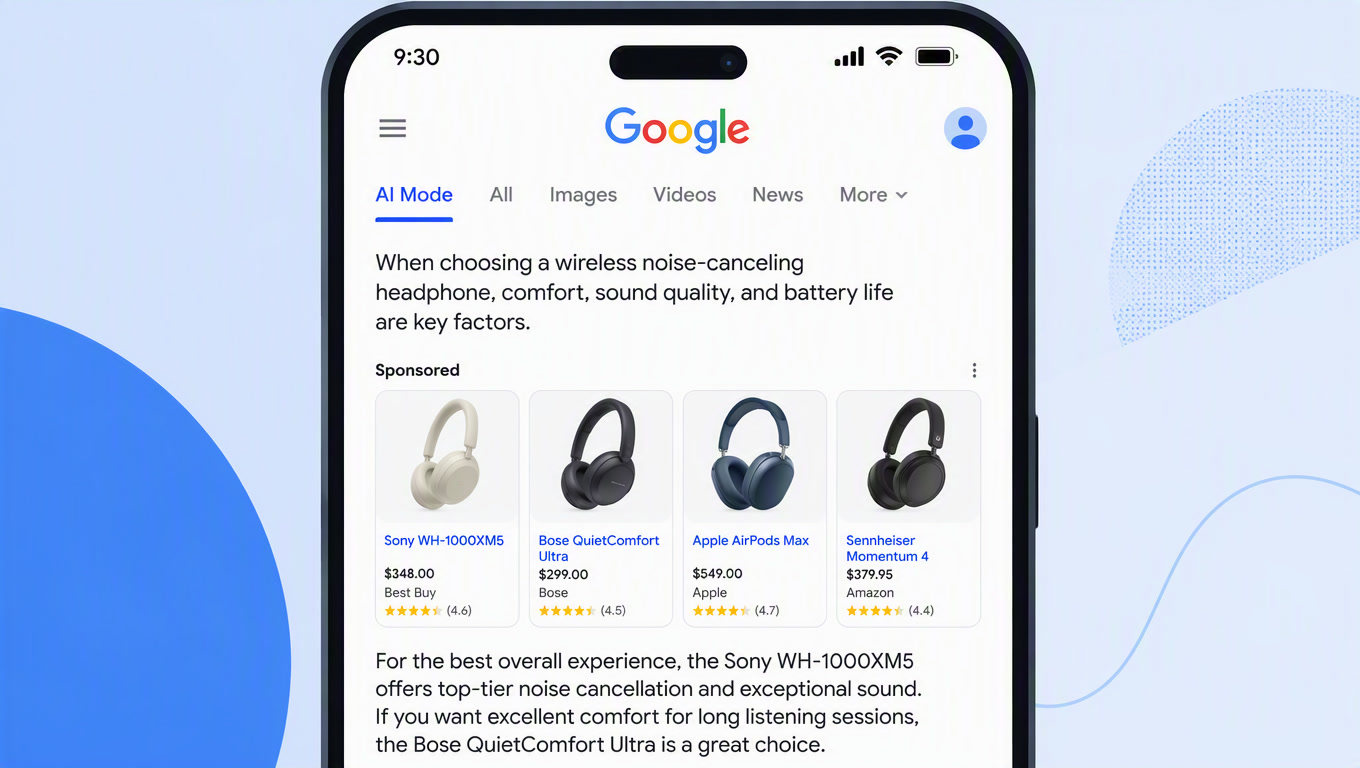
If you want the page-level half done properly, that is what our SEO and GEO service exists for. If you want to know what happens after the booking lands in your calendar and an agent starts moving it, the write-scope problem is a separate conversation. And if you want the traffic side of AI Mode — the ads now sitting inside the same answer — we broke down what inline shopping ads did to organic citations. The measurement trap that catches teams watching this shift is covered in why AI position counts don't add up to clicks.
The transferable rule: when an AI surface starts completing transactions, eligibility moves from your content to your connected accounts. Check the accounts before you brief anyone on content. The wiring is the campaign now.
Ready to find out which of your accounts Google can actually transact through? Book a call and we will map it against the vendor rules that apply to you.
Frequently Asked Questions
Does Google AI Mode charge businesses for bookings?
Not through the current partner integrations. Jobber states there are no lead fees for requests that come through Google AI Mode, and Housecall Pro says the same. That is a real difference from Google's own Local Services Ads, where a customer's booking request counts as a chargeable lead in the US and Canada. Treat the no-fee terms as promotional until each vendor publishes renewal terms — they are vendor policy, not protocol.
Do I need a Google Business Profile to appear in Google AI Mode?
It depends on which partner platform you use, and the two answers currently contradict each other. Jobber requires a Google Business Profile connected to your Jobber account at the same address as your company settings. Housecall Pro's partner page says a separate Google profile is not required: having the Housecall Pro integration is enough for matched requests to route to the job inbox. There is no universal eligibility rule — there is one rule per vendor.
How long does it take to appear in AI Mode after connecting an account?
Jobber's help page says Google usually finds a match within a few days once the requirements are met. Its separate Google Business Profile article notes Google can take up to a week to add a booking link after you enable it. Plan on a week before you judge the setup, and check the Google Business Profile directly rather than waiting for a report.