Voice + WhatsApp + CRM: how to stop customers repeating themselves
A voice call should not end as a forgotten transcript. This operating framework connects voice, WhatsApp, and CRM so context survives and every handoff has an owner.
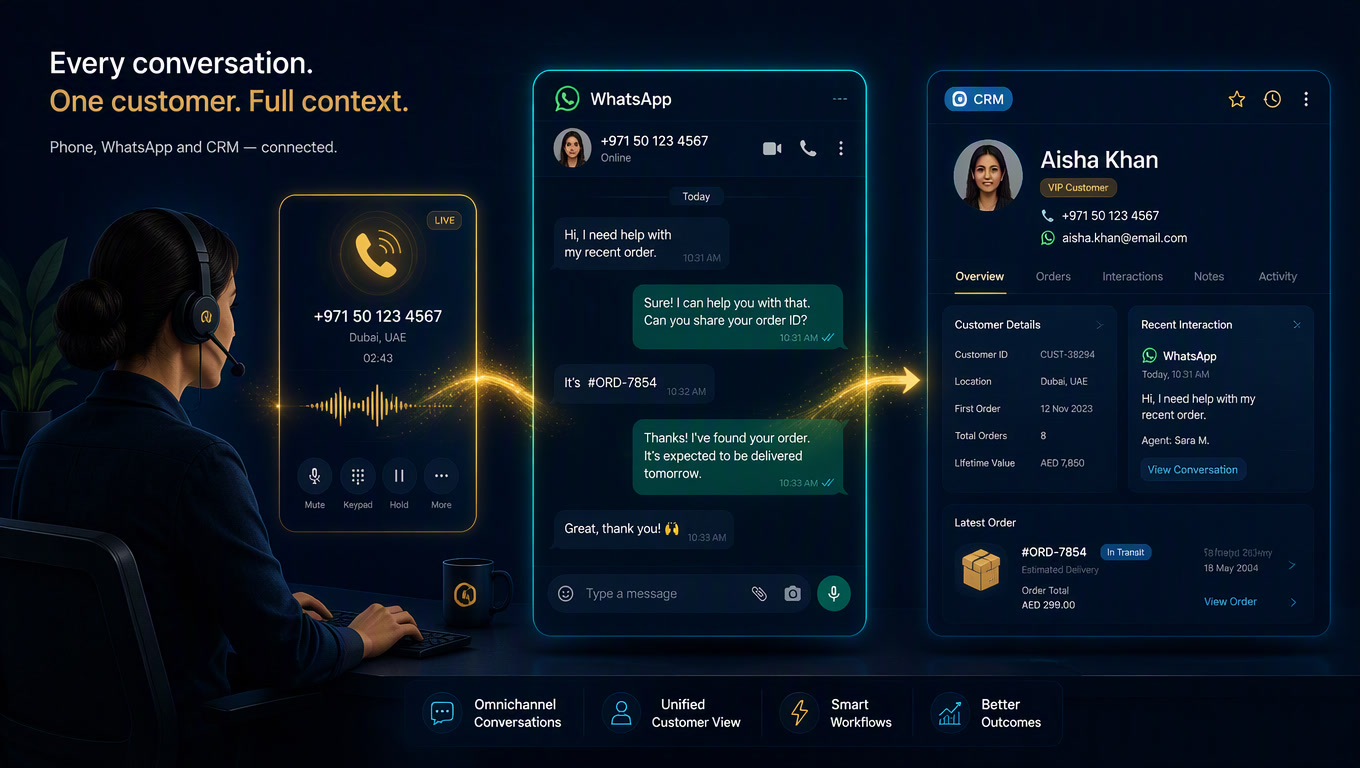
A voice + WhatsApp + CRM workflow works when it treats a call and a chat as one conversation with two jobs: voice handles urgency, while WhatsApp keeps the one action that needs to remain in writing. The CRM holds the state and assigns the owner. If the system only creates a transcript and sends a generic follow-up, it is not omnichannel service. It is a fast way to make a customer start over.
A missed or completed phone call does not always need another call. Sometimes the right next step is a written confirmation, a location pin, a quote, or a booking link. That is where WhatsApp wins. Too many teams do the handoff backward: the call ends, a transcript lands somewhere nobody reads, the automation sends "Hi, how can we help?", and the customer has to tell the story again.
That is an operating failure, not a minor CX issue. NextPhone's analysis of 1,446,980 business calls found that 28.5% arrived outside standard business hours and 34.8% of those after-hours callers expressed buying intent.[1] Speed matters at that moment. Preserving the context after a fast answer matters just as much.
At Mintec, we use one rule: every channel transition needs a specific job. Voice captures urgency and nuance. WhatsApp preserves a decision, proof, or asynchronous action. The CRM is not a storage box; it tells the team what happened, who acts next, and what the customer should never need to repeat.
The bad pattern: sending every caller to WhatsApp
Not every phone conversation deserves an automatic follow-up. If an agent answers today's opening hours and the caller says thanks, a chat message adds noise. If someone is calling about a complaint, a generic sales message is worse than no follow-up at all.
A move to WhatsApp makes sense when the next step improves in writing:
| Call outcome | Best next step | Why WhatsApp helps | Owner |
|---|---|---|---|
| The caller wants to book but needs to check times | Send the requested booking option or confirmation | They can choose or save the appointment without another call | Automation, with a human exception path |
| The caller asked for a quote, product sheet, or location | Send only the material agreed on during the call | It avoids dictating details and creates a useful record | Assigned sales rep |
| A high-intent caller is missing key information | Create a task and give the team a short brief | A person enters with context instead of interrogating them again | Sales or reception |
| It is a complaint or sensitive situation | Escalate to a person; do not trigger a sales sequence | The job is resolution, not nurture | Support owner |
| The call solved a simple question | Record the outcome in the CRM and close it | No WhatsApp is needed | Nobody else |
Our view is blunt: more channels do not mean more messages. A mature system can decide to send nothing. The value is carrying context when it is useful, not occupying every available channel.
WhatsApp calling makes this decision more important. Respond.io describes an environment where a WhatsApp call can stay connected to chat history and move to a human with the transcript and context available.[3] Your tools may differ, but the design principle holds: whoever continues the conversation should see one story, not three applications competing to describe it.
The one-conversation rule: identify, decide, continue, close
We use four states before drawing any workflow nodes. They force an operations decision first.
| State | Operational question | Minimum data | Valid output |
|---|---|---|---|
| 1. Identify | Do we know who is calling and their relationship to the business? | Phone, CRM match, known channel preference where available | Existing contact, new record, or human review |
| 2. Decide | Was the call resolved, does it need written evidence, or must it escalate? | Intent, urgency, outcome, classification confidence | Close, WhatsApp, transfer, or task |
| 3. Continue | What one action moves the customer forward? | Approved message or asset, owner, due time | Confirmation, requested resource, booking, or human handoff |
| 4. Close and learn | Did the next action happen and does the CRM reflect it? | Final status, owner, exception reason, date | Closed conversation or open case with an SLA |
The sequence matters. A lot of teams begin with an AI model that summarizes calls. We begin with state. A polished summary is useless if the system cannot tell whether to create a deal, update an existing contact, or alert support.
1. Identify without pretending to know the caller
A phone number is a starting point, not proof of identity. The workflow can search Clientify or another CRM, but it should flag duplicates, shared numbers, and weak matches for review. A relative may call from a current customer's phone. You do not want the agent assuming it is the customer and surfacing the wrong history.
Use a dedicated conversation_id, the provider's call ID, and the confirmed CRM contact when one exists. That lets you link a call, a WhatsApp message, and a follow-up task without cluttering the CRM with duplicate activities.
Six layers, one job for each layer
You can orchestrate the workflow in n8n, Make, or a phone platform with webhooks. Tool choice comes second. Clear responsibility does not.
| Layer | What it does | Example decision |
|---|---|---|
| Voice event | Receives call end, status, duration, and summary | Ignore a two-second abandoned call; process a real conversation |
| Normalization | Converts provider output into your own fields | intent=quote, urgency=high, outcome=needs_followup |
| CRM resolution | Finds, creates, or flags an identity conflict | Create a prospect only when the match is not reliable |
| Transition engine | Enforces the one-conversation rule | Continue on WhatsApp only when the outcome needs a written next step |
| Execution | Sends the agreed resource or creates an SLA-bound task | Send the requested quote; open a human case for a complaint |
| Observability | Records outcomes and alerts on exceptions | Alert when an urgent conversation has no owner |
The transition layer deserves more attention than the AI layer. It contains the rules that protect the experience: do not send a sales message after a complaint; do not open a new deal when the contact already has an active one; do not put an urgent case into an ownerless queue.
CloudTalk's 2026 compilation makes the case for this hybrid design: customers are more accepting of AI for simple, fast requests when human handoff is clear, while 88% still prefer a person for complex help.[2] The answer is not to hide the human. It is to give that person a prepared entry point.
A short operational brief beats a full transcript
Audio and transcripts can help with quality review. They are not useful to a salesperson who has two minutes to respond. The CRM needs a short, structured, checkable brief.
For a sales call, we use six fields:
- Stated reason: what the caller asked for, without re-labeling it as an opportunity.
- Call outcome: resolved, pending, escalated, abandoned, or not eligible.
- Promised item: quote, address, hours, link, callback, or nothing.
- Urgency: normal, today, or immediate, with the reason captured when relevant.
- Next owner and due time: one person or an SLA-backed queue, never "the team".
- Do-not-repeat context: two or three lines a human can read before replying.
We do not let a transcript directly instruct the CRM. A model may hear "I want to know pricing" and create a confident-looking summary that reads like a purchase order. The summary can propose; a rule or a person decides what changes in critical records. The same safeguard applies to agents that help build workflows: an AI-assisted n8n workflow is still an operational draft until someone reviews permissions, exceptions, and publication.
Three failures the clean diagram hides
Sending the same message after every call. It is easy to configure and makes the business sound disconnected. The output should follow the call outcome, not the fact that a webhook fired.
Splitting the call from commercial history. When the CRM stores one activity and WhatsApp lives in an unlinked inbox, the sales rep asks again about budget, product, and urgency. WhatsApp and CRM integration for Latin America is not valuable because two logos connect. It is valuable because the team works from a shared customer record.
Measuring messages sent instead of correct handoffs. Volume is a vanity metric. Measure whether the follow-up was relevant, whether the owner acted inside the SLA, and whether the customer had to repeat information. For scheduling, a confirmation saved in chat can be the bridge between a voice conversation and a real booking, as we show in our appointment automation architecture.
Launch the workflow without creating a spam machine
Start with one case and one outcome. For example, after-hours callers asking to book. Do not try to solve sales, support, collections, and post-sale service in the first sprint.
- Review 30 to 50 real calls and label reason, outcome, and appropriate next action.
- Define only three permitted results: close, send an agreed confirmation, or open a human task.
- Run the workflow in draft mode first: write the brief to the CRM, but require a person to approve the message.
- Test difficult matches: shared phone, duplicate contact, complaint, short call, and an existing customer.
- Turn on one automatic transition only after classification and human review are consistent.
- Review exceptions every week, not just green workflow executions.
The goal is not to make AI handle every conversation alone. It is to get each customer to the next step with less waiting, less repetition, and an accountable person when the case leaves the script. Voice handles now. WhatsApp preserves what should stay written. The CRM keeps the operation honest.
Sources
[1] https://www.getnextphone.com/blog/ai-receptionist-statistics — AI Receptionist Statistics [2] https://www.cloudtalk.io/blog/ai-voice-agent-statistics — AI Voice Agent Statistics 2026 [3] https://respond.io/blog/whatsapp-ai-voice-agent — WhatsApp AI Voice Agents
Frequently Asked Questions
When should a voice call move to WhatsApp?
Only when WhatsApp does a job voice cannot do well: preserve a confirmation, send a location or quote, share a booking link, or leave a written summary the customer requested. A simple call that is already resolved does not need another message.
What data should move from voice to WhatsApp and the CRM?
At minimum: confirmed identity, reason for contact, outcome, urgency, next action, owner, and a concise approved summary. Keep the full transcript as reference when appropriate, but do not make it the operational handoff.
Can n8n automate a voice-to-WhatsApp handoff?
Yes. n8n can receive a call event, normalize the summary, find or create a CRM record, decide whether a WhatsApp continuation is appropriate, and open a task for a person. Define the transition rule and owner for each exception before the workflow goes live.