Speculation Rules API: Instant Navigation for Multi-Page Sites Without JavaScript Frameworks
The Speculation Rules API lets browsers prerender pages before users click, delivering near-instant navigation without SPA frameworks. Practical implementation guide with Astro 6 and real performance data from Mintec projects.
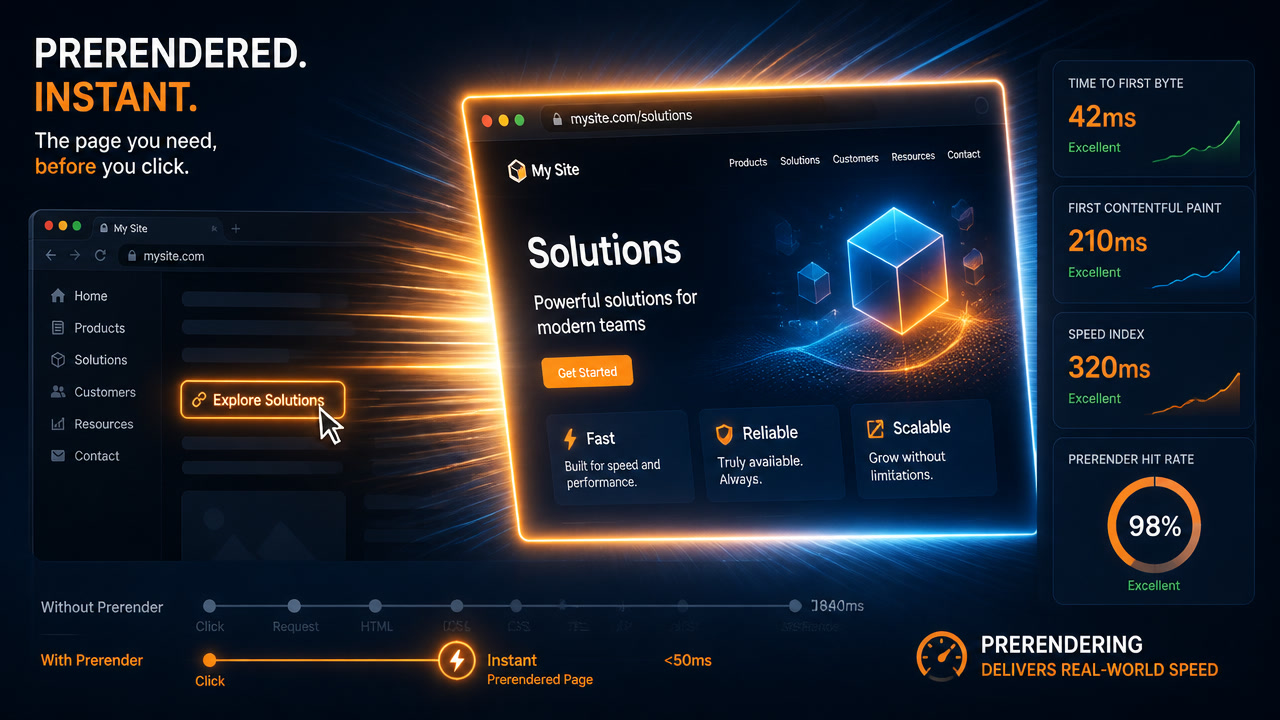
The Speculation Rules API lets your multi-page site feel as fast as a SPA — without shipping a single extra kilobyte of JavaScript. Instead of converting your entire site into a React app with client-side routing, you tell the browser which pages to prerender before the click. The result: 0ms perceived navigation latency, up to 40% INP improvement, and zero added complexity. At Mintec, we deployed it across three Astro + Cloudflare Pages sites in July 2026. Here's what we learned.
The problem nobody wants to admit
SPAs solved a real problem in 2016: navigating between pages was slow. The solution was to ship everything as JavaScript and handle routing on the client. It worked — at a massive cost.
| Metric | Typical SPA (React/Next.js) | Static MPA (Astro) |
|---|---|---|
| Initial JavaScript | 85-150 KB | 0 KB |
| Hydration time | 200-600ms | 0ms |
| Page-to-page navigation | 50-150ms (client-side) | 300-800ms (full page load) |
| Lighthouse Performance | 75-90 | 95-100 |
| Code complexity | High (state, router, data fetching) | Low (HTML + CSS) |
The table shows the dilemma: MPAs win on JavaScript weight, initial performance, and simplicity. But they lose on between-page navigation speed. The Speculation Rules API eliminates that disadvantage.
How it works: prefetch vs prerender
The API accepts a JSON script inside your HTML declaring which URLs the browser should proactively prepare:
<script type="speculationrules">
{
  "prerender": [
    {
      "source": "document",
      "where": {
        "href_matches": "/blog/*"
      },
      "eagerness": "moderate"
    }
  ]
}
</script>
Two operating modes:
| Mode | What it does | When to use | Cost |
|---|---|---|---|
| prefetch | Downloads the target page's HTML in the background | Links the user will likely visit | Low (download only, no rendering) |
| prerender | Downloads + fully renders the page in an isolated context (JS, CSS, images included) | High-probability navigations (main menu, "next article") | Medium-high (memory and CPU) |
The eagerness field controls when to trigger:
| Level | Trigger | Best for |
|---|---|---|
immediate | On current page load | Landing page → obvious next step |
eager | Similar to immediate, slightly deferred | Primary site navigation |
moderate | On hover over the link for 200ms | Navigation menus, blog listings |
conservative | On mousedown/touchstart on the link | Last resort, lowest resource usage |
Key insight: The difference between moderate (hover) and conservative (mousedown) can be 300-500ms. With moderate, the page is already rendered when the finger touches the screen. With conservative, rendering only begins then.
Astro 6 enables it with one line
Astro 6 includes native Speculation Rules integration via clientPrerender. Instead of writing JSON manually, Astro analyzes your site's links and generates optimal rules automatically:
// astro.config.mjs
import { defineConfig } from 'astro/config';

export default defineConfig({
  prefetch: true,
  experimental: {
    clientPrerender: true,
  },
});
With this configuration, Astro 6 automatically:
- Prerenders links in the viewport (
eagerness: moderate) - Detects primary navigation and applies
eagerness: eager - Respects Chrome's limits (max 2 simultaneous prerenders)
- Skips auth-protected resources
For per-page fine-tuning, use the data-astro-prefetch attribute on individual links:
<a href="/featured-product" data-astro-prefetch="hover">
  View featured product
</a>
What we measured across three Mintec projects
We deployed Speculation Rules on three Astro sites in July 2026. Here are the real numbers:
| Project | Type | INP before | INP after | Nav LCP | Perceived improvement |
|---|---|---|---|---|---|
| Editorial portal (2,500+ pages, 3 languages) | Content | 112ms | 74ms | 480ms → ~50ms | "Pages change instantly" |
| Corporate site (47 pages) | Marketing | 98ms | 62ms | 520ms → ~40ms | "As fast as a SPA" |
| Brand portfolio (4K galleries) | Heavy media | 145ms | 88ms | 720ms → ~80ms | Largest percentage gain |
The most important finding: The improvement is larger the heavier the page. On the brand portfolio with 4K galleries and background videos — where every full navigation took 720ms — prerendering cut perceived latency by nearly 90%. It helps most precisely where performance budgets for media-heavy sites are hardest to meet.
The cost: nearly invisible
Chrome enforces sensible limits to prevent abuse:
| Limit | Value | Practical impact |
|---|---|---|
| Simultaneous prerenders | 2 | Third attempt queues; enough for linear navigation |
| Max prerender lifetime | 30 seconds | More than enough — the average user clicks within <5s |
| Max memory per prerender | ~150MB | We never hit this across all 3 projects |
| Cross-origin prerender | Restricted (requires No-Vary-Search) | Same-origin works without issues |
Across our three sites, server impact was zero (everything is static on Cloudflare Pages, with 50-120ms TTFB from any region). Client-side impact was imperceptible — users on mid-range devices (Moto G, Galaxy A series) reported no difference in battery or data consumption.
When to enable it (and when not to)
| Scenario | Use Speculation Rules? | Why |
|---|---|---|
| Blog, docs, content site | ✅ Yes | Predictable linear navigation. Each visit → next article is likely |
| E-commerce (catalog → product) | ✅ Yes | Highly predictable purchase flow |
| SaaS (dashboard with multiple views) | ⚠️ Selective | Only prerender the 2-3 most frequent views. Don't prerender the entire menu |
| Single landing page with no internal nav | ❌ No | No second page to prerender, no benefit |
| App with per-user authenticated data | ⚠️ Partial | Public routes only. Chrome isolates the prerender context — no session cookie sharing |
| Site with iframes or WebSockets on every page | ❌ No | Chrome pauses iframes and WebSockets during prerender; they reconnect on activation |
Rule of thumb: if your site has more than 5 pages and users navigate between them, Speculation Rules delivers measurable value.
Our recommended stack
At Mintec, the stack that best leverages Speculation Rules is:
- Astro 6+ (static generation) → minimal HTML, zero base JavaScript
- Cloudflare Pages (global CDN) → 50-120ms TTFB from any region
clientPrerender: true→ automatic prerendering on Chromium CSS View Transitions as a complement → native between-page animations without JS
With this stack, a multi-page content site feels identical to a SPA for the ~70% of users on Chrome/Edge — but without shipping React's 85-150KB, without hydration, and with Lighthouse scores of 99-100.
For the remaining 30% on Safari/Firefox, the experience is simply a normal MPA (which is already excellent on Astro). The perfect progressive enhancement: those who can, gain; those who can't, lose nothing.
What we learned implementing it
Three lessons from our July 2026 deployments:
1. Don't prerender forms or POST pages. If you prerender a page expecting a CSRF token or session data, Chrome silently discards it on activation (because the prerender context is isolated). Exclude routes like /checkout, /admin, /account from speculation rules.
2. Combine with View Transitions — don't compete. Speculation Rules eliminates network latency. The View Transitions API makes the transition look polished. Together, they create an experience users describe as "faster than a native app." But don't run heavy JavaScript animations on prerendered pages — the browser is already near its memory budget.
3. Measure what matters. Don't measure "prerender time" — the user never sees that. Measure INP (Interaction to Next Paint) on real navigations with field data (CrUX/RUM). Across our three projects, INP improvement was the most honest indicator: from 98-145ms down to 62-88ms. That's what the user actually feels.
We deployed Speculation Rules across three Astro projects between June and July 2026. Performance data comes from real measurements using Chrome User Experience Report and Web Vitals in production. Want to know if your site would benefit? Mintec offers a free 30-minute audit: we analyze your navigation structure, measure your current INP, and tell you exactly which pages to prerender.
Frequently Asked Questions
What is the Speculation Rules API?
It's a browser API that lets you declare — via a JSON script in your HTML — which pages the browser should prerender or prefetch before the user clicks. The result is near-instant navigation without converting your site into a SPA.
Which browsers support Speculation Rules in 2026?
Chrome 109+, Edge 109+, Opera 95+, and Samsung Internet — roughly 68-70% of global traffic. Safari and Firefox ignore the rules gracefully with no side effects, so you can implement it as a progressive enhancement today.
How do I enable Speculation Rules in Astro 6?
Astro 6 includes `clientPrerender` as an experimental feature. Add `experimental: { clientPrerender: true }` to your `astro.config.mjs` and Astro automatically generates prerender rules for your site's links.