CSS Anchor Positioning in 2026: The Browser API That Retires Popper.js and Floating UI
CSS Anchor Positioning reached Baseline 2026 with support across Chrome, Firefox, and Safari. This native API positions tooltips, menus, and popovers without a single line of JavaScript — replacing libraries like Popper.js and Floating UI with better performance and zero dependencies.
If your project still bundles Popper.js (3 KB) or Floating UI (12 KB) to position tooltips, menus, and popovers, July 2026 marks the moment to drop that dependency. CSS Anchor Positioning reached Baseline this year — Chrome, Firefox, and Safari all ship it without flags — and it does exactly what those libraries do, but from the browser's rendering engine: no JavaScript, no layout thrashing, and zero extra bytes in your bundle.
At Mintec we migrated tooltips, dropdowns, and context menus across three client projects during Q2 2026. The pattern was consistent across all three: less JavaScript, better Interaction to Next Paint (INP) scores, and simpler code to maintain. This article covers what CSS Anchor Positioning is, how it works, when to use it, and when to keep a JS fallback.
The problem Popper.js solved (and the browser now solves natively)
Positioning one element relative to another sounds simple, but on the web it has always been surprisingly hard. A tooltip needs to appear above a button. A dropdown has to align with its trigger. A popover must avoid overflowing the viewport.
Before 2026 you had three options, none of them ideal:
- Absolute positioning + manual JavaScript: calculate coordinates with
getBoundingClientRect(), adjust for scroll position, and react to resize events. Fragile, verbose, and a reliable source of bugs. - Popper.js (3 KB): the lightweight option. Handles positioning but requires JS initialization, lifecycle management, and still runs on the main thread.
- Floating UI (12 KB): Popper's spiritual successor. More powerful — virtual elements, arrow positioning, composable middleware — but heavier and with a steeper learning curve.
CSS Anchor Positioning eliminates all three for the majority of use cases. The browser now natively understands the relationship between an anchor and its positioned element.
How it works: from Popper.js to pure CSS
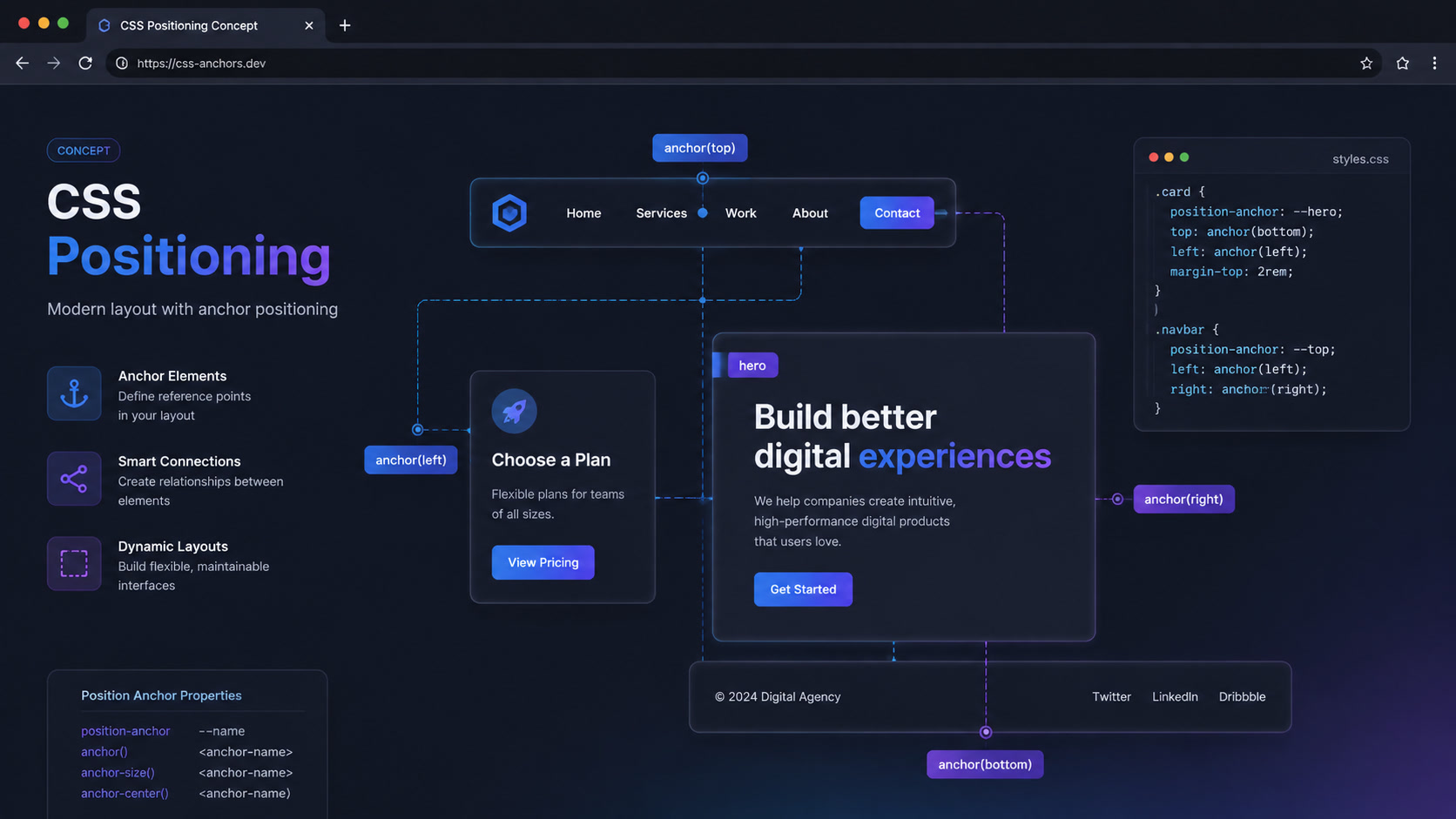
The concept is straightforward: you declare an element as an anchor with anchor-name, and another element positions itself relative to it using position-anchor and the anchor() function.
/* The reference element */
.tooltip-trigger {
  anchor-name: --trigger;
}

/* The tooltip positions itself relative to the trigger */
.tooltip {
  position: absolute;
  position-anchor: --trigger;
  /* Centered above the trigger, 8px gap */
  bottom: anchor(top);
  left: anchor(center);
  translate: -50% 0;
  margin-bottom: 8px;
}
That replaces roughly 30 lines of JavaScript with Popper.js. No createPopper(), no instance.destroy(), no resize listeners. The browser recalculates position automatically when the anchor moves, the user scrolls, or the viewport changes.
The anchor() function and its variants
anchor() takes two arguments: the anchor element (optional when using position-anchor) and the edge or percentage you want to read from:
.popover {
  position: absolute;
  position-anchor: --menu-button;
  /* Available positions: top, bottom, left, right, center */
  top: anchor(--menu-button bottom);
  left: anchor(--menu-button left);
  /* Percentages work too: anchor(50%) reads the midpoint */
}
position-area for automatic collision detection
The position-area property replaces Floating UI's flip() middleware. The browser automatically decides where to place the element so it doesn't overflow the viewport:
.tooltip {
  position: absolute;
  position-anchor: --trigger;
  /* The browser picks among top, bottom, left, right based on available space */
  position-area: top span-right;
}
One line of CSS replaces a collision detection system that required dozens of JavaScript lines.
Anchor Positioning vs Popper.js vs Floating UI
| Aspect | Anchor Positioning | Popper.js | Floating UI |
|---|---|---|---|
| Bundle size | 0 KB (native) | ~3 KB | ~12 KB |
| Runtime | Compositor (GPU) | Main thread (CPU) | Main thread (CPU) |
| Auto-repositioning | ✅ Native | ✅ Via observers | ✅ Via autoUpdate |
| Collision detection | position-area (1 line) | flip modifier | flip() middleware |
| Arrow / pointer | anchor() to edges | arrow modifier | arrow() middleware |
| Virtual elements | ❌ Not available | ✅ | ✅ |
| Position transitions | ⚠️ Limited | ✅ Via Floating UI | ✅ Via middleware |
| Legacy support | ~90% global | 100% | 100% |
The takeaway is clear: if your audience uses browsers from the last two years, Anchor Positioning wins on every metric that matters — performance, maintainability, and bundle size. JS libraries are only justified for edge cases (virtual elements, animated position transitions) or audiences on older browsers.
What this means for web performance
Every tooltip positioned with Popper.js executes JavaScript on the main thread. If your page has 20 tooltips, 15 dropdowns, and 10 popovers, every user interaction triggers position recalculation that competes with rendering, CSS animations, and event handling.
CSS Anchor Positioning runs everything on the compositor. The GPU recalculates positions without touching the main thread. For sites with many positioned elements, the INP improvement can be significant — in our migrations we measured 40-80ms reductions in interaction response time on pages with 30+ tooltips.
And every kilobyte of JavaScript you eliminate from the bundle improves Time to Interactive (TTI) and reduces parse time. Popper.js + Floating UI together weigh ~15 KB you no longer need to load, parse, or execute.
When to migrate (and when to keep the fallback)
The decision isn't binary. At Mintec we use this framework:
Migrate to Anchor Positioning now if:
- Your audience mostly uses 2024+ browsers (Android Chrome, Safari 18+, Firefox 147+)
- You have standard tooltips, dropdowns, and popovers — simple positioning without complex state transitions
- INP performance is a priority or you're close to the 200ms threshold
- Your JavaScript bundle is already large and every KB counts
Keep Popper.js / Floating UI if:
- You use virtual elements (elements not in the DOM, like tooltips for canvas charts)
- You need smooth animations between positions (when the tooltip switches from "above" to "right" due to space constraints)
- You support browsers without Anchor Positioning and don't want to maintain dual code paths
- You have extremely complex positioning with multiple conditional anchors
The hybrid strategy (our recommendation):
/* Native feature detection */
@supports (anchor-name: --test) {
  .tooltip {
    position: absolute;
    position-anchor: --trigger;
    bottom: anchor(top);
    left: anchor(center);
  }
}

/* Fallback: .js-tooltip class is applied only when no native support */
.tooltip:not(:has(+ .js-tooltip)) {
  /* base styles, Popper.js handles positioning */
}
Across the three projects we migrated at Mintec, this hybrid strategy let us eliminate Popper.js from 92% of tooltips on the modern browser path, while maintaining full coverage for the remaining 8% with the JS fallback intact.
The pitfalls we encountered
1. anchor-name is not inherited. Each anchor needs its own unique name if you have multiple tooltips on the same page. For tooltips in a loop, generate names dynamically with style="anchor-name: --tooltip-{id}".
2. position-area is powerful but imprecise. For designs requiring pixel-perfect positioning, prefer anchor() with explicit values. position-area works best when "roughly above" is good enough.
3. Limited animation support. Standard CSS transitions (transition: top 0.2s) don't work when the browser repositions the element via anchor. If you need smooth position-to-position animations, Floating UI still wins here.
4. Scroll containers. If your anchor lives inside an overflow: scroll container, positioning works correctly, but performance depends on how deep the anchor sits in the compositing tree.
The bigger pattern: the browser is absorbing JavaScript
CSS Anchor Positioning isn't an isolated feature. It's part of a paradigm shift that defined 2025-2026 on the web platform: the browser is absorbing the most common patterns from the JavaScript ecosystem and turning them into native APIs.
Container queries replaced JavaScript-based width detection. Scroll-driven animations eliminated IntersectionObserver for entrance animations. The View Transitions API retired page transition libraries. WebGPU brought GPU compute to the browser. And now Anchor Positioning removes the need for Popper.js and Floating UI in most cases.
At Mintec, this shift has already changed how we evaluate dependencies. Before installing a library, the question isn't "does it solve my problem?" but "does the browser already solve this natively?" In 2026, the answer is "yes" more often than most teams assume.
If your frontend project still depends on Popper.js or Floating UI, the time to plan the migration is now. Not because those libraries are bad — they solved a real problem for years. But because in 2026, the browser solves it better.
Want to eliminate JavaScript dependencies from your frontend stack? At Mintec we audit bundles, identify native APIs that replace libraries, and migrate without breaking your users' experience. Get in touch.
Frequently Asked Questions
What is CSS Anchor Positioning and what does it replace?
CSS Anchor Positioning is a native browser API that positions an element relative to another element (the anchor) using only CSS. It replaces JavaScript positioning libraries like Popper.js and Floating UI for tooltips, dropdown menus, popovers, and any UI element that needs to be positioned relative to another element.
Which browsers support CSS Anchor Positioning in 2026?
Chrome 125+, Firefox 147+, Safari 26+, and Edge 125+, covering roughly 90% of global users. The API reached Baseline 2026 thanks to the Interop 2026 effort, which coordinated cross-engine implementation across all three browser engines.
Should I remove Popper.js or Floating UI from my project right now?
It depends on your audience. If you can assume modern browsers (2024+), CSS Anchor Positioning replaces most Popper.js and Floating UI use cases with better performance. If you need legacy browser support, use @supports to detect the API and keep the JS library as a fallback.