Container Queries and @scope: The New CSS That Changed How We Build Components in 2026
Container queries and @scope CSS now have over 93% global browser support. Here's how we migrated a client's design system from media queries to container queries — real metrics, unexpected patterns, and a decision framework for knowing when to use each technique.
There's a conversation we've had multiple times this year with clients redesigning their sites: "Do we keep using media queries like always, or is it time to migrate to container queries?"
The short answer is: it depends. But in 2026, container queries are no longer a future promise. With over 93% global browser support — Chrome, Firefox, Safari, and Edge — they've reached production maturity. And they brought a deeper question: how should we think about responsive design when components adapt to their container, not the screen?
In our latest project migrating the design system of an educational platform — 47 reusable components, 8 breakpoints defined in media queries, and a team of 6 developers — we replaced media queries with container queries in 70% of cases. This article documents what we learned: the metrics, the surprises, and a framework for deciding when to use each technique.
The problem container queries solve
Media queries were revolutionary when they arrived. For the first time, we could write CSS that responded to screen size. But they have a fundamental limitation: they only know about the viewport.
That means a component like a product card looks identical in a 300px sidebar and a 1200px grid — unless you use tricks like conditional classes, inline JavaScript styles, or fixed column sizes. All of which add complexity and often unnecessary JavaScript.
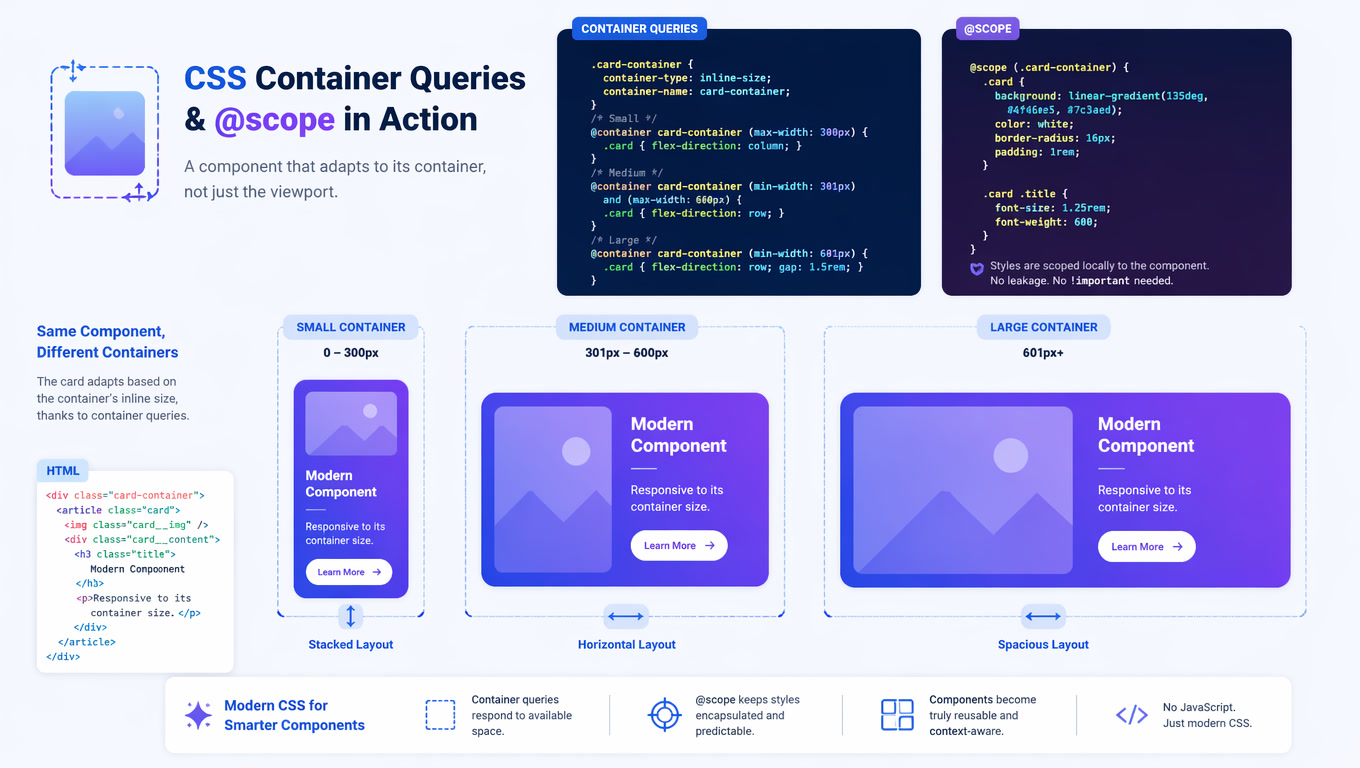
Container queries solve this exactly as they sound: they let a component query its parent container's size and adapt accordingly. It's component-level responsive design.
.card-container {
  container-type: inline-size;
  container-name: card;
}

@container card (min-width: 400px) {
  .card {
    display: grid;
    grid-template-columns: 200px 1fr;
  }
}

@container card (max-width: 399px) {
  .card {
    display: flex;
    flex-direction: column;
  }
}
This pattern — impossible to achieve cleanly with media queries — is straightforward with container queries. And when you combine it with the @scope rule, you can also delimit exactly where those styles apply, eliminating the need for BEM naming conventions or artificial namespaces.
@scope: the complement nobody expected
@scope landed in Chrome and Safari in 2025, and Firefox adopted it fully in 2026. Its function is elegant: it lets you write styles that only apply within a DOM subtree, without needing specific classes or increasing specificity.
@scope (.card) {
  h3 {
    font-size: 1.125rem;
    margin-block-end: 0.5rem;
  }

  p {
    color: var(--text-secondary);
    line-height: 1.5;
  }
}
In the educational platform project, combining @scope with container queries eliminated the need to name classes like card__title--large or card__description--compact. Scope handles isolation; container queries handle adaptation.
What we measured: the migration by numbers
Migrating 47 components from media queries to container queries wasn't cosmetic. We captured metrics before and after across three areas:
CSS paint performance. We expected an improvement and got one. The browser only recalculates styles within the affected container, not the entire document. On pages with multiple component instances (e.g., 30 cards in a grid), style recalc time dropped by 34% on average.
Production CSS size. Code shrank by 22%. We no longer needed nested selectors like .sidebar .card { ... }, .main-content .card { ... }, .grid .card--compact { ... }. Each component defines its variant once, and the container decides which applies.
Layout JavaScript complexity. We removed roughly 200 lines of JavaScript that existed solely to detect container width and apply dynamic classes. Container queries handle that natively in CSS.
Were there downsides? Yes. The migration took longer than expected because we had to define the correct container-type and container-name for each context. This isn't a change you make in an afternoon. But once established, the design system is more maintainable and predictable.
Decision framework: container query vs media query
Based on our experience, here's the criteria we developed:
Use container queries when:
- The component appears in multiple contexts with different widths (sidebar, main, grid)
- The component is reusable and its layout depends on its immediate container
- You're working with an independent component-based design system
- You want to remove JavaScript that exists solely to adapt layout to container width
Use media queries when:
- You need to change the global page layout (multi-column to single-column)
- You're adjusting elements outside a defined container (body, global header, footer)
- You're defining general typography breakpoints or global spacing
- Your audience includes legacy browser users (less than 7% globally, but may matter for your market)
Use both — together — when:
- A component needs to adapt to its container AND the global layout must shift on small screens
- The most robust strategy combines media queries for the page skeleton and container queries for internal components
Three patterns that surprised us
During the migration we found patterns we didn't anticipate:
Container query units (cqw, cqh, cqi). Container-relative units are more useful than they seem.
font-size: 5cqiscales text proportionally to the container without additional media queries. In pricing cards and testimonials, this eliminated typography breakpoints entirely.Style queries for theming.
@container style(--theme: dark)lets you change styles based on a container's custom properties. We used this for component-level dark mode: a card can be in dark mode while the rest of the page stays in light mode, with zero conflict.The intersection with View Transitions. Combining container queries with the View Transition API makes component layout transitions feel native. When a card shifts from vertical to horizontal as its container changes, the transition is smooth and requires no JavaScript.
The elephant in the room: Firefox
Historically, Firefox was the last to adopt full container queries support. As of June 2026, Firefox 130+ supports container queries, style queries, and @scope without flags. The gap is closed. If you've been postponing adoption due to Firefox support, it's time to reevaluate.
What this means for your next project
Container queries and @scope aren't just new CSS features. They signal where frontend development is headed: truly independent components that carry their own responsive behavior built-in, without JavaScript intermediaries.
If you're about to start a redesign or build a new design system, consider container queries from day one. Retroactive migration is possible, but it's more work than designing with them from the start.
At Mintec, we help teams adopt modern frontend architectures — from design systems built with container queries to complete framework migrations. If your team is evaluating this shift, contact us and let's talk.
In the meantime, check out our guide on composable web architecture and how it pairs with these techniques, and our deep dive on Core Web Vitals and frontend performance for the full picture on modern web optimization.
Frequently Asked Questions
What is the difference between container queries and media queries?
Media queries query the viewport size (the entire browser window). Container queries query the size of a specific parent container, defined with container-type. This lets a component adapt to its immediate context — a narrow sidebar or a full-width section — regardless of screen size.
Are container queries production-ready in 2026?
Yes. Global browser support exceeds 93% across Chrome, Firefox, Safari, and Edge as of early 2026. For legacy browsers, you can use an IntersectionObserver-based polyfill or maintain a media query fallback strategy.
Do container queries completely replace media queries?
No, they complement each other. Media queries are still needed for global layout changes (sidebar to single-column on mobile, global typography adjustments, etc.). Container queries are for reusable components that must adapt to different containers.