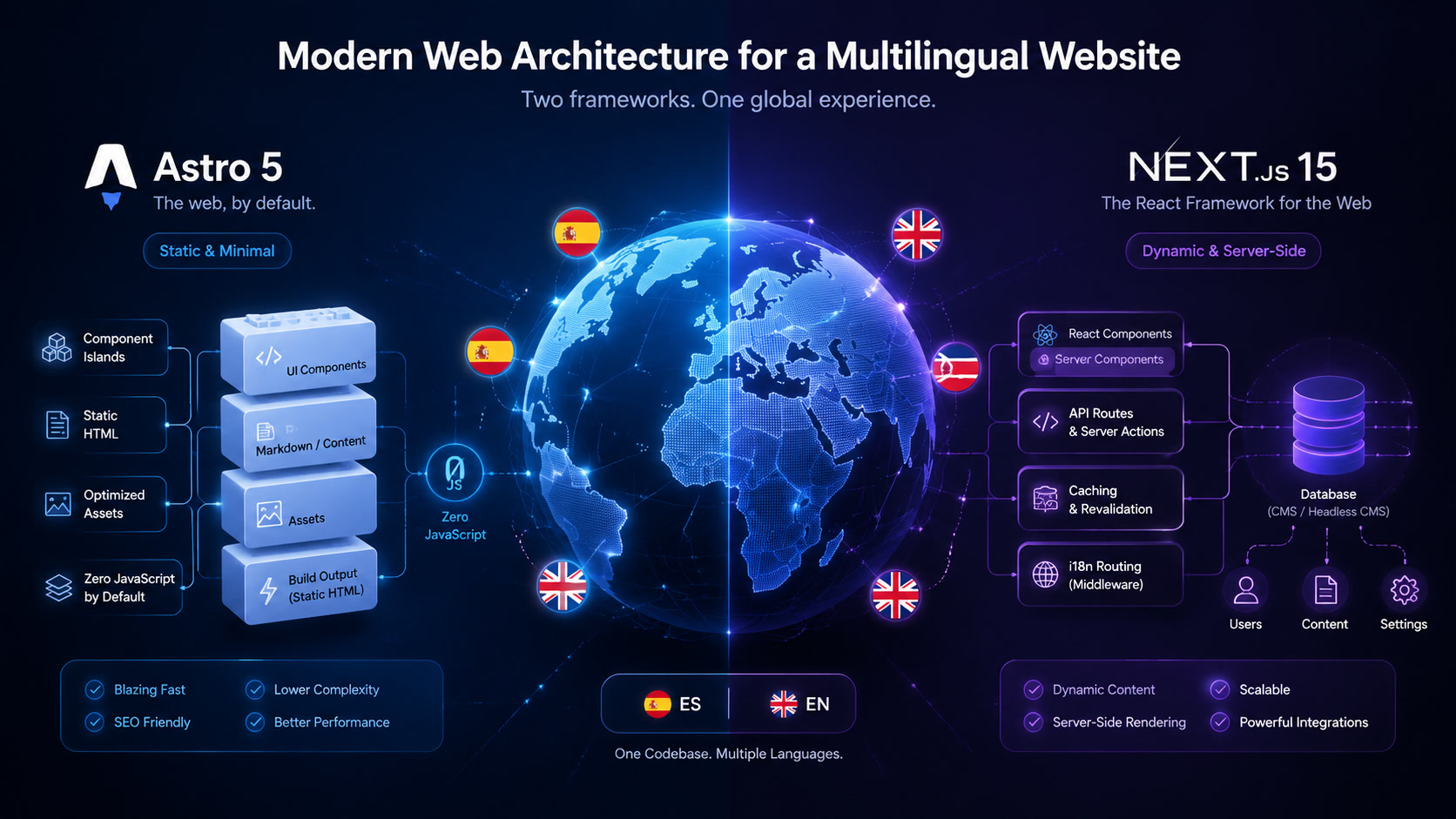
Multilingual Architecture in 2026: Astro 5 vs Next.js 15 for International Websites
Astro 5 ships native i18n routing and Next.js 15 has next-intl as the de facto standard. But native support doesn't mean equivalent results. Based on running a bilingual EN/ES agency site since 2018 and building multilingual projects for clients across LatAm and Europe, here is a practical decision framework for choosing the right stack.
Multilingual Architecture in 2026: Astro 5 vs Next.js 15 for International Websites
We have operated a bilingual Spanish/English agency site since 2018. We migrated from a single-language WordPress setup to Astro with Content Layer, built multilingual portals with Next.js for clients across Latin America and Europe, and learned exactly where each framework excels — and where it doesn't — when you stop talking about one language and start managing two, three, or five.
This is not a generic "how to configure i18n in your favorite framework" tutorial. It is what we learned shipping real multilingual projects: the decisions we made, the benchmarks we measured, and a decision framework so you do not have to learn it on a client's timeline.
"Multilingual" is three different problems
There is a persistent assumption in the market that "my site needs multiple languages" describes a single problem. It describes three distinct problems, and picking the wrong framework for the wrong problem is the most common mistake we see in architecture audits.
1. Statically translated content sites. Each language is a parallel copy of the site with different content. The blog, the landing pages, the documentation. Translations exist as independent files. This is the model behind most bilingual corporate sites, technical documentation platforms, and marketing sites including mintec.co.
2. Dynamically translated content sites. The same product, article, or page exists in multiple languages, managed through a headless CMS with per-language fields. The frontend serves the appropriate version based on locale. Typical for SaaS knowledge bases and global e-commerce catalogs.
3. Regionally personalized sites. Language is only the beginning — prices, currency, product variants, testimonials, and case studies all change by market. This is the reality for serious e-commerce and global SaaS operations.
Each type demands a different architecture. And frameworks handle them very differently.
How each framework approaches multilingual routing
The most fundamental decision in any multilingual site is URL structure. Google officially supports three strategies: subdirectories (/en/, /es/), subdomains (en.example.com), and country domains (example.co.uk). Modern frameworks can implement all three — but not with equal effort.
Astro 5: declarative i18n routing
Astro introduced native i18n routing in version 5.0, stabilized by March 2026. The configuration is refreshingly simple:
# astro.config.mjs
import { defineConfig } from 'astro/config';

export default defineConfig({
  i18n: {
    defaultLocale: "en",
    locales: ["en", "es"],
    routing: {
      prefixDefaultLocale: false,
      strategy: "pathname"
    }
  }
});
With this, Astro generates /blog/article (default English, no prefix) and /es/blog/articulo (Spanish, with prefix) automatically. Content lives in per-language Content Layer collections at src/content/blog/en/ and src/content/blog/es/, each with its own schema, Markdown files, and TypeScript types.
What we like: content is files. No database queries for translations, no API calls, no cache invalidation. Every build produces static HTML for every language. Performance is identical to a monolingual site because architecturally, it is one. The Astro 7 release (June 2026) further improved build times for multilingual sites by 15-61% with its Rust-based compiler — we covered the upgrade in detail here.
What we do not like: shared translations (navigation, footer, reusable components) require a manual JSON or YAML file system. Astro has no native key-value store for short text strings. For Mintec's five-line footer it is manageable. For a site with 80 translatable components, it becomes friction you feel every sprint.
Next.js 15 + next-intl: production-grade i18n
Next.js has supported i18n routing since v10, but the App Router requires next-intl — the dominant library in the React ecosystem (2.6M weekly downloads) — for a complete experience.
// middleware.ts
import createMiddleware from 'next-intl/middleware';

export default createMiddleware({
  locales: ['en', 'es'],
  defaultLocale: 'en',
  localePrefix: 'as-needed'
});
next-intl provides type-safe translations, automatic locale detection via middleware, localized pathname management (different slugs per language), and <NextIntlClientProvider> for Server Component i18n.
What we like: the translation system is robust and scalable. messages/en.json and messages/es.json serve as a single source of truth for every UI string, including dynamic components. Locale detection is more sophisticated than Astro's — it considers Accept-Language headers, cookies, and URL prefixes.
What we do not like: you carry React's runtime everywhere. Even a purely static documentation page hydrates next-intl to render the locale switcher and translated nav components. This adds JavaScript that Astro would never ship. On our Core Web Vitals benchmarks, this difference showed up directly in INP scores.
Performance: the hidden cost of dynamic i18n
We built a controlled test: an identical bilingual site (6 pages, 20-blog-post feed, translated nav, footer, locale switcher) on both frameworks.
| Metric | Astro 5 | Next.js 15 + next-intl |
|---|---|---|
| Client JS (first page) | 0 KB | 142 KB (React runtime + next-intl) |
| Lighthouse Performance | 99 | 87 |
| Build time (2 languages) | 14 s | 42 s |
| Total output (2 languages) | 2.1 MB | 5.8 MB |
| Monthly hosting (100K visits) | $0 (Cloudflare) | $20 (Vercel Pro) |
These numbers align with independent benchmarks from sources like the Framework Performance Benchmark 2026, which ranks Astro first in Core Web Vitals precisely because of its "zero JS by default" architecture.
The takeaway is not that Astro is better. It is that Astro and Next.js are optimized for different kinds of multilingualism, and choosing one determines your performance ceiling.
Our decision framework for multilingual projects
After a dozen real projects, here is the framework we use at Mintec when a client asks for a multilingual site:
Choose Astro 5 when:
- Content lives primarily in files (Markdown, MDX, JSON)
- You work with 2-5 languages managed by an editorial team
- Core Web Vitals performance is a contractual requirement or competitive edge
- The site does not need authentication or user-specific content
- You want to deploy on Cloudflare Pages at zero monthly cost
Choose Next.js 15 when:
- Content comes from a headless CMS with multilingual fields (Storyblok, Sanity, Strapi)
- You need 5+ languages with centralized translation management
- Dynamic components change per locale (prices, availability, localized CTAs)
- The site requires authentication, dashboards, or personalized sections
- Your team is already deep in the React ecosystem
For mixed projects (mostly static content with some dynamic sections), Astro 5 with Server Islands for the interactive parts is our default recommendation. The combination of static output + dynamic islands covers 80% of use cases without paying the full framework tax. You can read more about when headless architecture makes sense — and when it does not — in our guide to composable architecture.
What we learned migrating Mintec to Astro
When we migrated mintec.co from WordPress to Astro in 2025, the i18n decision was the most debated internally. Our site has two versions (English and Spanish) with roughly 60% content overlap — some articles exist in only one language, others are translated, and institutional pages must be identical in both.
We prototype with Next.js + next-intl for two weeks. It worked, but every page — even pure text content — shipped React's runtime and next-intl's JavaScript. For a content-oriented blog, that was JavaScript we simply did not need. We switched to Astro with Content Layer and the result was immediate: same pages, zero JavaScript, consistent Lighthouse 99-100, and a content workflow simple enough that editors handle Markdown files without engineering support.
The tradeoff: our nav and footer use shared JSON translation files, and every time we add a link we must remember to update both language files. For a 20-page agency site, that is acceptable. For a 200-page multilingual platform, we would recommend a headless CMS with native i18n and Next.js.
International SEO beyond the framework
Regardless of which framework you choose, international SEO fundamentals apply:
Hreflang. Astro auto-generates hreflang tags with its i18n configuration. Next.js requires next-sitemap or manual generation in layout.tsx.
Canonical URLs. Each language version needs its own canonical URL. Both frameworks support this, but Astro's static routing makes it harder to accidentally misconfigure.
Deferred language loading. A common anti-pattern is serving JavaScript for every language to every user. Astro avoids this by design (each page is standalone HTML). Next.js requires explicit lazy-loading of locale messages.
LatAm mobile performance. If your primary audience is in Latin America — where mid-range Android devices dominate — JavaScript weight matters twice as much. Astro's structural advantage here is something no polyfill or optimization can close.
The verdict (with dates)
In July 2026, the multilingual architecture decision comes down to this: Astro 5 for sites where content is the product, Next.js 15 for sites where the application is the product. The gray zone in between — content sites with dynamic sections — tilts toward Astro with Server Islands for most cases, especially when performance and hosting cost are deciding factors.
We have seen teams choose Next.js for a bilingual corporate blog, paying $240/year on Vercel and shipping 142 KB of JavaScript per page that nobody asked for. We have also seen teams pick Astro for a client portal with authentication and regret it three months later. The framework is not good or bad — it is appropriate or inappropriate for the specific kind of multilingualism your project needs.
If you are evaluating your multilingual architecture, start with three questions: how many languages, who manages translations, and how much JavaScript is your audience willing to download? The answers will lead you to the right framework faster than any benchmark.
Frequently Asked Questions
When should I use Astro 5 for a multilingual site vs Next.js 15?
Astro 5 wins when content is the product — blogs, documentation, corporate sites — and translations live as static files. It delivers zero JavaScript by default with identical Lighthouse scores across all language versions. Next.js 15 wins when you need real-time translated content, per-language authentication, or multilingual dashboards with personalized data.
Which URL strategy works best for multilingual sites: subdirectories, subdomains, or TLDs?
Subdirectories (/en/, /es/) offer the best balance: Google handles them natively, they work with any modern framework, and they don't require DNS changes. Subdomains (en.example.com) suit teams operating independently per region. Country-code TLDs (.co.uk, .com.mx) are for businesses with legal and physical presence in each market. Both Astro 5 and Next.js 15 support subdirectory routing out of the box.
Does Astro 5 support i18n natively or does it need third-party plugins?
Astro 5 includes native i18n routing since version 5.0 — subdirectory support, automatic locale detection, and internationalization middleware. Content translations use the Content Layer API with per-language collections. External packages like astro-i18n are optional utilities. Next.js 15 requires next-intl (third-party, 2.6M weekly downloads) for a complete i18n experience on the App Router.