AI Agents vs. Traditional Automation: What Actually Works for Business Processes
RPA bots follow scripts. AI agents make decisions. Here's the real difference, the cost comparison, and when to use each — backed by data from Gartner, Forrester, and real enterprise deployments.
AI Agents vs. Traditional Automation: What Actually Works for Business Processes
The word "automation" gets thrown around way too loosely. A scheduling script that sends a daily email is "automation." A 50-bot RPA deployment handling an entire finance function is "automation." An AI agent that researches vendors, drafts contracts, and coordinates approvals across three departments is also "automation." These are not the same thing, and treating them like variations of the same thing is how businesses pick the wrong tool and wonder why the ROI never materializes.
I spent time digging through the 2026 data on this. Gartner, Forrester, OneReach.ai, and real deployment numbers from companies that have been running both RPA and AI agents side by side. Here is what the data actually says.
The Core Difference
Ask yourself one question: does the system follow instructions, or does it pursue a goal?
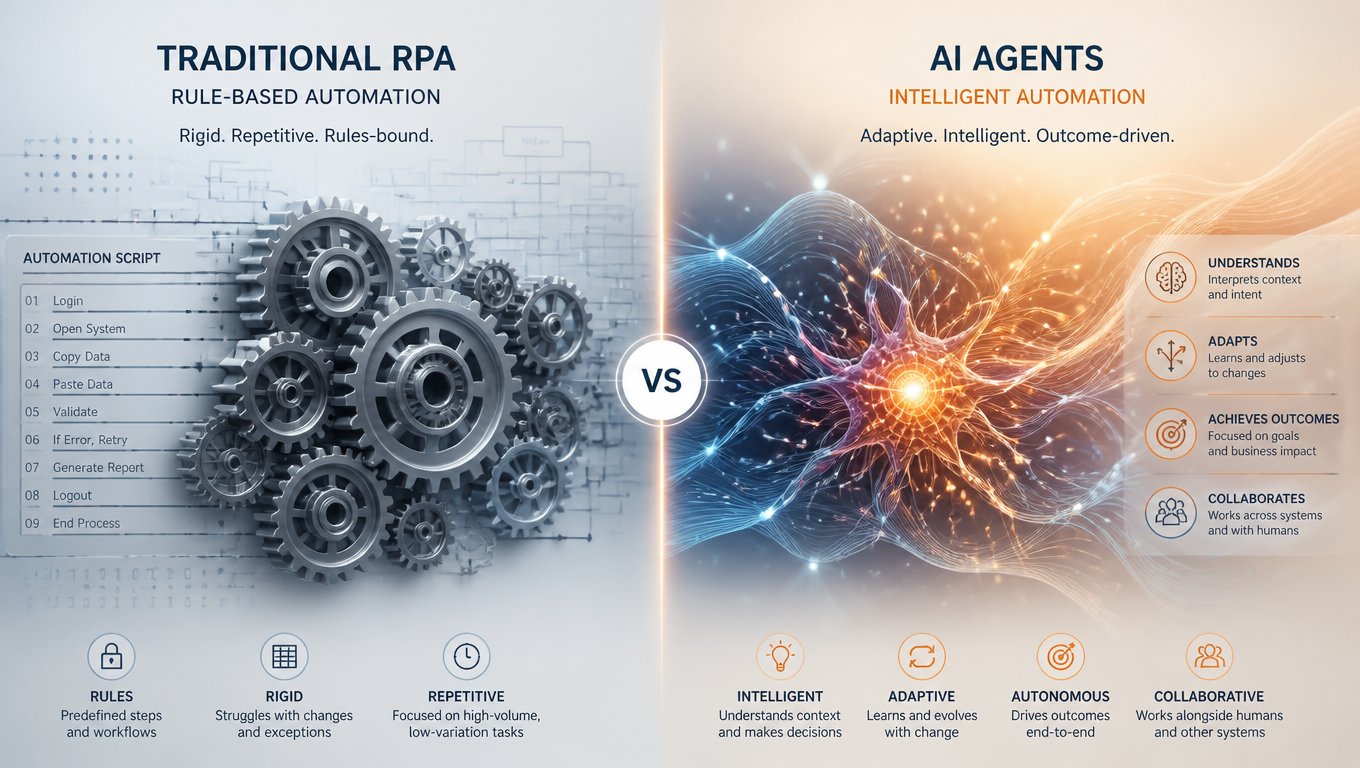
RPA follows instructions. You record a human doing something — clicking buttons, copying data between fields, navigating screens — and the software replays that sequence. It is deterministic. Same input gets same output every time. No reasoning, no judgment.
AI agents pursue goals. You give one a high-level objective like "research the top three CRM platforms and prepare a comparison report." It figures out the steps, picks the tools, adapts when something unexpected happens. It might take a different path each run. But it gets to the destination.
That architectural difference drives everything else — cost structure, maintenance burden, ROI trajectory, and what kinds of workflows each handles well.
Where RPA Earns Its Keep
RPA is not dead. It is genuinely good at a specific kind of work.
High-volume, rules-based tasks with structured data in stable interfaces. Data entry between two systems. Invoice processing when invoices are consistently formatted. Report generation from structured queries. File transfers. Form filling. For these, RPA delivers: faster execution, fewer errors, 24-hour operation.
The numbers from TechRadiant's 2026 research confirm this. RPA bots are fast, consistent, and cheap per transaction once built.
But here is the catch: 30-50% of RPA projects fail to deliver expected ROI according to Gartner and Forrester data, and maintenance consumes 70-75% of automation budgets. When a UI changes — button moves, field renames, new popup appears — the bot breaks. One financial services company spent more maintaining its RPA bots than the bots saved in labor costs. That is not a failure of execution. It is a structural limitation of the technology.
RPA also cannot touch unstructured data. An invoice that is a photographed document with handwriting, stamps, and coffee stains? RPA has no way to process it. Emails, conversational documents, variable-format content — RPA cannot handle those.
What AI Agents Actually Do Differently
AI agents are not better RPA bots. They work on different principles.
An agent gets a goal, observes its current state, reasons about the next action, executes it, observes the result, and loops. It calls APIs, queries databases, searches the web, reads files. It can handle exceptions and adapt to unexpected inputs in ways that scripted bots cannot.
The CrewAI survey of 500 senior executives found that 100% of respondents plan to expand their agentic AI deployments in 2026. Not some. All of them. These are people with budget authority who have seen what agents can do.
Organizations deploying AI agents report 171% average ROI, with early adopters hitting 300-500% within six months (OneReach.ai, 2026). That is 3-5x better than RPA after year three.
Gartner projects 40% of enterprise applications will embed AI agents by end of 2026 — up from less than 5% in 2025.
The Real Cost Numbers
RPA: $5,000-25,000 per bot annually. The heavy cost is upfront development and maintenance. UI changes are a recurring tax that grows with your fleet.
AI agents: $0.01-0.50 per task execution in API tokens. The heavy cost is upfront — prompt engineering, evaluation frameworks, reasoning architecture. But scaling costs are marginal.
The math flips depending on the task. An RPA bot doing a judgment-heavy task breaks constantly. An AI agent handling simple data entry costs 10x more per transaction than an RPA bot that does it flawlessly.
When to Use Each
RPA wins when: the process is fully rules-based, inputs are structured and predictable, the UI is stable, and per-transaction cost matters.
AI agents win when: the process requires reasoning or judgment, inputs are unstructured (emails, documents, conversations), exceptions are frequent, and the workflow spans multiple systems.
Hybrid wins when: structured sub-steps exist inside an ambiguous workflow. RPA handles the predictable parts; AI agents handle the exceptions.
Three Real Examples
Accounts Payable. RPA extracts data from standardized electronic invoices and enters them into the ERP. When an invoice arrives as a scanned PDF with handwritten notes — which happens roughly 20-30% of the time in most organizations — the AI agent reads it, interprets the numbers, cross-references with purchase orders, and either confirms the data or flags it for human review. The RPA handles the easy 70% autonomously. The AI agent handles another 20% that would have required a human. Only the remaining 10% — the truly ambiguous cases with missing data, mismatched totals, or unclear vendors — gets routed to a person. The result: an AP team that used to need five people now processes 3x the volume with two.
Customer Support. An AI agent sits in front of your support queue. It reads every incoming email, categorizes it by intent (refund request, technical issue, account question, complaint), assesses urgency based on language and customer history, and drafts a response for common issues. For technical escalations, it summarizes what has been tried and what the likely issue is before routing to a human. The key metric is not ticket deflection — it is time-to-resolution. Companies using this pattern report cutting average response time from 4 hours to under 5 minutes for the agent-handled tier. After three months, the agent typically handles 40% of tickets end-to-end. The support team does not shrink; it focuses on the complex cases that actually need human judgment.
Vendor Onboarding. This is a textbook hybrid case. A traditional workflow tool handles all the structured parts: collecting W-9 forms, running background checks, creating vendor records in the ERP, sending welcome packets. But 15-25% of vendor submissions have incomplete or non-standard documentation. Instead of bouncing the whole process back to a coordinator, the AI agent steps in. It emails the vendor in their language, asks for the specific missing information, reviews the response when it comes back, and either updates the workflow or escalates if the response does not resolve the issue. No human touches the process unless something genuinely unusual happens.
Common Pitfalls to Avoid
Having worked with dozens of automation projects, here are the patterns I see fail most often.
Starting with the tool. Teams pick UiPath or CrewAI or n8n and then look for processes to automate. This is backwards. Start with your process inventory. Then pick the technology.
Over-automating the wrong thing. Just because you can automate something does not mean you should. A process that runs three times a month and takes 10 minutes each time is not worth automating. A process that runs 500 times a day and takes 2 minutes each time is worth automating even if the implementation is expensive.
Underestimating maintenance. An RPA bot that saves you 40 hours a week but requires 20 hours of maintenance is not saving you anything. Factor in the full lifecycle cost, not just the build cost.
Ignoring the human side. Automation changes workflows, responsibilities, and job security perceptions. Teams that succeed invest in change management: clear communication, retraining, and honest conversations about how roles will evolve.
The Hard Part
The technology works. The organizational part is harder.
Blue Prism — one of the companies that invented RPA — now publishes content titled "The Future Isn't Retiring RPA — It's Fusing It with AI Agents." Even the incumbents acknowledge the shift. But most enterprises are stuck. They have RPA deployments that work but are brittle. They are evaluating AI agents but lack evaluation frameworks to know if the agents are making reliable decisions.
The companies succeeding share one pattern: they start with a process inventory, categorize workflows by structure and volatility, and only then choose the technology. They also invest in measurement from day one. They know their baseline — how long each process takes, how many errors occur, how much it costs — before they automate anything.
Lead with the problem, not the tool.
Related articles
- AI-Powered Customer Support Automation: Chatbots, Agents, and Real Results
- Complete Guide to AI for Business: Automation, CRM & Growth
- No-Code Meets AI: The Future of Business Automation
Where to Start
- Audit your processes. List every repetitive task in your operation. Note which are fully rules-based, which require judgment, and which mix both. For each one, estimate volume, time spent, error rate, and how often the underlying systems change.
- Map the volatility. How often do the applications or input formats change? High volatility means scripts will break frequently, which points toward AI agents that can adapt. Low volatility means RPA or traditional workflow tools will be more cost-effective.
- Calculate the real ROI case. Do not just estimate hours saved. Factor in maintenance cost, training time, and the cost of errors both before and after automation. Use those numbers to prioritize your automation queue.
- Start with one process. Pick the highest-value, lowest-risk candidate and automate it end-to-end before scaling to others. Measure the results for 30 days. Then decide whether to expand, adjust, or pivot.
- Build the evaluation framework early. If you are using AI agents, you need a way to measure whether the agent made the right decision. Start logging agent outputs and having humans review a sample before you scale to high-volume processes.
At Mintec, we build both traditional workflow automation and AI agent deployments for logistics, legal, and ecommerce clients. Same approach always: understand the problem first, then pick the tool.
Related reading: Our guide to marketing automation covers the lighter end. This piece on why automate your digital strategy makes the business case. And our article on chatbots for business is a good starting point if you are evaluating bot-based automation.
Frequently Asked Questions
What is the simplest difference between AI agents and traditional automation?
Traditional automation follows predefined rules and steps, while AI agents can interpret context and choose actions toward a goal. The right choice depends on how structured, predictable, and judgment-heavy the process is.
When should a business use RPA instead of an AI agent?
Use RPA for high-volume, stable, rules-based work with structured inputs and a predictable interface. It is usually the more efficient option when the process does not need interpretation or flexible decision-making.
Should AI agents replace existing RPA bots?
Usually not. A hybrid design is often stronger: keep RPA for reliable structured steps and use AI agents for unstructured inputs, exceptions, and decisions that would otherwise break a scripted bot.