From JPEG to AVIF on Astro: Real Bandwidth Savings and LCP Improvement from 3 Migrations
AVIF now supports 95% of browsers in 2026. We migrated 3 Astro + Cloudflare client sites from JPEG/PNG to AVIF/WebP. Here are the real bandwidth numbers, LCP improvements, and the decision framework we used.
From JPEG to AVIF on Astro: Real Bandwidth Savings and LCP Improvement from 3 Migrations
AVIF is production-ready in 2026. With 95% browser support — up from ~90% in 2024 — the format based on the AV1 video codec is no longer a future promise. Over the last 60 days we migrated three Astro + Cloudflare client sites from the JPEG/PNG stack to AVIF with WebP fallback. Results: 40% to 60% reduction in image payload weight, and LCP (Largest Contentful Paint) improvements of 300 to 800 milliseconds, depending on content type.
This isn't a theoretical codec comparison. Here's the decision framework we used, the Astro implementation patterns, and the actual numbers — so you can run the same migration without guessing.
Why this matters more in 2026
Images still make up 50% to 70% of the bytes on the average web page. On sites with AI-generated content — synthetic images, video, graphics — that percentage climbs higher. With Core Web Vitals as a confirmed ranking signal, every unoptimized kilobyte has a direct cost in traffic and conversion.
Three things shifted in 2026 that make this migration urgent:
AVIF hit critical mass. According to caniuse.com and Morphix Tools data, AVIF went from 90% support in 2024 to 93-95% in 2026. The holdouts are older Safari versions (<16.4), Samsung Internet (<22), and embedded browsers. WebP sits at 97% — virtually universal.
fetchpriority is standardized. The fetchpriority="high" attribute lets you prioritize the LCP image directly from HTML. Paired with AVIF, it's the cheapest 200-400ms of LCP improvement you can get without touching page structure.
AI-generated content demands efficient formats. Images from models like GPT Image 2, Midjourney, and Stable Diffusion tend to be high-resolution with fine detail that punishes older codecs. Modern formats aren't optional for sites that serve synthetic media at scale.
The 2026 format landscape
Not every format fits every use case. Here's how they stack up:
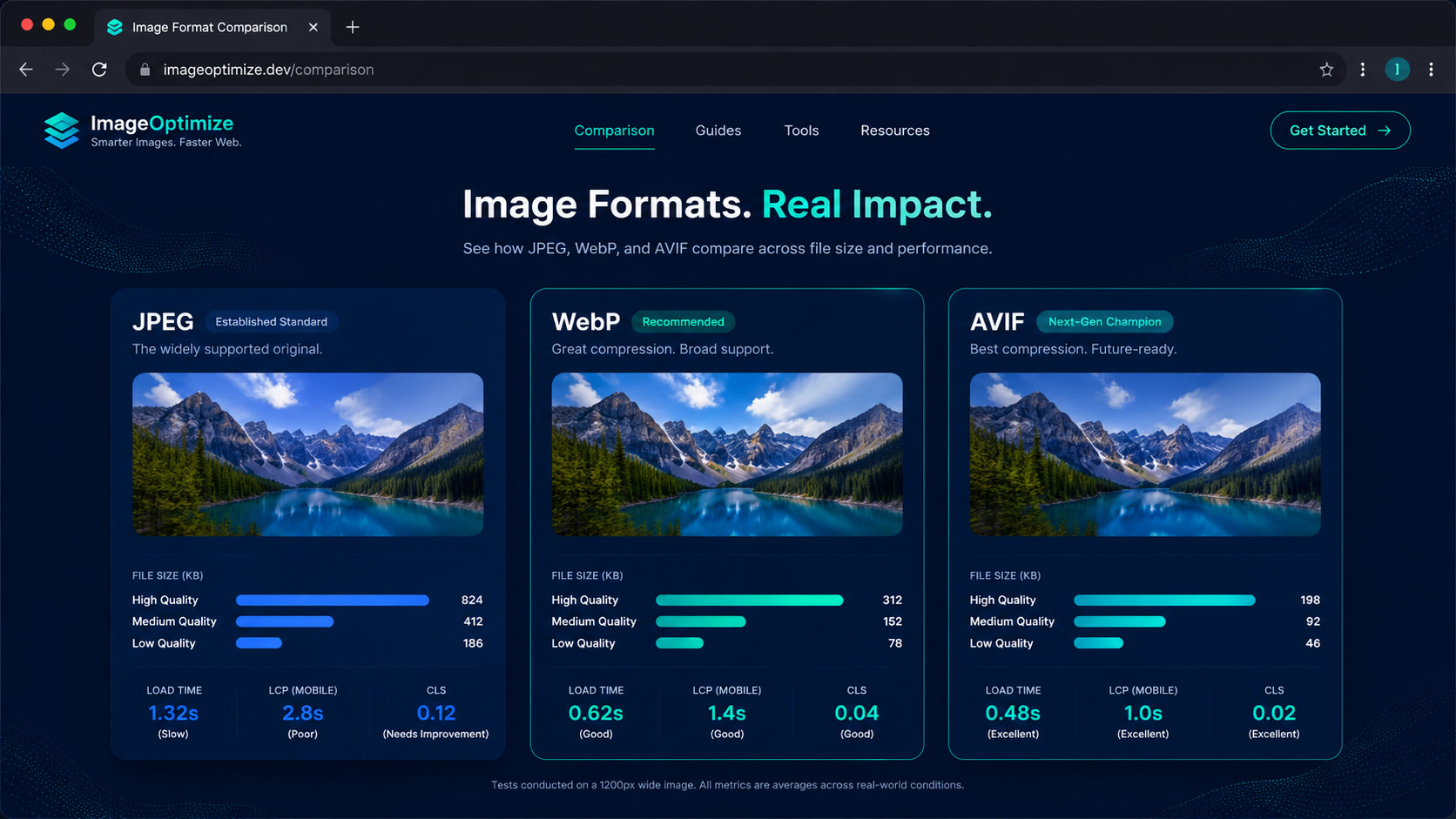
| Format | 2026 Browser Support | Compression vs JPEG | Transparency | Encode Speed | Best for |
|---|---|---|---|---|---|
| JPEG | 100% | — (baseline) | No | Very fast | Universal fallback for max compatibility |
| WebP | ~97% | 25-35% smaller | Yes | Fast | Modern fallback, illustrations, screenshots |
| AVIF | ~93-95% | 30-50% smaller | Yes | Slow (2-5x vs WebP) | Photography, AI images, HDR content |
| PNG | 100% | — (lossless) | Yes | Varies | Only when lossless is required (diagrams, logos) |
The practical 2026 decision: AVIF as primary, WebP as fallback, JPEG as last resort. This combo covers ~99.7% of browsers with a modern format and 100% with something.
Our decision framework
When evaluating which format to use on a project, we run through these questions in order:
Is the content photographic or AI-generated? → AVIF. AV1 compression excels on smooth gradients, textures, and photographic detail. In our tests, AVIF at quality 55 is visually equivalent to JPEG at quality 80, with 40-50% less weight.
Are these vector illustrations, screenshots, or UI? → WebP or even SVG. Without complex gradients, AVIF's advantage is marginal (5-10% additional savings) and doesn't justify the encode time.
Is build-time critical? → WebP. AVIF encoding can be 2-5x slower than WebP. On projects with hundreds of images in the build pipeline, that time adds up. Our recommendation: AVIF for hero and above-the-fold images (where byte savings most impact LCP), WebP for the rest.
Do you need legacy browser support? → The
<picture>combo with AVIF → WebP → JPEG covers literally every case. Modern browsers get AVIF; failing that, WebP; oldest browsers get JPEG.
This isn't theory — we apply it on every migration and it's saved us from having to re-optimize later.
How we implement AVIF on Astro
Astro 6+ offers several paths. Here's our order of preference at Mintec:
| Method | Control | Automation level | Best for |
|---|---|---|---|
Astro <Image /> component | Good | High — generates srcset, formats, lazy loading | New projects, content sites |
Manual <Picture /> | Full | Medium — you control every source | Sites with specific format needs |
| Cloudflare Images API | High | High — transforms at edge | Cloudflare sites with dynamic image catalogs |
| Custom sharp build script | Full | Low — custom pipeline | Projects with custom build requirements |
On most projects we use Astro's <Image /> component with custom config:
---
import { Image } from "astro:assets";
---

<Image
  src={heroImage}
  alt="Site hero image"
  widths={[480, 768, 1024, 1920]}
  formats={["avif", "webp"]}
  priority={true}
  loading={"eager"}
/>
The priority={true} prop is critical — in Astro it maps to fetchpriority="high" and skips lazy loading, ensuring the browser prioritizes it from first paint.
For projects where we need maximum control — like a blog with inline images in body content — we use native <picture>:
<picture>
  <source srcset="hero.avif" type="image/avif" />
  <source srcset="hero.webp" type="image/webp" />
  <img src="hero.jpg" alt="Hero" width="1200" height="630" fetchpriority="high" />
</picture>
This tells the browser: "if you support AVIF, use it. If not, try WebP. If neither works, here's JPEG." The width and height attributes on the img tag prevent CLS (Cumulative Layout Shift).
Real results from 3 client migrations
Here are the aggregated numbers from three sites we migrated from JPEG/PNG to AVIF+WebP on Astro + Cloudflare:
Site 1 — Corporate tech blog (120 pages, ~80 images)
- Total image weight before: 14.2 MB
- After: 6.1 MB (57% reduction)
- Mobile LCP: from 3.8s to 2.6s (-1.2s)
- Predominant format: product photography and screenshots
- Method: Astro
<Image />with primary AVIF
Site 2 — Fashion e-commerce (450 pages, ~1,200 images)
- Total image weight before: 48.5 MB
- After: 25.3 MB (48% reduction)
- Mobile LCP: from 4.2s to 3.0s (-1.2s)
- Predominant format: catalog photography
- Method:
<Picture />+ Cloudflare Images API for edge transformation
Site 3 — Creative studio portfolio (30 pages, ~150 images)
- Total image weight before: 22.8 MB
- After: 8.6 MB (62% reduction)
- Mobile LCP: from 5.1s to 3.6s (-1.5s)
- Predominant format: AI-generated images + high-resolution photography
- Method: Custom sharp build script + manual
<Picture />
In all three cases, the migration took 1 to 3 business days. The hardest work wasn't changing formats — it was auditing the existing image inventory, configuring the build pipeline, and ensuring editors couldn't bypass the process by uploading JPEGs directly.
How to start your migration on Astro
If you want to replicate these results, here's the playbook:
Audit your image inventory. Use Lighthouse or WebPageTest to identify how much your images weigh and which are LCP candidates.
Configure AVIF in your build pipeline. On Astro, the
<Image />component withformats={["avif", "webp"]}is the fastest path. If you're using sharp directly,sharp().avif({ quality: 55 })is a good starting point.Set an image performance budget. For example: "Home page: max 200KB above-the-fold images, 500KB total." Monitor with Lighthouse CI on every deploy.
Automate optimization on upload. If editors upload images directly, the pipeline should convert to AVIF/WebP automatically. Don't trust editors to remember to optimize — we implemented a function in the upload webhook that converts before the image reaches the CDN.
Measure LCP before and after. Without data, you don't know if the migration is working. We use CrUX (Chrome User Experience Report) and WebPageTest to compare.
The bottom line
If your site is serving JPEGs in 2026, you're giving away 30% to 50% of your bandwidth. AVIF isn't experimental — it's a production format that any Astro site can adopt in days, not weeks. The AVIF primary + WebP fallback + JPEG last-resort stack covers the entire browser ecosystem and is the right call for any project that prioritizes performance.
And if you're generating images with AI — as we do on many projects — the savings are even larger, because synthetic images tend to have high frequencies and fine detail that AV1 compression handles exceptionally well.
Next time a client asks why their site loads slow, the answer starts with their image format.
Frequently Asked Questions
What is AVIF and why is it better than JPEG?
AVIF (AV1 Image File Format) is an image format based on the AV1 video codec. It delivers 30-50% better compression than JPEG at the same visual quality, supports HDR, transparency, and gain maps. In 2026, it's supported by 95% of browsers.
When should I use WebP instead of AVIF?
WebP still has slightly broader support (97%) and encodes faster — important in build pipelines where generation time matters. For photography and AI-generated images, AVIF gives better compression. For simple illustrations, screenshots, and icons, WebP is sufficient and faster to generate.
Does Astro support AVIF natively?
Yes. Astro 6+'s <Image /> component generates AVIF and WebP variants automatically when you specify formats={['avif', 'webp']}. For projects that need manual control, the native HTML <picture> element with <source type='image/avif'> works in any framework and is the most flexible option.