From AI to Browser: A Production Pipeline for AI-Generated Website Media
AI-generated images come out of the model as 2-3MB PNGs. Without a generation, optimization, and delivery pipeline, they destroy your LCP. Here is how we built ours at Mintec.
From AI to Browser: A Production Pipeline for AI-Generated Website Media
I keep seeing websites with AI-generated images in hero sections, backgrounds, and even replacing product photos. But almost nobody talks about what happens between the prompt and the browser. Generating the asset is 10% of the work. Optimizing and delivering it fast is the other 90%.
In 2026, AI-generated media has crossed the uncanny valley. Sora produces 60-second clips with consistent physics, Runway Gen-4 edits video frame-by-frame, and GPT Image 2 generates images that pass as real without close inspection. The problem is no longer "can AI create it" — it is "how do you get it on a website without failing Core Web Vitals on LCP?"
At Mintec, we process 30-50 AI-generated images every month for our blog and client projects. This article documents the pipeline we built, the formats we chose, the real costs, and the technical decisions that separate a fast site from one that bleeds traffic because of a poorly served hero image.
The three-stage pipeline
Every AI-generated media asset that touches our stack goes through three phases. No exceptions:
- Generate — right model, prompt, and resolution
- Optimize — format, compression, responsive variants
- Deliver — CDN, caching, strategic lazy loading
Let us walk through each one with real numbers from our pipeline.
Stage 1: Generate — choose the model for the use case
Not every AI model is built for web production. The differences are in consistency, output weight, and cost per asset.
Images: GPT Image 2 low
For blog images, hero sections, and social media, we use GPT Image 2 at low quality and 1K resolution through WaveSpeed. Cost: $0.01 per image — compared to $50-150 for a stock photo or professional illustration, the savings are absurd.
Prompt rules we learned the hard way:
- Describe a single scene, not a collage. The model performs best with one clear composition (a person at a desk, not "person working with floating graphs and statistics").
- Do not ask for text. AI-generated images with embedded text rarely look legible at 1K.
- Maintain visual consistency across generations: when creating a series, reuse the same palette, lighting, and style descriptors. For example, "dark blue background, side lighting, minimalist style" repeated in every prompt produces coherent visuals across a batch.
Video: Sora, Runway Gen-4, Kling 2.0
We have tested the major models on client projects throughout 2026. Our findings:
- Sora: best for narrative and consistent physics, but output weight is high (30-50 MB for 10 seconds at medium quality).
- Runway Gen-4: superior for editing and variations on the same clip. Ideal when you need 5 versions of the same video with different text or framing.
- Kling 2.0 (ByteDance): optimized for social media integration with better native compression than Sora.
In all three cases, raw video never goes straight to the site. It goes through Stage 2.
Stage 2: Optimize — the step everybody skips
This is where most projects fail. The generated image comes out of the model as a 2-3 MB PNG. Uploading it directly to your CMS is an LCP disaster waiting to happen.
Image optimization
Our pipeline converts every image into three chained formats:
- Original PNG (from the model) — discarded after conversion
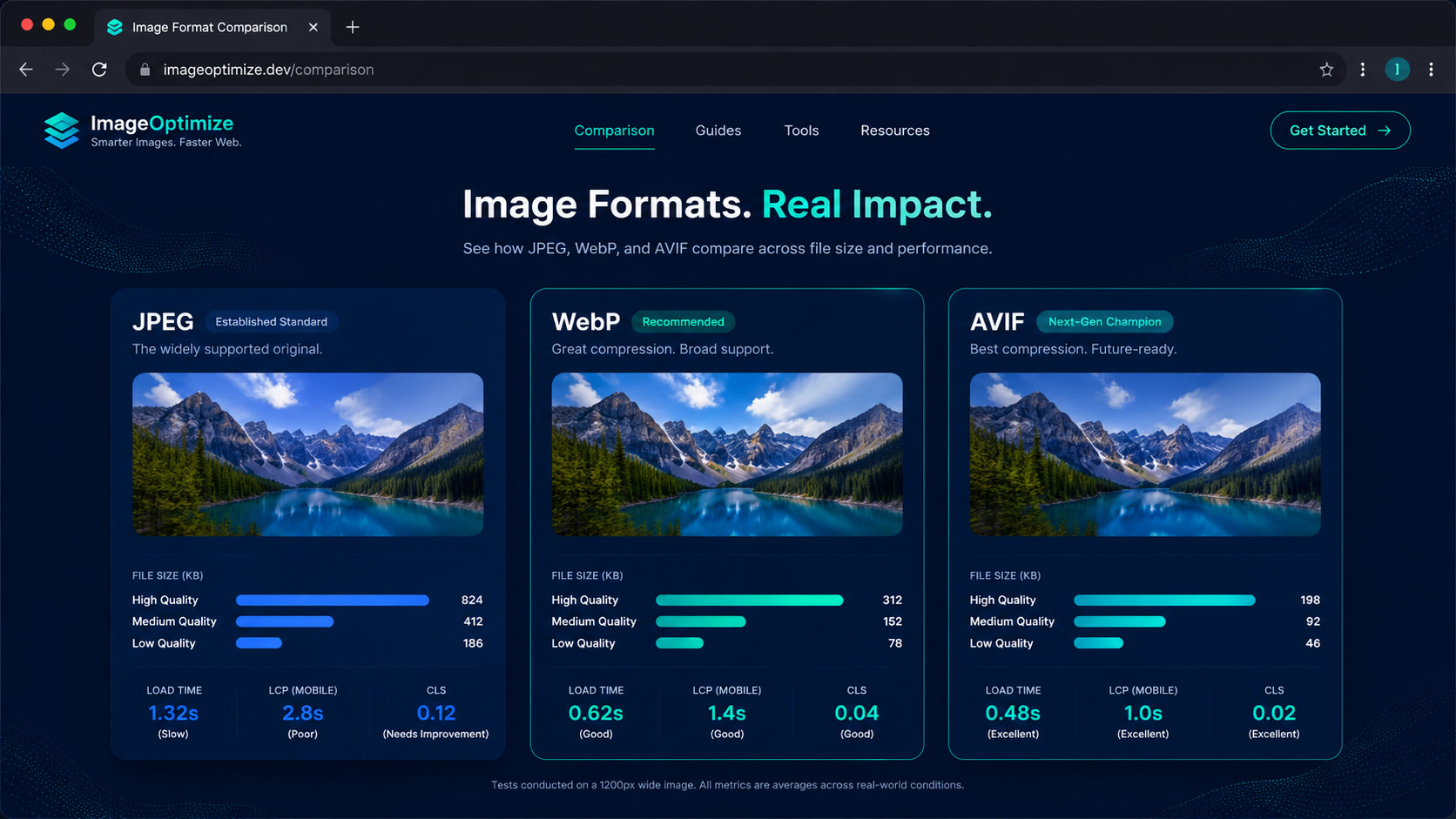
- WebP — minimal quality loss, ~85% savings over PNG
- AVIF — best compression, ~91% savings, supported by Chrome 126+, Firefox 130+, Safari 18+
Real pipeline benchmarks with GPT Image 2 output:
| Format | Size | vs. PNG |
|---|---|---|
| PNG (original) | 2.1 MB | — |
| WebP (q=80) | 312 KB | -85% |
| AVIF (q=60) | 184 KB | -91% |
We serve AVIF as the primary format with WebP fallback via <picture>. The difference between 2.1 MB and 184 KB is not marginal — it is the difference between a 3.2-second LCP and a 1.4-second LCP on mobile 4G.
Beyond format, we generate three responsive variants per image: 640w, 1280w, and 1920w, served through srcset. The browser picks the exact size for the user's viewport, wasting zero bytes.
Video optimization
AI-generated video needs more work:
- Transcode to AV1+HEVC+H.264. The model outputs in a codec that is not optimal for the web. AV1 as primary, HEVC for Safari, H.264 as universal fallback.
- Trim duration. A 10-second clip works well. A 30-second clip is too heavy for hero sections. AI-generated video tends to be longer than needed — plan your cuts.
- Generate an optimized poster in AVIF/WebP. The poster is what actually impacts LCP on pages with hero video, as we documented in our adaptive video with Astro guide.
The savings are significant: a 38 MB Sora clip in H.264 drops to 14 MB in AV1. Still heavy for mobile, but with an optimized poster and deferred player loading, the LCP impact drops dramatically.
Stage 3: Deliver — CDN, caching, and lazy loading
An optimized image served poorly is a race car with flat tires. Delivery is the last mile and the most underestimated.
Our production setup
- CDN: Cloudflare (where we host mintec.co). All generated images are cached across 330+ global data centers.
- Cache-Control:
public, max-age=31536000, immutablefor image variants. Once the model generates an image, it will not regenerate the same one. - Hero images:
fetchpriority="high"+loading="eager". The browser prioritizes them from the HTML, without waiting for CSSOM. - Secondary images:
loading="lazy"+decoding="async". They do not compete with initial rendering. - Generated video: eager poster, Server Island player to defer full player loading — exactly as described in our edge and serverless architecture guide.
Gallery pages with generated images
When a project has 20+ AI-generated images on one page (product galleries, portfolios), the approach changes:
- First 3-4 images eager, the rest lazy with Intersection Observer
- Images served in AVIF at 640w max (galleries do not need 1920w)
- Preconnect to the image domain to resolve DNS before rendering
On a visual marketplace project with 30 generated images per page, this strategy dropped LCP from 4.1s to 1.9s and total media weight from 18 MB to 2.3 MB.
Real numbers from the Mintec pipeline
We have been running this pipeline for six months. Cumulative numbers through July 2026:
| Metric | Value |
|---|---|
| Images generated | 240+ |
| Total generation cost | ~$2.40 |
| Savings vs. stock photos (estimated) | ~$12,000 - $36,000 |
| Average served size | 198 KB (vs. 2.1 MB original) |
| Generation failure rate | 3% (regenerated with corrected prompt) |
The number that surprises clients most is not the cost savings — it is the gap between what the model generates (2 MB) and what actually reaches the browser (198 KB). The optimization pipeline does that invisible work, and that invisible work is what separates a well-built site from one that fails a technical audit.
The decision framework: generate with AI or produce traditionally?
Not every media asset on a website should be AI-generated. We use this matrix:
| Asset type | Generate with AI? | Pipeline needed | ROI |
|---|---|---|---|
| Blog hero images | Yes, always | Optimize + Deliver | Very high ($0.01 vs $50-150) |
| Decorative backgrounds | Yes | Optimize only | Very high |
| Product photos | No (insufficient control) | — | Low (shoot traditionally) |
| Testimonial video | Mixed (AI + editing) | Full pipeline | Medium (use-case dependent) |
| Conceptual illustrations | Yes | Optimize + Deliver | High |
The rule of thumb: if the asset needs millimeter precision (product photos, exact brand identity), produce it traditionally. If it needs volume and variation (blogs, socials, landing pages), generate with AI.
What we learned in 6 months of production
After hundreds of generated images, here are our practical takeaways:
- Optimization is the pipeline, not an optional step. A generated image that has not been through AVIF/WebP and srcset should not reach production. We automated this with a script that runs after every generation.
- Prompts determine visual consistency. If you generate 30 images for an article, the differences between generations become noticeable. We mitigate this with a prompt template that fixes palette, lighting, and style in every generation.
- AI-generated video still needs human post-production. Cutting scenes, syncing audio, and adjusting codecs is not automatic. The pipeline saves time on shooting, not on editing.
- Performance impact must always be measured. After adding AI-generated media to a page, we run Lighthouse and compare CrUX before/after. If LCP climbs more than 0.3s, we review the pipeline, not the model.
AI-generated media for websites is production-ready. But the model that generates the image is only the beginning. What determines whether a site is fast or slow is not whether it uses AI — it is whether there is a pipeline that turns those 2 MB PNGs into 184 KB AVIF files served from the edge with perpetual caching. That pipeline is 90% of the work, and it is invisible to the end user. But without it, the other 10% (the generation) is worthless.
If you are evaluating AI-generated media for your website, start with the optimization pipeline — not the generation model.
For more depth, read about our Next.js to Astro migration, adaptive video with Astro, and check out our web design and development services.
Frequently Asked Questions
How much does it cost to generate AI images for a blog?
Using models like GPT Image 2 via WaveSpeed at low quality and 1K resolution, it costs roughly $0.01 per image. Compared to $50-150 for a stock photo or professional illustration, the savings are significant when you scale to dozens of images per month.
Which format performs best for AI-generated images on the web?
AVIF delivers the best compression for AI-generated images, saving 85-91% compared to the original PNG. WebP is the second choice with slightly broader browser support. In both cases, the image should leave the model as PNG and be converted during the optimization pipeline.
Is AI-generated video ready for web production?
Yes, but with caveats. Raw video from models like Sora or Runway Gen-4 needs transcoding to AV1/HEVC/H.264, duration trimming (5-15 seconds is ideal for the web), and an optimized poster. Without this post-processing, a single 10-second clip can exceed 30MB and destroy your performance metrics.