The Agentic CMS: Why Your Content Models Are Now AI Infrastructure
AI agents aren't a plugin — they're consumers of your content. Why the design of your schemas, endpoints, and data architecture determines whether your stack survives or explodes when agents start operating.
The Agentic CMS: Why Your Content Models Are Now AI Infrastructure
In the past 12 months, every major headless CMS has shipped AI features. Sanity has MCP. Payload has native RAG. Storyblok has visual assistants. But most teams are treating this as another feature, not as an architectural shift that changes how you design your site.
At Mintec, we've worked with several of these stacks — and the most common pattern is teams integrating AI agents without changing how they model their content. The result is predictable: the agent technically works, but output quality is inconsistent, API costs spike, and you end up with more review work than if you'd done it manually.
The problem isn't the technology. It's that you're treating the agent like a human user with API permissions, when it's actually a fundamentally different consumer of your content. This article is about that mindset shift and the architectural decisions that matter.
CMS with AI vs. Agentic CMS
A CMS "with AI" is what most teams have today: a generate button in the editor, an assistant that suggests titles, a plugin that translates content. The agent operates inside the editor, as a copilot. It's useful, but limited.
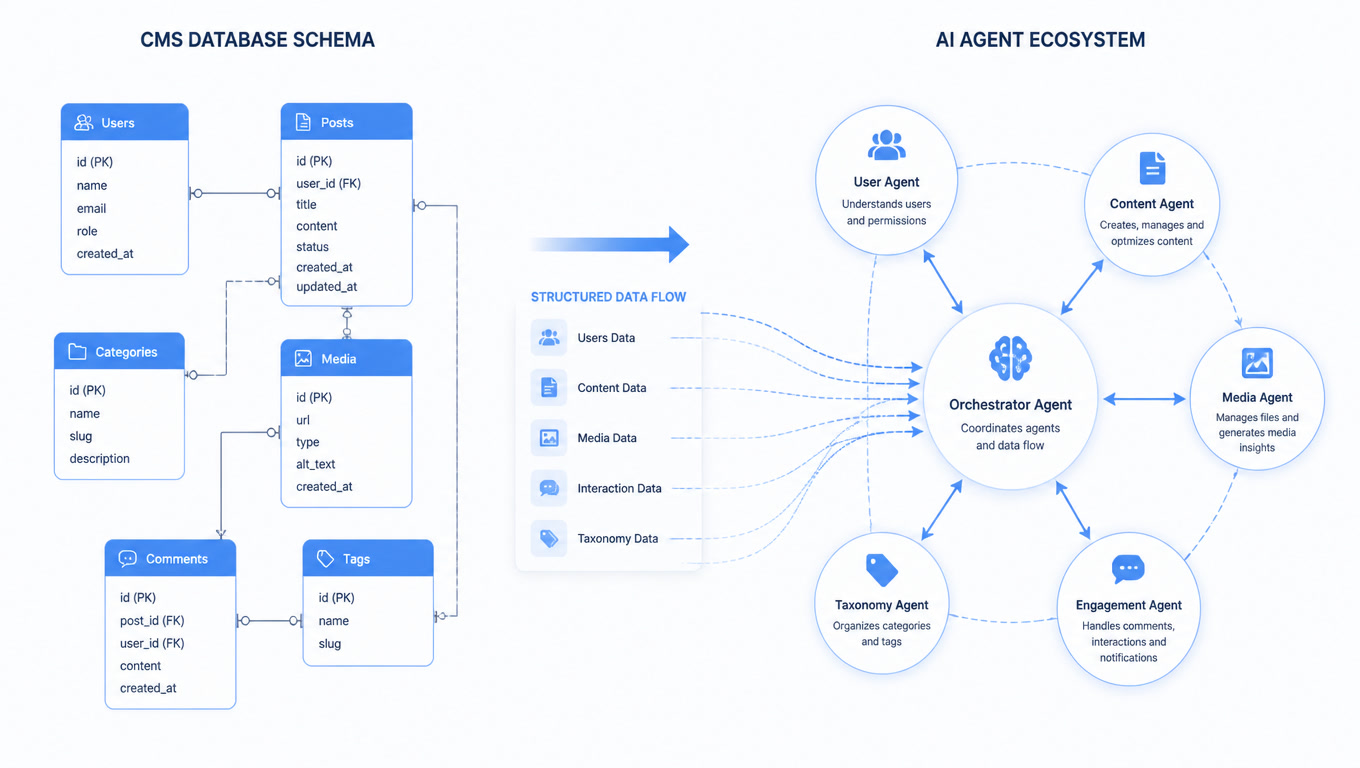
An agentic CMS is something different. Here, the agent operates outside the editor. It reads schemas, understands data types, creates full entries, generates assets, distributes content across channels — all programmatically, without a human touching the interface. The CMS isn't a tool for humans with AI features. It's infrastructure for agents with an editor for humans.
The difference is architectural, not functional. And it boils down to one question: can an agent introspect your content model and understand what a "Product," "Article," or "Event" actually is?
If the answer is "yes, because schemas are explicitly typed and APIs document relationships" — you're ready. If the answer is "no, because content lives in free-text fields or HTML templates" — the agent is operating blind.
Content Lake: The Concept That Matters
Sanity popularized the term "Content Lake" and it's the central idea you need to understand. A Content Lake is a content repository where every piece is structured as typed data, not HTML blobs. The difference:
Traditional CMS: Content lives inside templates. An agent that needs to find all product pages referencing a discontinued SKU has to parse HTML, guess structure, and hope templates are consistent. It's like searching for data in Word documents.
Content Lake: Every entry is an object with typed fields, explicit relationships, and structured metadata. An agent can write a query: "give me all products with status='discontinued' that are referenced in more than 3 articles." That's a database query, not an HTML scrape.
For development teams, this means your CMS architecture is no longer just a "how do I store content" decision. It's a "how do I expose data so autonomous agents can operate on it safely and predictably" decision.
The 3 Architecture Decisions That Change Everything
1. Explicit Typing vs. Flexible Fields
The most common mistake is designing content models for the editor interface, not for programmatic consumption. You think about "what the editor needs to see" instead of "what the agent needs to understand."
What fails: A "body" field of type "rich text" containing mixed paragraphs, images, tables, and videos. An agent can generate text for that field, but can't generate the image that goes inside it, or the table that structures the comparison, because it doesn't know those elements exist as separate entities.
What works: A "body" field that's an array of typed blocks: {type: 'paragraph', text: '...'}, {type: 'image', asset: '...', caption: '...'}, {type: 'comparison_table', rows: [...]}. Now the agent can generate, validate, and replace each block individually. And your CMS can render each type with the correct template.
In our latest migration to Payload for an e-commerce client, changing from "one rich text field" to "an array of typed blocks" reduced AI-generated content errors by 60%. Not because the model was better, but because the schema gave it enough context to generate valid content.
2. Navigable Relationships vs. Loose IDs
Classic headless CMS stores relationships as IDs: author_id: 42. For an agent, that's a meaningless number. You need relationships the agent can introspect.
What fails: An agent that needs to generate an article about a product has to make a separate query to get product data, another for the author, another for categories. Each query is an API round trip, and each round trip costs money and latency.
What works: Nested relationships or explicit populates the agent can request in a single query: article?populate=[product, author, categories]. The agent gets full context in one call, reduces token costs (no need to generate additional queries), and can make more informed decisions.
This is particularly relevant when using MCP servers like Astro's — which exposes your content collections as tools an agent can invoke directly. If your relationships are well-modeled, the agent can navigate your content structure without knowing the CMS's internal implementation.
3. Schema-Level Validation vs. Presentation-Level Validation
When an agent generates content, where is correctness validated? Most teams validate at presentation: "if it looks right on the page, it's fine." For agents, this is a disaster.
What fails: An agent generates a product entry without a price, without a SKU, without a short description. The page breaks, or worse — shows empty data that users trust.
What works: Validation in the schema: required fields that the CMS rejects if empty, types that reject strings where numbers are expected, relationships that require valid references. The agent fails before content reaches the CMS, not after it's already published.
Payload CMS does this particularly well with field-level validations. Sanity handles it with document-level validation. Storyblok has component-level restrictions. Regardless of CMS, the point is the same: your schema is the line of defense between an agent generating useful content and one generating garbage that nobody reviewed.
The Real Case of Agents Outnumbering Editors
There's a trend we're seeing in real projects: teams with more AI agents working on content than human editors. CosmicJS published an article about "when agents outnumber editors" that hits this exact point.
When your team has 2 human editors and 5 agents generating content for different channels (blog, social, email, product, localization), your CMS needs to solve problems that didn't exist before:
- Concurrency: Two agents trying to edit the same entry simultaneously. Your CMS needs locking or merge strategies.
- Granular permissions: An agent can create content but not publish it. Another can translate but not edit the original. Classic CMS roles (admin, editor, viewer) aren't enough.
- Auditability: When an agent generates content that causes a problem (wrong data, inappropriate tone, brand violation), you need a trail of which agent made what change, when, and why. Version history isn't a feature anymore — it's a compliance requirement.
When to Migrate vs. When to Adapt
You don't need to throw away your current CMS. If you're on a modern headless CMS (Contentful, Strapi, Sanity, Payload, Hygraph) with well-structured APIs, you already have the foundation. The changes that matter are design-level, not platform-level:
- Audit your content models with the lens of "can an agent understand this?" Typed fields, explicit relationships, schema-level validations.
- Add an introspection endpoint if your CMS doesn't have one. MCP servers like Astro's do exactly this — they expose your content structure as discoverable tools for agents.
- Implement schema-level validation before giving agents access. It's the difference between useful generated content and content that needs manual rewriting.
Migration to an agentic CMS makes sense when: you operate at scale (10k+ content entries), you have multiple channels requiring synchronized content, or you need agents working in parallel without collisions.
What's Next: Agents That Understand Your Architecture
What's coming is more interesting than current agentic CMS features. Astro already has an MCP server exposing content collections as tools. Sanity is investing in MCP and semantic graphs. Payload enables native RAG over your content database.
The question isn't whether your agents will touch your content stack. It's whether your stack is ready for them to do so. An agentic CMS isn't a feature — it's an architectural posture. And the time to adopt it is before you need it, not after your agents are generating content you can't control.
At Mintec, we help teams design content models that work for both humans and AI agents. If you're evaluating an agentic CMS migration or want to audit your current schemas, let's talk.
Frequently Asked Questions
What is an agentic CMS?
An agentic CMS is a headless CMS designed so autonomous AI agents can read, create, edit, and distribute content through structured APIs. It's not a chatbot bolted onto an editor — it's infrastructure where CMS schemas act as business rules, APIs as controls, and version history as a safety net. Sanity, Payload, and Storyblok lead this category.
How does an agentic CMS change content model design?
When an agent consumes your content, every model field becomes a programmable surface. Fields must be explicitly typed, relationships between entries must be navigable, and schemas must document which fields are required vs. optional. An agent can't infer that 'hero_image' is an image field — it needs the schema to declare it with types, validations, and constraints.
Do I need to migrate to an agentic CMS?
Not necessarily. If your current headless CMS exposes well-structured APIs with well-defined schemas, you already have the foundation. The real change is in how you design your content models: explicit typing, navigable relationships, validated fields. Migration makes sense when you need content operations at scale with multiple agents working in parallel.