Meta's AI Is Rewriting Your Ads Without Permission. The Hidden Cost of Advantage+ Creative Auto-Enhancements.
Meta's Advantage+ Creative auto-enhancements — brightness adjustments, AI-generated music, background extensions, text variations — are on by default and silently altering your brand identity. At Mintec we manage paid media for 30+ client accounts monthly. Here's what our audit uncovered.
Meta's AI Is Rewriting Your Ads Without Permission. The Hidden Cost of Advantage+ Creative Auto-Enhancements.
There's a conversation that plays out weekly in our paid media team. A client spots an ad on Instagram and asks: "Who added this music?" or "Why does the button text say something different?" The answer is almost always the same — it wasn't the agency, it wasn't the client. It was Meta's AI.
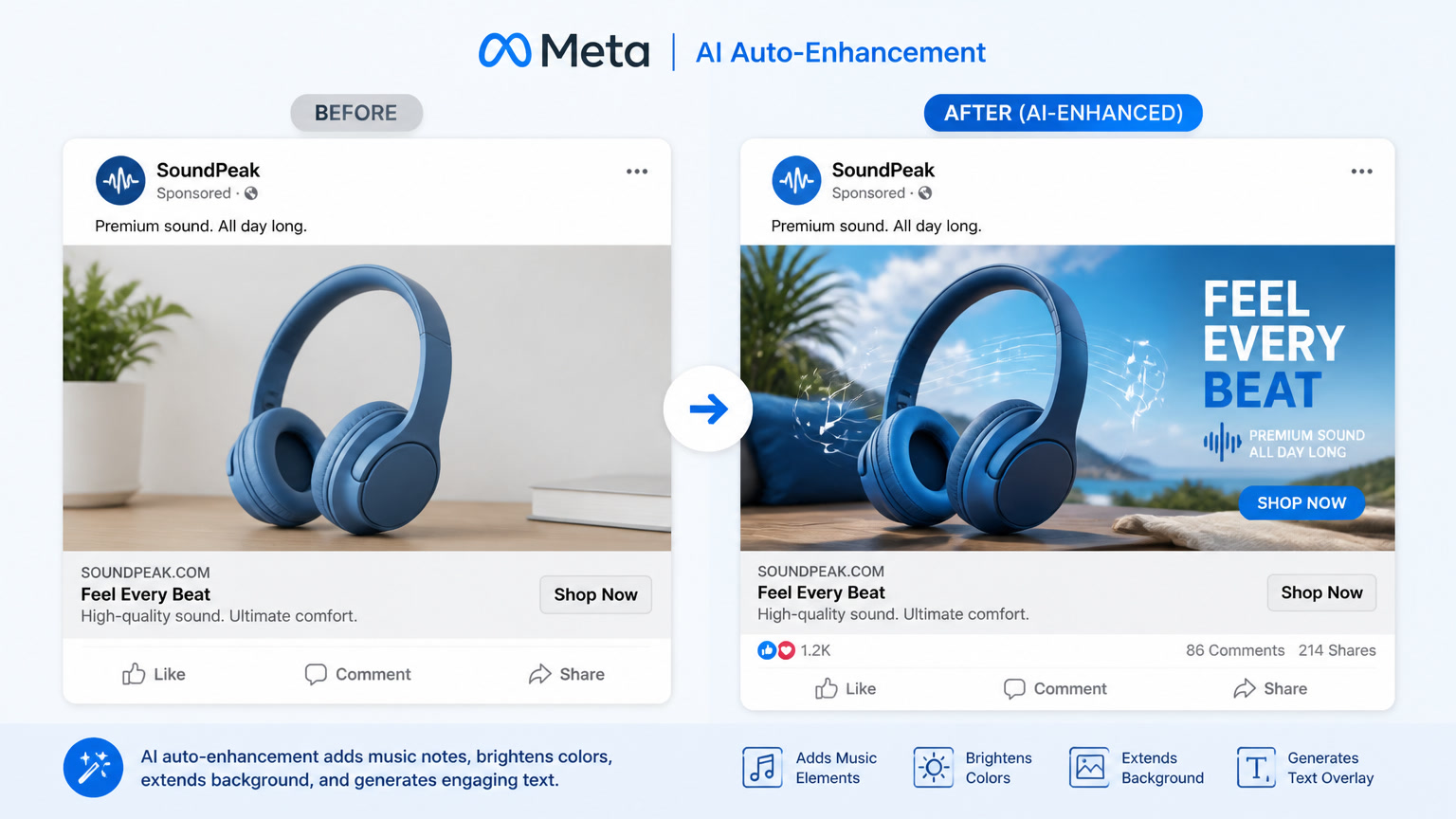
Advantage+ Creative auto-enhancements — the suite of tools Meta enables by default on every ad account — are actively modifying the ads your audience sees. They adjust brightness. They add AI-generated background music. They extend image backgrounds to fill placements you never asked for. They generate text variations you didn't write. All of this happens without anyone on your team approving it.
At Mintec, we manage paid media campaigns for 30+ client accounts monthly across e-commerce, lead generation, and B2B brands. When Meta completed its rollout of these enhancements in early 2026, we started noticing patterns that didn't show up in Meta's reporting dashboards. This article documents what we found.
What Meta's AI Is Actually Doing to Your Ads
Advantage+ Creative isn't a single feature — it's a bundle of automatic modifications Meta groups under "creative enhancements." Based on Meta's official documentation and what we've observed across real campaigns, here's what's happening under the hood:
Brightness and color adjustments. Meta's AI modifies brightness, contrast, and saturation so images "perform better" on each placement. The catch: brands with defined color identities — a specific corporate blue, a consistent product lighting style — watch their carefully crafted visuals get altered mid-flight.
AI-generated background music. Meta can add AI-composed music tracks to static images and videos. This sounds helpful until your fintech client discovers their IRA investment ad is scoring like a trending TikTok sound.
Image background extensions. When you upload a horizontal image and Meta needs a vertical version for Stories or Reels, the AI extends the background by generating new content. We've seen extensions that duplicate objects, create impossible perspectives, or introduce elements that weren't in the original frame.
Auto-generated text variations. Meta can rewrite your headline, description, and call-to-action on the fly. In theory, this helps find the best-performing message. In practice, we've seen headlines that shift brand tone, offers that get modified, and CTAs that no longer reflect the actual conversion action.
Static image animation. Meta turns still images into short motion clips with subtle animation. Great for visual products. Terrible for brands that need static, legible messaging — like compliance-heavy ads with regulatory fine print.
The Hidden Risk No One Is Tracking
The problem isn't that Meta modifies ads. The problem is these modifications are on by default and they fragment brand identity across every impression.
Real example: we manage campaigns for a natural cosmetics brand whose visual identity is built on earth tones and soft, organic lighting. When auto-enhancements kicked in, Meta started oversaturating colors and adding electronic background music. The result: ads that looked like they belonged to a different brand. CTR barely changed, but brand recall — measured through Brand Lift surveys — dropped 22% in three weeks.
Another case: a healthcare client whose ads must comply with regulations requiring promotional text to remain unaltered without approval. Meta's auto-generated text variations produced headlines that omitted required disclaimers. We had to disable all enhancements and file a compliance report to the client.
Meta reports these enhancements improve overall performance. That's true — for accounts with high conversion volume and generic creative, we saw CTR improvements of up to 15% and CPA reductions of 8-12%. But the benefit isn't universal. Brands with strong visual identity, regulated industries, and campaigns with specific messaging pay an invisible cost: loss of communication control.
An Audit Framework for Auto-Enhancements
After months of managing these tools, we've developed a four-step audit that we apply to every new account:
Step 1: Map the activations. Audit which specific enhancements are active on each campaign. In Ads Manager, navigate to the Advantage+ creative section. Screenshot every configuration.
Step 2: Run an A/A test. Create two campaign versions — one with all enhancements enabled, one with all disabled. Allocate equal budget and audience. Measure for 7 days, tracking not just CPA and CTR but also frequency, engagement rate, and brand lift if available.
Step 3: Weekly visual audit. Each week, review a sample of 20 delivered ads. Use Meta's Ad Library to see how your creative actually renders across placements. Document unexpected modifications.
Step 4: Industry-based decision. If you work with consumer brands or e-commerce with large catalogs, enhancements may work in your favor. If you work with healthcare, finance, legal, or brands with strict visual identity, disable all enhancements and rely on your base creative strategy.
Why This Matters More in the Andromeda Era
With Andromeda fully live — Meta's system where creative IS the targeting signal — this issue becomes urgent. If Meta uses your creative to decide who sees your ad, and Meta is also automatically modifying that creative, the message reaching the end user may bear little resemblance to what you approved.
In our most successful Andromeda campaigns, the winning strategy isn't letting Meta do everything. It's feeding Meta a lot of well-made creatives while keeping auto-enhancements disabled. That way Andromeda's AI optimizes which creative to show to whom, without distorting the message.
How to Take Back Control
The answer isn't abandoning Advantage+ Creative. It's treating it like what it is — a tool that needs human oversight. At Mintec, we follow these guidelines:
- Default off for new clients. Enhancements only activate after 30 days of baseline data.
- Whitelist, don't blacklist. We approve specific enhancements per account rather than disabling after things go wrong.
- Weekly modification report. Each client receives a report showing what Meta modified in their ads that week.
- Quarterly re-test. Every three months, we re-run the A/A test to check if the algorithm improved.
Meta's AI can make your ads more efficient. But it can't protect your brand. That's still your job.
At Mintec we help brands navigate the Meta Ads ecosystem without losing creative control. Contact us for an audit of your current campaigns.
Frequently Asked Questions
What are Advantage+ Creative auto-enhancements?
They're automatic modifications Meta applies to your ads: brightness and contrast adjustments, AI-generated background music, image extensions to fill placements, auto-generated text variations, static image animation, and background expansion. They're enabled by default in Ads Manager since early 2026.
How do auto-enhancements affect campaign performance?
The impact is mixed. Meta reports CTR improvements and lower CPA in some cases, but advertisers report brand consistency issues, tone-deaf messaging, and compliance violations in regulated industries like healthcare and finance. In our campaigns, the positive lift concentrates in accounts with high conversion volume, while mid-market accounts see more of the downside.
Can I disable Advantage+ Creative auto-enhancements?
You can disable individual enhancements like text variations, AI-generated music, and image animation in Ads Manager's Advantage+ creative section. However, Meta doesn't allow disabling placement-based auto-cropping or brightness/color adjustments entirely. The only way to get full control is to disable all ad advantages at the campaign level.