Headless Video Editors: When Composable Architecture Meets Video Production
Headless video editors (API-first rendering) are the infrastructure layer programmatic video production needed. Remotion, Shotstack, Creatomate and the composable architecture pattern applied to video.
Headless Video Editors: When Composable Architecture Meets Video Production
In 2026, headless architecture conquered the web — and now it is conquering the editing suite. The pattern that separated content from presentation in CMS platforms is now separating composition from rendering in video, and headless video editors are becoming the invisible infrastructure behind programmatic video production.
If you have spent time in composable architecture, you already know the idea: APIs, specialized services, modular integration. Now apply it to video. Instead of opening Premiere, dragging clips on a timeline, and exporting, the pipeline works like this: an API call generates the finished video — rendered in the cloud, ready for distribution.
This is not a theoretical concept. It is the infrastructure teams producing video at scale are already using: dynamic ads, audience-personalized content, data-driven videos generated in real time.
The headless pattern, applied to video
In a headless CMS, content lives in a centralized repository and is distributed through APIs to multiple channels: web, mobile, apps, voice interfaces. Content does not depend on the platform displaying it.
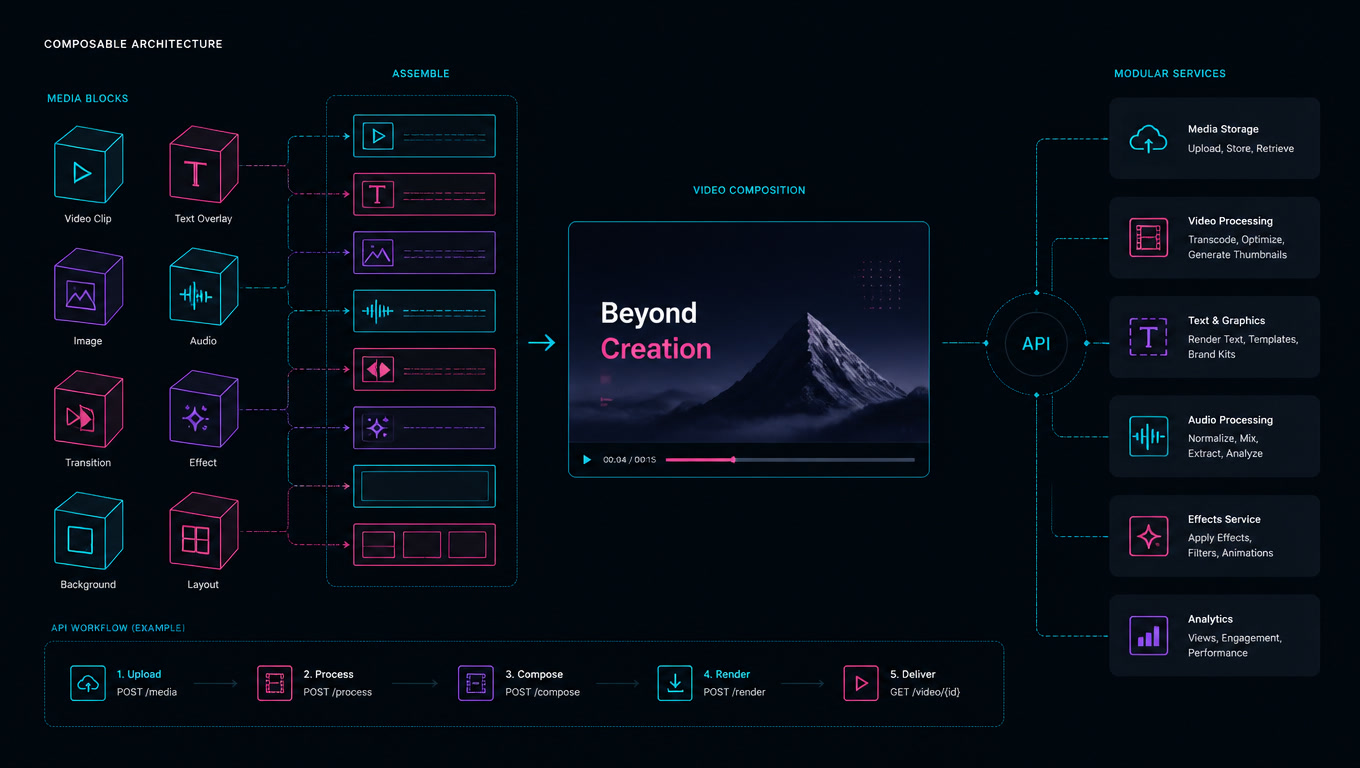
A headless video editor applies the same logic: the visual composition (layers, timing, effects, assets) is defined in code or JSON structure, and rendering happens in a separate service — no graphical interface, no manual timeline, no dependency on local hardware.
The direct comparison:
| Aspect | Traditional CMS | Headless CMS | Traditional video editor | Headless video editor |
|---|---|---|---|---|
| Composition layer | WYSIWYG | API + content structure | Visual timeline | Code / JSON |
| Rendering layer | CMS server | Frontend (Astro, Next.js) | Local GPU | Cloud service |
| Distribution | Single platform | Multi-channel | Single export format | API-driven, multi-channel |
| Scalability | Limited | Horizontal | Linear | Horizontal |
Composable architecture is not just a more elegant way of doing things — it solves concrete problems that traditional editors cannot address.
Four tools, four approaches
The headless video editor market has crystallized around four distinct architectures. Each solves a different problem.
Remotion is the most developer-friendly. React components that render video frame-by-frame. If your team already thinks in React, Remotion is the natural extension — you can use hooks, state, reusable components. The tradeoff: it requires your own infrastructure (Lambda, ECS, or a server with Chromium) for production rendering. It is not managed.
Shotstack is the opposite: JSON in, video out. You do not need to write rendering code — you define a timeline in JSON and the service renders it. Ideal for automated pipelines where the input comes from a CMS or database. The tradeoff: less creative control, more service dependency.
Creatomate bridges no-code and API. It has a visual editor for designing templates and an API for passing variables. It is the most accessible option for marketing teams wanting dynamic personalization without touching rendering code.
JSON2Video is the budget option — a JSON-based API with accessible pricing. Useful for simple automations and side projects, though heavier pipelines need alternatives with better compositing.
What composable architecture changes in production
After using Remotion on real projects, there are three things the headless architecture solves that traditional editors simply cannot:
1. Reproducibility. A Premiere project depends on the editor state, installed plugins, version. A headless pipeline is deterministic: same JSON input, same video output. This changes QA and debugging completely.
2. Versioning. The composition lives in code or JSON — versioned with Git, reviewed in PRs, reverted if something goes wrong. There is no "the last version .prproj file is on someone's hard drive."
3. Parallelism. Rendering 100 ad variants in a traditional editor takes 100 times the time. A headless pipeline renders 100 videos in parallel, each in an isolated container. The difference is not incremental — it is exponential.
The most common mistake: confusing API with architecture
Having an API does not make you headless. Many tools add "API" to their name without changing the underlying architecture. An API that renders video in a single monolithic service is not the same as an architecture where composition, rendering, and distribution are independent services.
The test: Can you change the rendering engine without rewriting the composition? Can you distribute the same video across five channels without duplicating work? If the answer is no, you have an API — not a headless architecture.
At Mintec, we have seen this confusion cause real problems: teams investing in an "API-first" tool and discovering that switching rendering providers requires rewriting the entire pipeline.
When to use each approach
Use a headless editor when:
- You produce video at volume (more than 10 variants per campaign)
- Input comes from structured data (CMS, database, external API)
- You need integration with automated pipelines
- The video is data-driven (dynamic personalization by audience)
Use a traditional editor when:
- The video requires frame-by-frame creative control
- You produce editorial or narrative content
- Volume is low and personalization is not needed
- The team lacks development capacity
Most teams need both. The question is not "headless or traditional?" — it is "which layer of my pipeline can be headless?" In practice, promotional and dynamic video benefits from the composable pattern, while editorial and narrative content still requires direct human control.
The coming trend: video as structured content
The next logical step is treating video not as a binary file, but as structured content — just as headless CMS treated pages. A video's composition (layers, timing, assets, metadata) is as structurable as a web page's content.
When video is structured content, AI agents can interact with it: generate variants, apply transformations, validate compliance, optimize for different channels. This is not science fiction — there are already tools exposing video composition through MCP (Model Context Protocol) so AI agents can manipulate video pipelines programmatically.
Composable architecture is not a fad — it is the natural direction of scaled video production. If your video pipeline still depends on opening an editor and clicking "export," you are missing the automation layer that separates teams that scale from those that drown in manual processes.
Frequently Asked Questions
What is a headless video editor?
A headless video editor renders finished video from an API call, template, or code instead of a manual timeline interface. Automation tools use it to produce video programmatically and at scale.
When should you choose a headless video editor over a traditional one?
When you need to produce video at volume (audience variants, dynamic personalization, data-driven content) or integrate video production into an automated pipeline. If you need total creative control over every frame, a traditional editor is still more flexible.
How does this relate to composable architecture?
It's the same pattern: decoupling the video rendering layer from the presentation or distribution layer. Just as a headless CMS separates content from presentation, a headless editor separates composition from distribution.